Virtual Memory in Memory Management
Virtual memory is an advanced memory management technique used by modern operating systems to overcome the limitation of physical RAM. It allows the system to execute programs that are larger than the available main memory by intelligently managing data between primary memory (RAM) and secondary storage such as a hard disk or SSD.
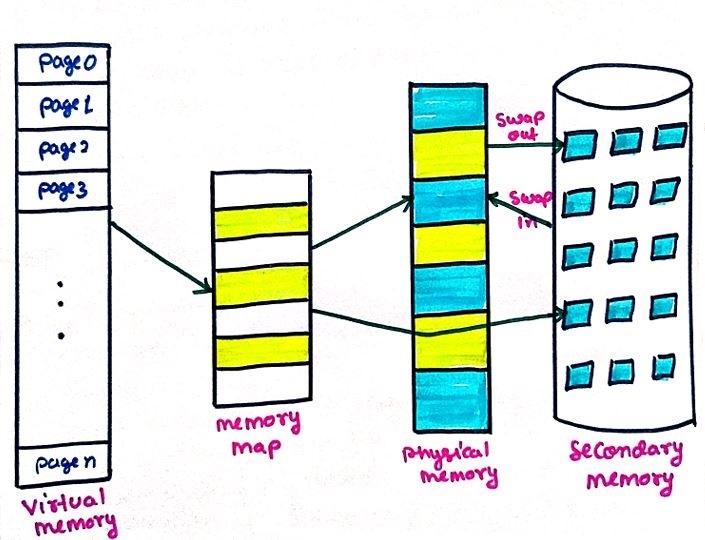
Figure 1: The concept of virtual memory — secondary storage is used as an extension of physical RAM.
In a virtual memory system, the operating system does not load the entire program into RAM at once. Instead, it divides the program into small fixed-size blocks called pages. Only the pages that are currently required for execution are loaded into main memory, while the remaining pages stay in secondary storage.
When a program tries to access a page that is not present in RAM, a situation known as a page fault occurs. The operating system then retrieves the required page from secondary memory and places it into a free frame in RAM. This process happens transparently, meaning the user and application are unaware of it.
Virtual memory creates an illusion for programs that a large amount of continuous memory is available, even though the actual physical memory may be limited. This abstraction improves system flexibility and allows multiple large applications to run simultaneously without exhausting RAM.
Another key benefit of virtual memory is efficient resource utilization. Since only active parts of programs occupy main memory, RAM is used more effectively. This leads to better CPU utilization, reduced program load time, and improved system performance in multitasking environments.
Overall, virtual memory plays a critical role in modern operating systems by enabling the execution of large programs, improving memory efficiency, and providing a smooth and responsive computing experience even on systems with limited physical memory.
Why Virtual Memory is Important
Virtual memory plays a crucial role in modern operating systems because it removes the dependency on large physical RAM. Without virtual memory, a system would be limited by the size of its main memory, making it difficult to run complex and memory-intensive applications.
- Execution of Large Programs: Virtual memory allows programs that require more memory than the available RAM to run smoothly. Only the necessary parts of a program are loaded into main memory, while the rest remains on disk.
- Efficient Memory Utilization: By loading only active pages into RAM, virtual memory minimizes wastage and ensures that memory resources are used effectively.
- Supports Multitasking: Multiple applications can run at the same time because virtual memory shares RAM among processes intelligently, improving overall system productivity.
- Improved System Performance: Programs start faster since the entire application does not need to be loaded into RAM at once. This results in better responsiveness.
- Better Memory Isolation and Security: Each process gets its own virtual address space, preventing unauthorized access to another process’s memory.
Virtual Memory = Physical RAM + Secondary Storage (Disk used as extended memory)
Disadvantages of Virtual Memory
Virtual memory is extremely useful, but it is not without cost. It's worth understanding the trade-offs alongside the benefits above, since exam and interview questions often ask for both sides.
- Slower access on a page fault: Retrieving a page from secondary storage is dramatically slower than reading directly from RAM, so frequent page faults can hurt performance noticeably — the solved example later in this chapter shows just how large this slowdown can be.
- Extra hardware and software overhead: Address translation, page tables, and page-fault handling all require additional processing compared to a system that uses only physical addressing directly.
- Thrashing risk: If too many processes compete for too little physical memory, the system can spend more time swapping pages in and out than doing useful work, a condition known as thrashing.
- Increased complexity: Implementing and tuning virtual memory correctly — choosing page sizes, replacement policies, and frame allocations — adds real design complexity to the operating system.
Demand Paging
Demand Paging is a memory management technique used in operating systems where pages are loaded into
main memory (RAM) only when they are actually required by the CPU. This approach helps in saving memory
space and improves system efficiency.
In demand paging, the operating system does not load the complete program into RAM at once.
Instead, it loads only those pages that are needed during execution. If a required page is not
present in main memory, a page fault occurs.
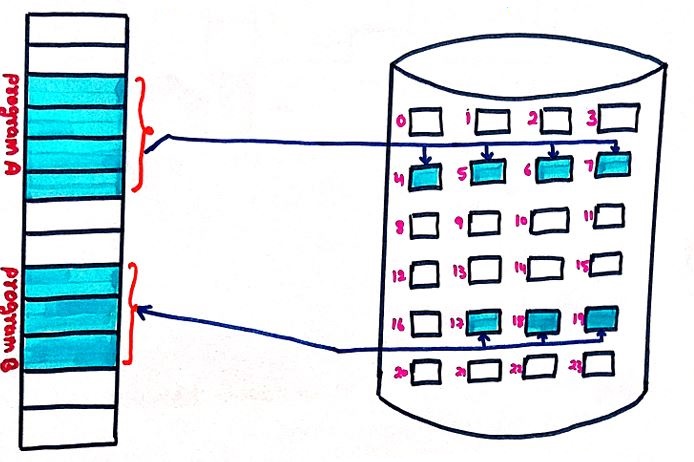
Figure 2: The concept of demand paging — only actively needed pages are loaded into RAM.
Working Process of Demand Paging
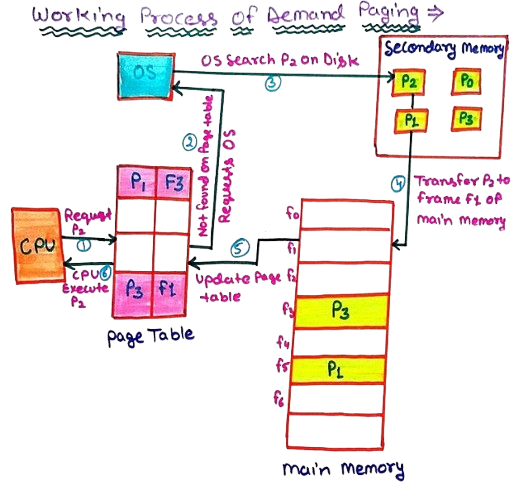
Figure 3: Step-by-step working of demand paging, from the CPU's request to the page being loaded into RAM.
Step-by-Step Working of Demand Paging
Step 1 — CPU Requests a Page
The CPU requests a specific page (for example, page P2) for execution. It first checks whether this page is available in the main memory.
Step 2 — Page Table Lookup
The operating system checks the page table entry for page P2. If the page table indicates that P2 is not present in RAM, a page fault is generated.
Step 3 — OS Searches Secondary Memory
After detecting the page fault, the operating system searches for page P2 in secondary memory such as the hard disk, where inactive pages are stored.
Step 4 — Page Transfer to Main Memory
The operating system selects a free frame in main memory (for example, frame F1) and transfers page P2 from disk to this frame.
Step 5 — Page Table Update
Once the page is loaded into RAM, the operating system updates the page table to reflect the new mapping between page P2 and frame F1.
Step 6 — CPU Resumes Execution
After updating the page table, the CPU resumes execution and successfully accesses page P2 from main memory.
Figure 4 : Simplified page-fault handling decision flow — a present page is accessed directly, while a missing page triggers a fetch from disk.
Solved Example: Effective Access Time (EAT) With Page Faults
One of the most important practical questions about demand paging is exactly how much a page fault actually costs in terms of speed. This is measured using the Effective Access Time (EAT), which averages the cost of a normal memory access against the (much larger) cost of handling a page fault, weighted by how often each happens.
where p is the page fault rate — the probability that a given memory reference results in a page fault.
Example: Suppose a system has a memory access time of 100 nanoseconds, a page fault service time of 8 milliseconds (the time needed to fetch a page from disk and resume execution), and a page fault rate of 0.001 (meaning 1 out of every 1000 memory references causes a page fault).
Before substituting into the formula, both times must be expressed in the same unit. Converting the page fault service time to nanoseconds:
Now applying the formula:
EAT = 0.999 × 100 + 0.001 × 8,000,000
EAT = 99.9 + 8,000
EAT = 8,099.9 nanoseconds
Compare this to the 100 nanoseconds a memory access would take with zero page faults — the Effective Access Time is roughly 81 times slower, even though only 1 in every 1000 references actually faulted. This is exactly why keeping the page fault rate low is so important: because a page fault is so much more expensive than a normal access, even a small fault rate has an outsized effect on overall performance.
Advantages of Demand Paging
Demand Paging is a modern memory management technique used by operating systems to improve system performance and optimize memory utilization. Instead of loading an entire program into main memory at once, only the required pages are loaded when they are actually needed. This approach provides several important advantages, especially in multitasking and large-scale computing environments.
Advantages
- Efficient Utilization of Main Memory: Demand paging ensures that only actively used pages occupy RAM. Pages that are not required immediately remain in secondary storage, which prevents unnecessary memory consumption and reduces wastage of valuable main memory.
- Faster Program Startup Time: Since the operating system loads only a small portion of the program initially, applications start executing much faster. The remaining pages are fetched later on demand, improving the overall user experience.
- Supports Execution of Large Programs: Programs that are larger than the available physical memory can still be executed efficiently. Demand paging allows the system to run such programs by loading only the required pages, making better use of limited RAM.
- Reduced I/O Operations: Only necessary pages are transferred between secondary memory and main memory. This significantly reduces disk I/O operations, resulting in better system performance and lower access latency.
- Improved System Throughput: By minimizing memory usage per process, demand paging allows more processes to reside in memory simultaneously. This increases the level of multiprogramming and improves overall system throughput.
Disadvantages
- High cost per page fault: As the solved EAT example above shows, a single page fault can cost thousands of times more than a normal memory access, since it involves a disk operation.
- Risk of thrashing: If the page fault rate climbs too high — for example, because too many processes are competing for too little RAM — the system can spend most of its time handling faults instead of running programs.
- Extra bookkeeping overhead: The operating system must continuously maintain page tables, track which frames are free, and decide which page to replace when memory is full, all of which consume CPU time.
- Unpredictable response times: Because a memory access might unexpectedly trigger a slow disk operation, individual instruction timings become less predictable, which can be undesirable for real-time systems.
In summary, demand paging plays a vital role in modern operating systems by improving memory efficiency, speeding up execution, and enabling the execution of large applications without requiring excessive physical memory — provided the page fault rate is kept low enough for the trade-offs above to remain worthwhile.
Practice Problems
Try working through each of these using the Effective Access Time formula introduced above before checking the answer.
Practice Problem 1 — Effective Access Time
A system has a memory access time of 120 nanoseconds, a page fault service time of 10 milliseconds, and a page fault rate of 0.0005. Calculate the Effective Access Time.
Show Answer
EAT = (1 − 0.0005) × 120 + 0.0005 × 10,000,000
EAT = 0.9995 × 120 + 5,000
EAT = 119.94 + 5,000 = 5,119.94 nanoseconds
Practice Problem 2 — Target Page Fault Rate
A system has a memory access time of 200 nanoseconds and a page fault service time of 12 milliseconds. The system designers want the Effective Access Time to stay below 1,000 nanoseconds. Roughly how small does the page fault rate need to be?
Show Answer
Practice Problem 3 — Conceptual
Explain, in your own words, why a page fault rate as small as 0.001 (just 1 in 1000 accesses) can still noticeably slow down a system, even though 999 out of 1000 accesses are completely unaffected.
Show Answer
Frequently Asked Interview Questions
-
What is virtual memory?
Virtual memory is a memory management technique that uses secondary storage as an extension of physical RAM, allowing the system to run programs larger than the available physical memory by keeping only actively needed pages in RAM. -
What is a page fault?
A page fault occurs when a program tries to access a page that is not currently present in main memory, prompting the operating system to fetch that page from secondary storage. -
What is demand paging?
Demand paging is a technique where pages of a program are loaded into main memory only when they are actually referenced during execution, rather than loading the entire program upfront. -
What is Effective Access Time, and why is it important?
Effective Access Time is the average memory access time for a system, accounting for both normal accesses and the much slower cost of occasional page faults; it's important because it shows how heavily even a small page fault rate can affect overall performance. -
What is thrashing, and how does it relate to virtual memory?
Thrashing occurs when a system spends more time handling page faults and swapping pages in and out of memory than actually executing processes, typically because too many processes are competing for too little physical memory. -
Why is a page fault so much more expensive than a normal memory access?
A normal memory access only involves reading from RAM, which takes on the order of nanoseconds, while a page fault requires a disk operation to fetch the missing page, which takes on the order of milliseconds — roughly a million times slower. -
How does demand paging improve program startup time?
Since only a small initial portion of a program needs to be loaded into RAM before execution can begin, the program can start running much sooner, with the remaining pages loaded later as they are actually referenced. -
What steps does the operating system take when handling a page fault?
The OS detects the missing page through the page table, locates it in secondary storage, loads it into a free frame in RAM, updates the page table with the new mapping, and then resumes the CPU's execution.
Conclusion
Demand paging allows the operating system to manage memory efficiently by loading pages only when they are needed. This technique plays a crucial role in virtual memory systems and improves overall system performance, provided the page fault rate is kept low — which is exactly the job of the page replacement algorithms covered in the next chapter.
Summary
- Virtual memory uses disk as extra memory
- Demand paging loads pages only when needed
- Page fault occurs when page is missing
- Effective Access Time shows how costly even a small page fault rate can be
- Improves performance and memory usage, as long as the fault rate stays low