Introduction to Operating System
An Operating System (OS) is system software that manages the hardware resources of a computer and provides common services for application programs. It acts as an important layer between computer hardware and the software that users run.
For example, when a user opens a web browser, saves a document, prints a file, or runs a program, the application does not normally need to control the hardware directly. The operating system provides the services and mechanisms required to perform these operations.
Understanding the basic role and functions of an operating system provides a foundation for topics such as process management, CPU scheduling, process synchronization, deadlocks, memory management, file systems and disk scheduling.
What is an Operating System?
An Operating System is system software that manages computer hardware resources and provides an environment for executing application programs. It controls and coordinates resources such as the CPU, main memory, storage devices and input/output devices.
The operating system also provides interfaces through which application programs can request services. Instead of requiring every application to understand the detailed operation of each hardware device, the OS provides common services and manages access to the underlying resources.
A simple way to understand the relationship is:
User → Application Software → Operating System → Hardware
Why is an Operating System Needed?
It helps to first imagine a computer with no operating system at all. In that situation, every single application would have to talk to the CPU, memory chips, hard disk and keyboard directly, using the exact instructions that particular piece of hardware understands. A calculator app and a video game would each need to carry their own low-level hardware-control code. This is slow to build, error-prone, and completely impractical for modern computing.
An Operating System removes this burden by sitting between the applications and the hardware, and solving four recurring problems that every multi-purpose computer faces:
- Hardware abstraction: Applications ask for a "file to be saved" or "data to be printed" using simple, standard instructions. The OS translates these requests into the exact electrical signals a specific disk or printer model needs, so the same application can run on many different hardware configurations without being rewritten.
- Resource arbitration: A computer usually runs many programs at once, but it has only one CPU (or a limited number of cores) and a fixed amount of memory. Someone has to decide whose turn it is to use the processor next, and how the available memory should be divided. The OS makes these decisions continuously, thousands of times per second.
- Isolation and protection: If one program could freely read or overwrite the memory of another program, a single buggy or malicious application could crash the entire system. The OS enforces boundaries so that one process cannot interfere with another process or with the OS itself.
- Consistency for the user: Whether someone opens a file, connects a USB drive, or launches a new application, the experience needs to behave in a predictable, uniform way. The OS provides this consistent behaviour across very different hardware.
In short, an Operating System is needed because raw hardware, by itself, has no concept of "sharing," "safety," or "convenience." Those qualities have to be built on top of the hardware, and that is exactly the job the operating system performs.
Operating System as a Resource Manager
One of the most useful ways to think about an Operating System is to view it as a resource manager. A computer has a fixed set of resources: CPU time, main memory, storage space, and input/output devices such as a network card or printer. At any moment, several processes may want to use the same resource at the same time, and the OS is responsible for deciding who gets it, for how long, and in what order.
Consider a simple example. Suppose three processes — a music player, a code editor, and a file download — are all running at the same time on a single-core CPU:
- The CPU scheduler decides which of the three processes gets the processor next, and for how many milliseconds, before switching to another one.
- The memory manager decides how much RAM each process is allowed to use, and keeps their memory areas separate so the download process cannot accidentally overwrite memory used by the code editor.
- The device manager coordinates access to the network card so the download process can receive data without conflicting with any other process using the network.
This constant allocation-and-reclaiming activity is what allows dozens of programs to appear to run "at the same time" on hardware that, in reality, has far fewer physical resources than the number of running processes. As a resource manager, the OS aims for two goals that can sometimes conflict with each other: keeping the system efficient (resources should not sit idle) and keeping it fair (no single process should be starved of the resources it needs).
Kernel vs Shell
Two terms that are often confused by beginners are kernel and shell. They are both part of the operating system, but they sit at very different levels and do very different jobs.
The kernel is the core of the operating system. It runs with the highest level of privilege and has direct control over the hardware. The kernel is responsible for CPU scheduling, memory management, device communication, and enforcing protection between processes. Ordinary applications and users never interact with the kernel directly — they interact with it only through carefully controlled entry points called system calls.
The shell is a program that sits on top of the kernel and acts as an interface between the user and the operating system. When a user types a command such as listing files or running a program, the shell interprets that command and asks the kernel to carry it out on its behalf. A shell can be text-based, such as Bash on Linux or Command Prompt / PowerShell on Windows, or it can be graphical, such as the desktop and icons a user normally sees and clicks on.
| Aspect | Kernel | Shell |
|---|---|---|
| Role | Core component that directly manages hardware and resources | Interface that accepts and interprets user commands |
| Privilege level | Runs in kernel mode (highest privilege) | Runs in user mode (restricted privilege) |
| Visibility to the user | Hidden; never accessed directly | Directly visible and used by the user |
| Examples | Process scheduler, memory manager, device drivers | Bash, Zsh, Command Prompt, PowerShell, a graphical desktop |
A useful way to remember the relationship: the user talks to the shell, the shell talks to the kernel, and the kernel talks to the hardware.
User Mode and Kernel Mode (Dual-Mode Operation)
Modern processors support at least two privilege levels, commonly called user mode and kernel mode. This separation, known as dual-mode operation, is one of the main mechanisms that lets an operating system protect itself and other processes from a misbehaving program.
When the CPU is running in user mode, the currently executing program is only allowed to perform a restricted set of instructions. It cannot directly access hardware devices or critical memory regions belonging to the OS or to other processes. Ordinary applications — a word processor, a browser, a game — normally run in user mode.
When the CPU is running in kernel mode (sometimes called supervisor mode), it is allowed to execute any instruction, including ones that directly control hardware and manage memory for every process on the system. Only trusted operating-system code runs in kernel mode.
A hardware mode bit tells the processor which mode it is currently in. When a user-mode program needs a privileged operation performed — for example, reading a file from disk — it cannot do this itself. Instead, it executes a special instruction that generates a controlled interruption, often called a trap or a system call. This switches the CPU into kernel mode, hands control to the OS, lets the OS safely perform the requested operation, and then switches the CPU back to user mode before returning control to the application.
| Aspect | User Mode | Kernel Mode |
|---|---|---|
| Who runs here | Application programs | Core operating-system code |
| Access to hardware | Not allowed directly | Full access |
| Effect of a crash | Usually limited to that one process | Can affect the entire system |
| How it is entered | Default mode for applications | Entered via system calls, interrupts, or traps |
This separation is precisely why an ordinary application cannot simply overwrite another program's memory or shut down a hardware device on its own — doing so requires kernel-mode privilege, and only the OS is trusted with that privilege.
How a Program Executes Under an Operating System
It is worth walking through what actually happens, step by step, from the moment a user double-clicks a program icon to the moment that program finishes running. This sequence shows the OS's role as an active manager, not just a passive layer.
- Loading: The OS locates the program's executable file on disk and loads the necessary parts of it into main memory.
- Process creation: The OS creates a Process Control Block (PCB) — an internal record that stores the program's state, its memory boundaries, its priority, and other bookkeeping information the OS needs to manage it.
- Scheduling: The process is placed in a ready queue. The CPU scheduler eventually selects it and allocates it a time slice on the processor, based on the scheduling policy in use.
- Execution in user mode: The program's instructions run on the CPU in user mode, performing calculations and manipulating data that belongs to it.
- System call (if needed): If the program needs a privileged operation — reading a file, allocating more memory, sending network data — it issues a system call. This traps into kernel mode, the OS performs the operation safely, and control returns to the program.
- Context switching: If the process's time slice ends, or it has to wait for an I/O operation to complete, the OS saves its current state in the PCB and switches the CPU to another ready process. Later, the OS restores the saved state and resumes execution exactly where it left off.
- Termination: When the program finishes, or is closed by the user, the OS reclaims the memory, closes any open files or connections, removes the PCB, and marks those resources as available for other processes.
Real-World Examples of Operating Systems
Operating systems are not limited to desktop computers. The same core ideas — resource management, scheduling, and protection — appear across many kinds of devices, though each OS is tuned for its own environment.
| Operating System | Typically Used On | Notable Characteristic |
|---|---|---|
| Windows | Desktops, laptops | Widely used in homes and offices, with broad support for third-party hardware and software. |
| Linux | Servers, developer workstations, embedded devices | Open-source; its kernel can be customised, and it powers most of the world's web servers. |
| macOS | Apple desktops and laptops | Built on a Unix-based kernel and tightly integrated with Apple's own hardware. |
| Android | Smartphones, tablets | Built on the Linux kernel, optimised for touch input and battery-constrained devices. |
| iOS | iPhones, iPads | Emphasises strict app sandboxing, so individual apps are strongly isolated from one another. |
Notice that every example still relies on the same core ideas introduced above: a kernel that controls the hardware in kernel mode, applications that run in a more restricted user mode, and a scheduler that decides which process gets the CPU next.
Operating System Architecture — A Simplified Diagram
The diagram below is a simplified view of how the pieces discussed so far fit together: the user interacts with a shell or GUI, which passes requests through the system-call interface into the kernel, and the kernel is the only layer that talks directly to the hardware.
Figure 1: Simplified Operating System architecture — requests flow downward from the user through the shell and system-call interface into the kernel, which is the only layer with direct hardware access.
Only the kernel layer in this diagram runs in kernel mode. Every layer above it — the shell, the GUI, and ordinary applications — runs in user mode and must pass through the system-call interface whenever it needs something the kernel controls.
Objectives of an Operating System
The design of an operating system is guided by several important objectives. Three commonly discussed objectives are convenience, efficient resource utilization, and the ability to evolve.
1. Convenience
The OS makes a computer system easier to use by providing standard interfaces and services. Users and applications do not need to manage every hardware detail themselves.
2. Efficiency
The OS manages resources such as CPU time, memory and storage so that they can be shared and used effectively by the programs running on the system.
3. Ability to Evolve
An operating system should be designed so that new features, hardware support and improvements can be added without requiring the complete system to be redesigned.
The Layered View of a Computer System
A computer system can be viewed as a set of layers. Hardware is at the bottom, the operating system manages the hardware, application programs use operating-system services, and users interact with the applications.
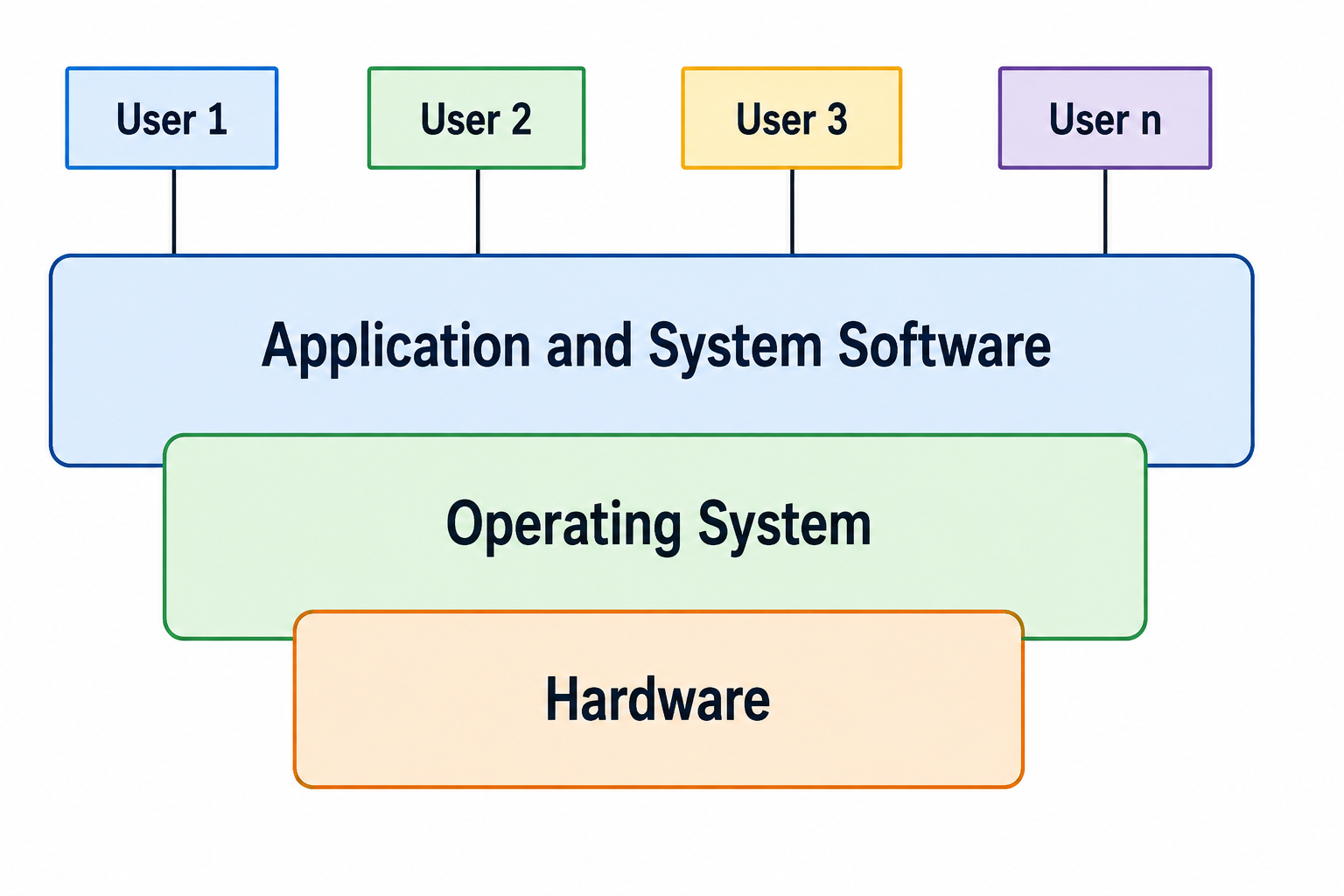
Figure 2: Layered view of a computer system.
The diagram helps illustrate the position of the operating system. Applications operate above the OS, while the OS manages and coordinates the hardware resources below it.
This layered view is useful when studying later topics because many Operating System mechanisms can be understood as services provided between applications and hardware.
Functions of an Operating System
An Operating System performs several functions to manage resources and provide services to users and application programs. The major functions discussed in this tutorial are memory management, processor management, device management, file management, job scheduling, time sharing and security management.
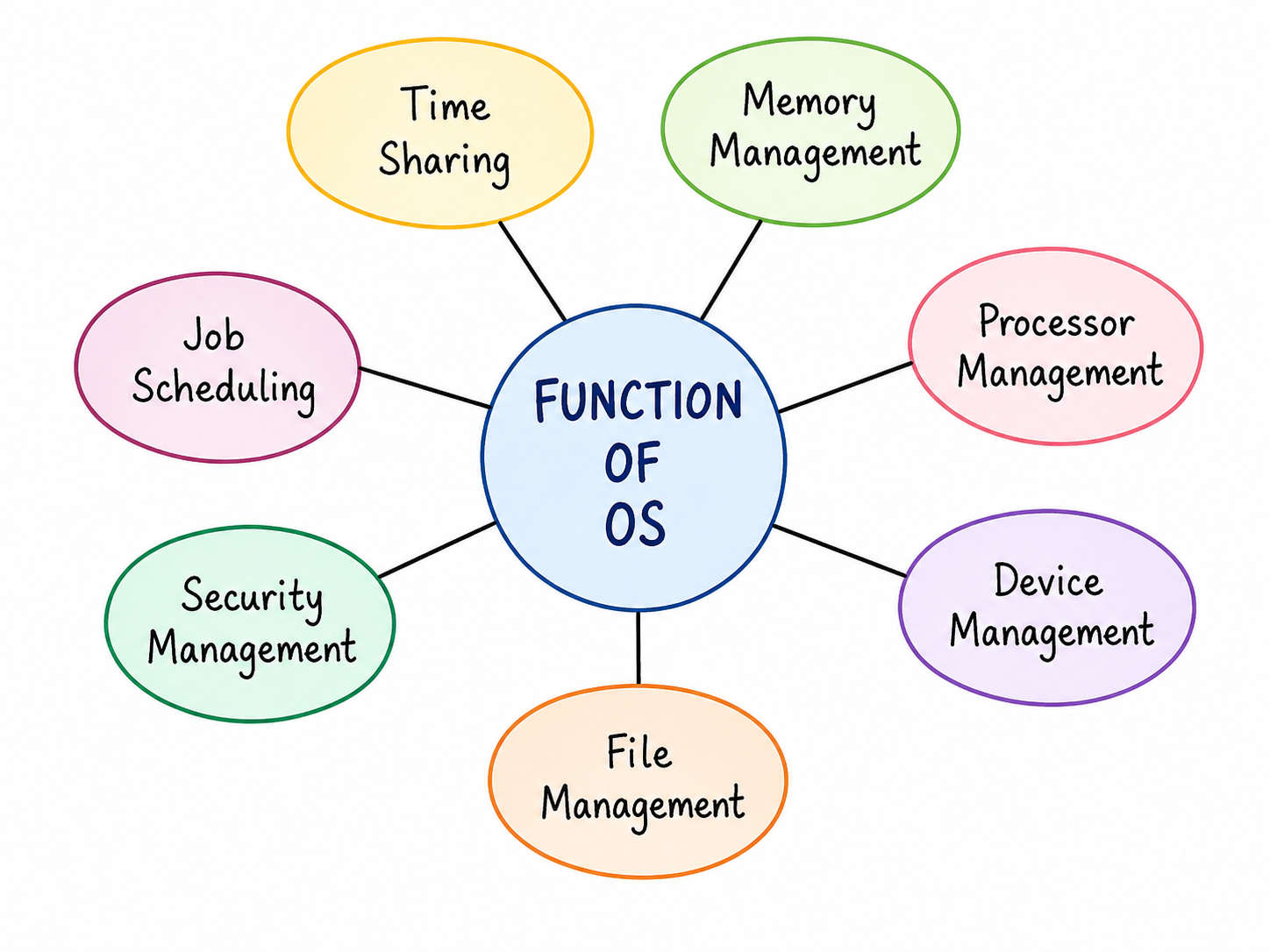
Figure 3: Major functions of an Operating System.
Memory Management
Memory management deals with the organization and use of main memory. The operating system keeps track of memory usage and allocates memory to processes when required.
When a process finishes or no longer needs a portion of memory, the operating system can make that memory available for other processes. Memory management also includes mechanisms for protecting the memory used by different processes.
Important memory-management concepts include paging, segmentation, fragmentation and virtual memory. These topics can be studied separately in the later chapters of this Operating System tutorial series.
Processor Management
Processor management, also called CPU or process management in many contexts, involves controlling how processes use the CPU. When several processes are ready to execute, the operating system needs a mechanism for deciding which process should receive CPU time.
CPU scheduling algorithms such as First-Come, First-Served (FCFS), Shortest Job First (SJF), Priority Scheduling and Round Robin provide different ways of making these decisions.
The detailed study of scheduling algorithms includes concepts such as waiting time, turnaround time, response time and Gantt-chart-based problem solving.
Device Management
Device management is concerned with communication between the operating system and input/output devices such as keyboards, displays, printers, storage devices and network interfaces.
Different hardware devices can have different operating characteristics. Device drivers help the operating system communicate with particular hardware devices while providing applications with more consistent interfaces.
The operating system can also coordinate access to devices when multiple processes request the same resource.
File Management
File management deals with the organization and handling of data stored in files. The operating system provides operations for creating, opening, reading, writing, renaming and deleting files.
Files can be organized into directories or folders. The operating system also maintains information about files and controls access according to the permissions and security mechanisms supported by the system.
File management is closely related to directory structures, file allocation methods and disk management, which are covered in separate tutorials.
Job Scheduling
Job scheduling refers to decisions about which submitted jobs should be admitted for processing. In systems that handle many jobs, scheduling policies can help determine the order in which work is introduced into the system.
Job scheduling is related to, but should not be confused with, CPU scheduling. Job scheduling can refer to the admission of jobs into the system, while CPU scheduling selects among processes that are ready to use the processor.
Time Sharing
Time sharing is a method in which CPU time is divided among multiple processes or users. The processor switches between tasks so that each task receives CPU service according to the scheduling policy.
Rapid switching can provide interactive users with responsive access to a shared computer system. Time-sharing systems therefore need suitable scheduling and resource-management mechanisms.
Security Management
Security management protects system resources and data from unauthorized access. Operating systems can provide mechanisms for user authentication, permissions and access control.
Security is particularly important when multiple users or applications share the same computer system. Access-control mechanisms help define which users or processes are allowed to perform specific operations on system resources.
Summary Table of OS Functions
| Function | What It Manages |
|---|---|
| Memory Management | Allocation, tracking and protection of main memory. |
| Processor Management | Allocation of CPU time to processes and related process-management activities. |
| Device Management | Communication and coordination with input/output devices. |
| File Management | Creation, organization, access and management of files and directories. |
| Job Scheduling | Admission and ordering of submitted jobs according to system policies. |
| Time Sharing | Sharing processor time among multiple processes or users. |
| Security Management | Authentication, permissions and protection of system resources. |
Advantages of Using an Operating System
- Provides a common environment for application programs.
- Manages CPU, memory, storage and input/output resources.
- Provides services for file and device operations.
- Supports controlled sharing of system resources.
- Provides security and access-control mechanisms.
Challenges and Limitations
- The operating system itself requires memory, processor time and storage.
- Managing multiple resources and processes increases system complexity.
- Incorrect resource-management decisions can contribute to problems such as starvation or deadlock.
- Security vulnerabilities in an operating system can affect applications and data that depend on it.
Common Mistakes Beginners Make
| Mistake | Correct Understanding |
|---|---|
| Thinking that an OS is only the graphical interface. | The OS includes many resource-management and service components that operate behind the user interface. |
| Confusing application software with system software. | Applications use operating-system services, while the OS manages resources and provides those services. |
| Assuming CPU scheduling and job scheduling are identical. | Job scheduling can concern admission of jobs, while CPU scheduling selects a process for processor time. |
| Ignoring security as an OS responsibility. | Access control, authentication and resource protection are important operating-system responsibilities. |
| Thinking the kernel and the shell are the same thing. | The kernel directly controls hardware in kernel mode; the shell is a user-mode program that simply forwards commands to the kernel. |
| Assuming an application can access hardware whenever it wants. | Applications run in user mode and must go through a system call, which switches the CPU into kernel mode, before any hardware-level action is performed. |
Frequently Asked Questions
What is an Operating System?
An Operating System is system software that manages computer hardware resources and provides services and an execution environment for application programs.
Why is an Operating System needed?
Without an OS, every application would need to control hardware directly, share the CPU and memory without any coordination, and would have no protection from other running programs. The OS solves these problems through hardware abstraction, resource arbitration, and process isolation.
What is the difference between a kernel and a shell?
The kernel is the core of the OS that runs in kernel mode and directly controls the hardware. The shell is a user-mode program that interprets user commands and passes the corresponding requests to the kernel.
What is the difference between user mode and kernel mode?
User mode is a restricted CPU privilege level used by ordinary applications, which cannot directly access hardware. Kernel mode is a fully privileged level used only by trusted OS code, which can execute any instruction, including direct hardware access.
What are the main objectives of an Operating System?
Common objectives include making the system convenient to use, using hardware resources efficiently, and allowing the system to evolve as new requirements arise.
What are the major functions of an Operating System?
Major functions include memory management, processor management, device management, file management, job scheduling, time sharing and security management.
What is time sharing?
Time sharing is a method of sharing processor time among multiple processes or users through rapid switching and scheduling.
Why is memory management required?
Memory management is required to allocate, track, protect and reclaim main-memory resources used by processes.
Why is security management important in an Operating System?
Security management helps protect system resources and data by controlling authentication, permissions and access to resources.
Frequently Asked Interview Questions
- What is an Operating System? An Operating System is system software that manages hardware resources and provides services to application programs.
- Why is an Operating System needed if applications could theoretically run without one? Because raw hardware provides no built-in way to share the CPU and memory fairly among many programs, or to protect one program from another; the OS provides these guarantees.
- What is the role of the OS as a resource manager? It decides how CPU time, memory, and I/O devices are allocated among competing processes, balancing efficiency and fairness.
- Differentiate between the kernel and the shell. The kernel is the privileged core that directly manages hardware; the shell is a user-facing interface that forwards commands to the kernel.
- What triggers a switch from user mode to kernel mode? A system call, hardware interrupt, or trap instruction causes the CPU to switch from user mode into kernel mode so the OS can safely perform a privileged operation.
- What are the main objectives of an Operating System? Common objectives are convenience, efficient resource utilization and the ability to evolve.
- What is memory management? It is the management of main memory allocation, tracking, protection and reclamation.
- What is CPU scheduling? CPU scheduling determines which ready process should receive processor time according to a scheduling policy.
- What is time sharing? It is a method of sharing CPU time among multiple processes or users.
- Why is file management required? It provides mechanisms for organizing, storing, accessing and protecting files and directories.
Summary
An Operating System is an important layer of system software between application programs and computer hardware. It exists because raw hardware cannot, on its own, share itself fairly or safely among many running programs — the OS provides that coordination, acting as a resource manager for the CPU, memory, storage and I/O devices.
Internally, the OS is organised so that only its trusted kernel runs in the fully privileged kernel mode with direct hardware access, while the shell and all applications run in the more restricted user mode, communicating with the kernel through system calls. Tracing a program's execution — from loading, through scheduling and system calls, to termination — shows this coordination in action, and the same fundamental design appears across very different real-world systems such as Windows, Linux, macOS, Android and iOS.
The major functions introduced in this chapter are memory management, processor management, device management, file management, job scheduling, time sharing and security management. These concepts provide the foundation for more detailed Operating System topics.
The next chapter introduces different types of Operating Systems and explains how their characteristics and use cases differ.