Process Management in Operating System
In the previous chapter, we looked at system calls like fork(), exec(),
wait(), and exit(), all grouped under Process Control. Before those calls make
complete sense in practice, it helps to understand exactly what a process actually is, how the operating
system keeps track of one, how it moves a process through its entire lifetime on the system, how a process
is actually born and eventually cleaned up, and how it compares to a thread. That is exactly what this
chapter covers.
A process is simply a program in execution. This distinction matters more than it might first appear — a program sitting on a disk as a file is just a passive set of instructions, but the moment it is loaded into memory and the CPU begins executing those instructions, it becomes a process, with its own memory, its own current status, and its own place in the operating system's bookkeeping. A single program can even be turned into several separate processes at once, such as opening the same text editor twice, each running independently of the other.
Process States
A process doesn't simply exist in a single, unchanging condition from the moment it starts until the moment it finishes. As it competes for the CPU alongside other processes, and as it waits on things like input, output, or other events, it moves through a series of distinct states. Understanding these states is essential, since the operating system's scheduling decisions are really just decisions about moving processes between these states.
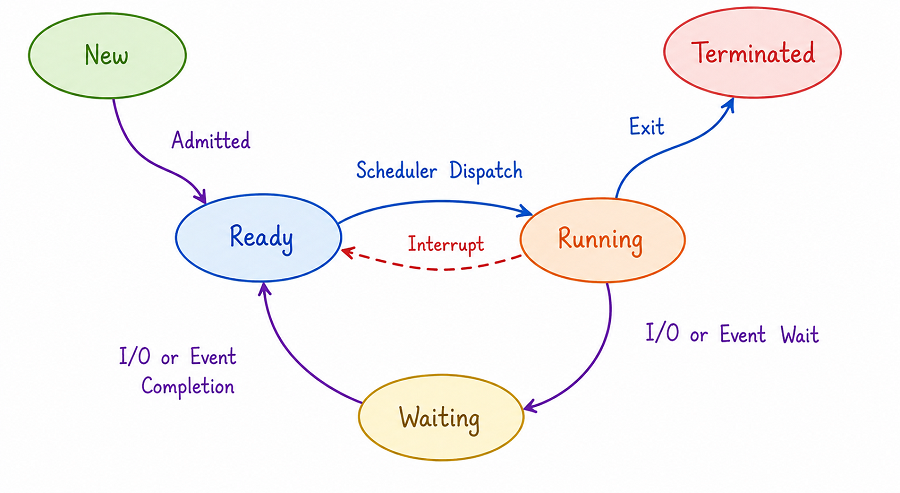
The diagram above shows all five states a process can be in, along with the labelled transitions that move a process from one state to another. A process begins in the New state, representing the moment it is first being created, before the operating system has finished setting it up. Once the operating system has admitted the process into the system, shown in the diagram as the "Admitted" transition, it moves into the Ready state, where it waits for its turn to actually use the CPU.
When the scheduler selects a ready process to actually run, shown as the "Scheduler Dispatch" transition, the process moves into the Running state, meaning its instructions are currently being executed by the CPU. From here, a running process can follow one of several paths. If it needs to wait for something, such as a file being read from a disk or data arriving over a network, it follows the "I/O or Event Wait" transition into the Waiting state, where it remains until whatever it is waiting for becomes available. Once that happens, the "I/O or Event Completion" transition moves it back into the Ready state, where it waits once again for its next turn on the CPU.
A running process can also be interrupted before it finishes its current turn, shown in the diagram as the red dashed "Interrupt" transition moving it back from Running directly to Ready, which typically happens when the operating system decides another process should get a chance to run instead, a decision explored in detail in the dedicated CPU scheduling chapter later in this series. Finally, once a process has completed its work entirely, it follows the "Exit" transition into the Terminated state, at which point the operating system reclaims any resources the process was using and removes it from the system.
Figure A (original): The five process states redrawn as a single compact flow, showing every transition in one view.
The Process Control Block (PCB)
With potentially dozens or even hundreds of processes existing on a system at once, each in a different state and each needing its own memory and resources, the operating system needs a reliable way to keep track of every single one individually. It does this using a data structure called the Process Control Block, or PCB, and the operating system maintains exactly one PCB for every process that exists on the system.
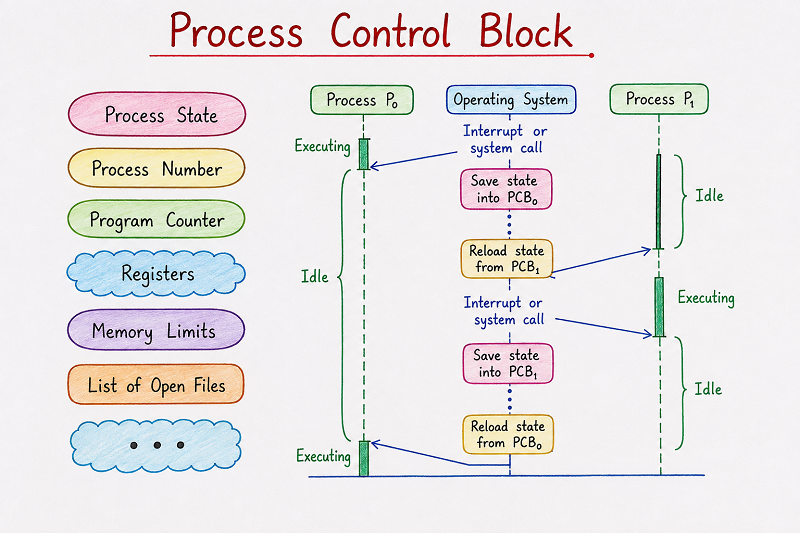
The left side of the diagram above lists the essential fields stored inside a Process Control Block. The Process State field records which of the five states covered earlier the process is currently in. The Process Number field, often called a Process ID or PID, is a unique identifier the operating system uses to distinguish this process from every other process on the system. The Program Counter field keeps track of the address of the next instruction that needs to be executed once this process resumes running, which is essential for a process to be able to pause and later continue exactly where it left off.
The Registers field stores the current values of the CPU's internal registers at the moment the process was last paused, since these values need to be restored exactly as they were before the process can continue correctly. The Memory Limits field records the boundaries of the memory space this particular process is allowed to use, helping enforce the kind of protection between processes discussed in the earlier Security Management section. The List of Open Files field keeps track of every file the process currently has open, and the diagram's closing "..." field represents the fact that a real PCB typically stores several additional details beyond these, such as CPU scheduling information, accounting data, and I/O status information, depending on the specific operating system.
How Context Switching Works
The right side of the Process Control Block diagram shows exactly why all of this information needs to be stored so carefully, by illustrating what happens when the operating system switches the CPU from one process to another, a procedure known as context switching.
The diagram shows two processes, labelled Process P₀ and Process P₁, along with a column in the middle representing the actions taken by the Operating System. Initially, Process P₀ is shown Executing, while Process P₁ sits Idle, waiting for its turn. At some point, an "Interrupt or system call" occurs, shown as an arrow pointing from Process P₀ into the Operating System column. At this exact moment, the operating system cannot simply abandon Process P₀'s progress — it needs to preserve everything about its current condition so that it can resume correctly later.
This is exactly what the "Save state into PCB₀" step in the diagram represents: the operating system copies the current program counter, register values, and other essential details of Process P₀ into its Process Control Block, safely preserving its exact state. Immediately afterward, the diagram shows a "Reload state from PCB₁" step, where the operating system does the reverse for Process P₁, loading its previously saved program counter and register values back into the CPU, allowing Process P₁ to resume exactly where it had left off. Following this, Process P₁ becomes the one shown Executing, while Process P₀ becomes Idle, exactly swapping their earlier positions.
The diagram then shows this same sequence happening in reverse: another "Interrupt or system call" occurs, this time from Process P₁, its state is saved into PCB₁, the previously saved state from PCB₀ is reloaded, and Process P₀ resumes Executing once again while Process P₁ becomes Idle. This back-and-forth switching, made possible entirely because each process's state is safely preserved inside its own PCB, is what allows an operating system to share a single CPU among many processes while making it appear, from each process's own perspective, as though it had never been interrupted at all.
It's worth noting that context switching itself takes a small but real amount of time and doesn't do any useful work on its own — the CPU isn't actually executing either process's instructions while the switch itself is happening. Because of this overhead, operating systems try to switch between processes efficiently, balancing the need for fair CPU sharing against the cost of performing the switch too frequently.
Process Creation and Termination
Every process on a running system, apart from the very first one started when the operating system boots,
is created by another already-running process. Understanding this parent-child relationship, and what
actually happens at both ends of a process's life, fills in the gap between the abstract five-state diagram
above and the concrete fork()/exit() calls introduced in the previous chapter.
How a Process Is Created
- A parent process requests creation. An existing process — for example, a command-line shell — calls a process-control system call such as
fork(), asking the kernel to bring a new process into existence. - The kernel allocates a PCB and a unique PID. The new process is registered in the kernel's internal process table, and its state is initially set to New.
- Resources are set up. The kernel allocates memory for the new process and, depending on the exact call used, either duplicates the parent's memory contents or prepares space for a fresh program image. Certain resources, such as open file descriptors and environment variables, are typically inherited from the parent.
- A program image is loaded (if required). If the new process is meant to run different code than its parent, a call from the
exec()family replaces its memory with the instructions of the new program, as shown in the fork()/exec() example in the previous chapter. - The process is admitted into the Ready queue. Once set up is complete, the process moves from the New state into the Ready state, and from this point onward it follows the same lifecycle already described above.
Figure B (original): A process tree — a shell forks two children, and one child forks a grandchild of its own, illustrating how parent-child relationships branch as processes create other processes.
How a Process Terminates
A process's life ends in one of two broad ways:
- Normal termination: The process finishes its work and calls
exit(), voluntarily asking the kernel to end it. This is the most common and cleanest way a process's life ends. - Abnormal termination: The process is ended before it naturally finishes — for example, the kernel forcibly stops it after it violates a memory boundary, or another process sends it a termination signal using a call such as
kill(), introduced in the previous chapter.
Either way, termination triggers the same underlying cleanup: the kernel reclaims the memory the process was
using, closes any files it still had open, removes its entry from the scheduler's queues, and records its
exit status so the parent process can retrieve it. This is exactly why the wait() call exists —
it lets a parent process pause until a specific child finishes and collect that exit status.
Two special situations are worth knowing about. A process that has finished executing but whose exit status
has not yet been collected by its parent is called a zombie process — it no longer does any
work, but a small entry for it remains in the process table until the parent calls wait(). If a
parent process terminates before its child does, the child becomes an orphan process; most
operating systems handle this by having a special system process (traditionally called init on
Unix-like systems) adopt the orphan, so it is still properly cleaned up once it finishes.
Process vs. Thread
Everything covered in this chapter so far has treated a process as a single, self-contained unit of execution. In reality, a process can be broken down further into one or more threads, which are covered in full detail in the next chapter. Since the two concepts are easy to mix up, it's worth comparing them directly here before moving on.
| Aspect | Process | Thread |
|---|---|---|
| Memory space | Has its own separate, protected memory space | Shares the memory space of the process it belongs to |
| Creation overhead | Relatively heavyweight — the kernel sets up a new PCB, memory space, and resource tables | Relatively lightweight — threads mainly need their own program counter, registers, and stack |
| Context-switch cost | Higher, since memory-mapping information also needs to change | Lower, since threads of the same process already share the same memory mappings |
| Communication | Requires explicit interprocess communication calls, such as pipe() or shmget(), covered in the previous chapter | Can communicate directly, since shared variables in memory are visible to every thread in the process |
| Fault isolation | A crash in one process does not directly affect another process's memory | A misbehaving thread can corrupt shared memory and affect every other thread in the same process |
| Tracked by | Its own Process Control Block (PCB) | A lighter Thread Control Block, alongside the PCB of the parent process |
A simple way to remember the relationship: every process starts out with a single thread of execution, and a process that creates additional threads is really just adding more independent, simultaneously running paths of execution inside the same protected memory space — rather than creating entirely new, isolated processes each time.
Process vs. Program: A Quick Comparison
| Program | Process |
|---|---|
| A passive set of instructions stored on disk | An active program currently being executed by the CPU |
| Does not change or consume CPU time on its own | Moves through states like Ready, Running, and Waiting |
| Exists as a single file regardless of how often it's used | A new process is created every time the program is run |
| Has no associated Process Control Block | Is tracked by the operating system using its own PCB |
Summary Table of Process States
| State | What It Means |
|---|---|
| New | The process is being created and set up by the operating system |
| Ready | The process is waiting for its turn to be assigned the CPU |
| Running | The process's instructions are currently being executed by the CPU |
| Waiting | The process is paused, waiting for an I/O operation or event to complete |
| Terminated | The process has finished executing and its resources are being reclaimed |
Best Practices While Learning Process Management
- Draw the five-state diagram from memory a few times until the transitions between states feel intuitive, since exam questions often describe a scenario and ask which transition applies.
- Learn the PCB fields by grouping them logically — identity (Process Number), execution position (Program Counter, Registers), status (Process State), and boundaries (Memory Limits, Open Files) — rather than memorising them as an unordered list.
- Walk through the context-switching diagram step by step until you can explain, in your own words, why saving and reloading state is what makes switching between processes possible at all.
- Practice sketching a small process tree (parent, a couple of children, maybe a grandchild) for a scenario like a shell running two commands, one of which launches a helper process of its own.
- Keep the process-vs-thread table close at hand while studying Threads next, since almost every comparison question in that chapter builds directly on the differences listed here.
Common Mistakes Beginners Make
| Mistake | Correct Practice |
|---|---|
| Using the terms "program" and "process" interchangeably. | Remember that a program is a passive file, while a process is that program actively being executed, with its own state and PCB. |
| Assuming a process moves directly from Running to Terminated only. | Understand that a running process can also move to Waiting or back to Ready, depending on what happens during its execution. |
| Thinking context switching itself performs useful work for a process. | Remember that context switching only saves and restores state — it introduces overhead without directly advancing either process's task. |
| Believing a zombie process is still doing work in the background. | Understand that a zombie process has already finished executing; only its exit-status entry remains until the parent calls wait(). |
| Assuming threads and processes are essentially the same thing with different names. | Remember that threads of the same process share one memory space, while separate processes each have their own protected memory space. |
Frequently Asked Interview Questions
-
What is a process?
A process is a program in execution, along with its current state, memory, and the resources it is using while it runs. -
What are the five states a process can be in?
The five states are New, Ready, Running, Waiting, and Terminated. -
What is a Process Control Block?
A Process Control Block, or PCB, is a data structure the operating system maintains for every process, storing details like its process state, process number, program counter, registers, memory limits, and open files. -
What is context switching?
Context switching is the procedure of saving the state of a currently running process into its PCB and reloading the previously saved state of another process, allowing the CPU to switch between them. -
What steps are involved in creating a new process?
The kernel allocates a PCB and PID, sets up memory and inherited resources for the new process, optionally loads a new program image using exec(), and then admits the process into the Ready queue. -
What is a zombie process?
A zombie process is a process that has finished executing but whose exit status has not yet been collected by its parent through wait(), so a small entry for it still exists in the process table. -
What is an orphan process, and how does the OS handle it?
An orphan process is a child process whose parent has terminated before it did; it is typically adopted by a special system process, such as init on Unix-like systems, which ensures it is properly cleaned up once it finishes. -
What is the key difference between a process and a thread?
A process has its own separate, protected memory space, while a thread shares the memory space of the process it belongs to, making threads lighter weight to create and switch between. -
Why does the operating system need to save a process's registers during a context switch?
The register values represent the exact working state of the process at the moment it was paused, and they must be restored precisely for the process to resume correctly from where it left off. -
What is the difference between the Ready state and the Waiting state?
A process in the Ready state is prepared to run and only waiting for the CPU, while a process in the Waiting state cannot run yet because it is waiting for an I/O operation or event to complete.
Summary
A process is far more than just a running copy of a program — it is an entity the operating system actively tracks and manages throughout its entire lifetime, moving through the New, Ready, Running, Waiting, and Terminated states as it competes for the CPU and waits on events. The Process Control Block is what makes this tracking possible, storing everything the operating system needs to know about a process, including its current state, program counter, registers, and memory boundaries. Context switching relies entirely on this stored information, allowing the operating system to pause one process and resume another without losing any of its progress.
We also traced a process's life from birth to death — how a parent process creates a child through
fork(), how that child may load an entirely different program through exec(), and
how termination, whether normal or abnormal, always ends with the kernel reclaiming resources and recording
an exit status for the parent to collect. Finally, comparing processes against threads made clear that a
process is really a container of resources and protection, while a thread is a lightweight path of execution
that can share that container with others.
With a solid understanding of processes, their states, how the PCB supports context switching, how processes are created and terminated, and how they differ from threads, you're now ready to explore Threads in the next chapter, which looks at how a single process can be broken down further into multiple, lighter-weight units of execution that share the same process resources.