Threads in Operating System
In the previous chapter, we looked at how a process moves through its lifecycle, from creation all the way through to termination, and how the operating system tracks every process individually using its own Process Control Block. That view treats a process as a single, self-contained unit of execution. In practice, however, many modern programs need to do several things at once within that same process — a word processor might need to save a file in the background while still responding to keystrokes, or a web browser might need to load images, run scripts, and respond to clicks all around the same time. This is exactly the problem that threads are designed to solve.
A thread is the smallest unit of execution within a process. Rather than a process being limited to doing one thing at a time, it can be broken down into multiple threads, each capable of running independently while still belonging to, and sharing the resources of, the same parent process. Understanding threads properly builds directly on the process concepts from the previous chapter, and it also sets up the CPU scheduling chapter that follows, since a scheduler ultimately decides which thread, not just which process, gets to run next.
What Exactly Is a Thread?
A thread can be thought of as a lightweight version of a process. Like a process, a thread has its own program counter, its own set of registers, and its own stack, which together allow it to execute independently and keep track of exactly where it is in its own sequence of instructions. Unlike a process, however, a thread does not have its own separate memory space, open files, or other resources. Instead, every thread belonging to the same process shares that process's memory and resources with every other thread in that same process.
This shared-resource design is what makes threads so useful. Since threads within the same process already share memory, they can communicate and exchange data with one another far more easily and efficiently than separate processes can, which normally require special interprocess communication mechanisms, such as the pipes and shared memory system calls covered in the earlier System Calls chapter, just to exchange information safely.
Thread vs. Process: A Quick Comparison
| Process | Thread |
|---|---|
| Has its own independent memory space | Shares memory space with other threads in the same process |
| Creation is relatively slow and resource-intensive | Creation is faster and requires fewer resources |
| Communication with other processes requires IPC mechanisms | Communication with other threads happens directly through shared memory |
| A crash in one process does not directly affect another process | A serious error in one thread can potentially affect the entire process |
| Tracked using its own Process Control Block | Tracked using a smaller structure, sometimes called a Thread Control Block |
Why Multithreading Matters
Multithreading refers to the practice of dividing a program into multiple threads that can run concurrently, and it offers several practical benefits over relying on a single thread of execution for an entire program.
Responsiveness is one of the most immediately noticeable benefits. In a multithreaded application, one thread can continue responding to user actions even while another thread is busy performing a lengthy task, such as loading a large file. Without multithreading, the entire application would appear to freeze until that lengthy task finished completely.
Resource sharing is another major benefit, since threads within the same process automatically share memory and other resources, avoiding the extra overhead that would be needed if the same work were instead split across several completely separate processes.
Economy refers to the fact that creating and managing threads is considerably cheaper, in terms of both time and system resources, than creating and managing entirely new processes. Since a thread doesn't need its own separate memory space or its own copy of open files, setting one up takes far less effort from the operating system.
Scalability is especially relevant on systems with multiple CPU cores, where separate threads belonging to the same process can genuinely run in parallel on different cores at the same time, allowing a single application to take full advantage of the available hardware rather than leaving extra processing power sitting idle.
User-Level Threads and Kernel-Level Threads
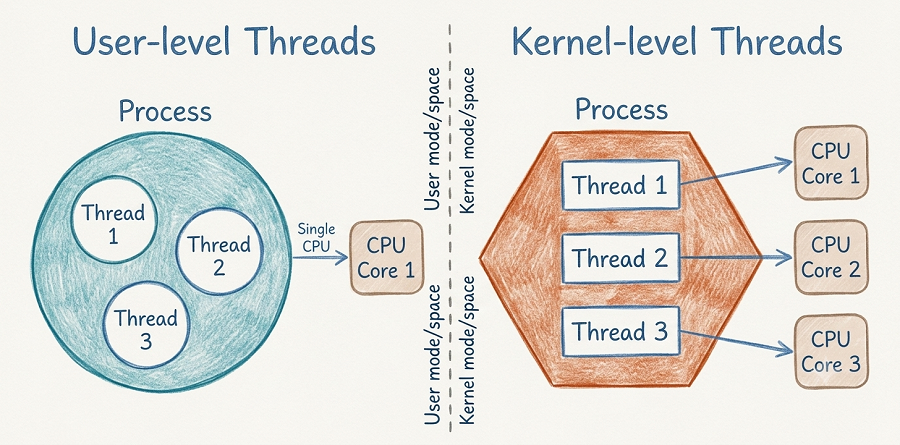
The diagram above compares the two fundamental ways an operating system can implement threads: User-level Threads, shown on the left, and Kernel-level Threads, shown on the right, separated by a dashed line representing the boundary between user mode/space and kernel mode/space discussed in the earlier System Calls chapter.
User-Level Threads
On the left side of the diagram, a single Process is shown as a large circle containing three threads — Thread 1, Thread 2, and Thread 3 — all managed entirely within that circle, meaning entirely within user mode/space. The diagram shows this entire group of threads connecting to a single CPU Core 1 through one combined "Single CPU" connection, illustrating an important limitation: the operating system's kernel is not directly aware of these individual threads at all. As far as the kernel is concerned, it sees only one process, and it is the process itself, using a thread library running in user mode, that manages the creation, scheduling, and switching between its own threads internally.
Because the kernel has no visibility into user-level threads, switching between them can be very fast, since it doesn't require the more expensive mode switch into kernel mode described in the earlier System Calls chapter. However, this design has a significant downside, also visible in the diagram: since the kernel sees only a single process sharing one connection to the CPU, if one user-level thread makes a blocking request, the entire process, including every other thread inside it, gets blocked as well, since the kernel has no way to schedule another thread from that same process independently.
Kernel-Level Threads
On the right side of the diagram, a single Process is again shown, this time as a hexagon, also containing three threads — Thread 1, Thread 2, and Thread 3. Unlike the user-level side, however, each individual thread here has its own separate arrow pointing to its own separate CPU core: Thread 1 to CPU Core 1, Thread 2 to CPU Core 2, and Thread 3 to CPU Core 3. This reflects the defining feature of kernel-level threads: the kernel itself is directly aware of each individual thread and manages their creation, scheduling, and switching itself, in kernel mode/space, rather than leaving that responsibility to a user-mode library.
Because the kernel can see and schedule each thread independently, kernel-level threads can achieve genuine parallel execution across multiple CPU cores at the same time, exactly as shown by the three separate arrows reaching three separate cores in the diagram. This also solves the blocking problem seen with user-level threads: if one kernel-level thread blocks, the kernel can simply schedule a different thread from the same process to continue running on another core. The trade-off, however, is that creating and managing kernel-level threads is more expensive than managing user-level threads, since every thread operation now requires the kernel's direct involvement, including the mode-switching overhead that user-level threads manage to avoid entirely.
Comparing User-Level and Kernel-Level Threads
| User-Level Threads | Kernel-Level Threads |
|---|---|
| Managed entirely in user mode/space by a thread library | Managed directly by the kernel in kernel mode/space |
| Faster to create and switch between, since no kernel involvement is needed | Slower to create and switch, due to kernel mode-switching overhead |
| The kernel sees only one process, unaware of individual threads | The kernel is aware of and schedules each thread individually |
| One blocking thread can block the entire process | Other threads in the same process can continue running if one blocks |
| Cannot take full advantage of multiple CPU cores on their own | Can run in true parallel across multiple CPU cores |
How Multithreading Connects to Later Chapters
The concepts covered in this chapter connect directly to several later topics in this Operating System series. CPU scheduling, covered next, applies not just to entire processes but to individual kernel-level threads as well, since the scheduler ultimately decides which specific thread runs on which CPU core at any given moment. Process synchronization, covered shortly after that, becomes especially important in multithreaded programs, since threads sharing the same memory can easily interfere with one another unless their access to shared data is carefully coordinated using tools like semaphores and mutexes.
Best Practices While Learning Threads
- Anchor the difference between user-level and kernel-level threads around one question: does the kernel know this thread exists individually, or does it only see the process as a whole?
- Keep the process-versus-thread comparison table close by while revising, since exam questions frequently test this distinction directly.
- Connect the blocking behaviour shown in the diagram back to real scenarios — a single-threaded blocking call freezing an entire user-level-threaded application is a common practical example.
- Revisit this chapter before studying CPU Scheduling next, since scheduling decisions increasingly apply at the thread level on modern systems.
Common Mistakes Beginners Make
| Mistake | Correct Practice |
|---|---|
| Assuming a thread has its own separate memory space, just like a process does. | Remember that threads within the same process share that process's memory and resources. |
| Believing user-level threads are always slower than kernel-level threads. | Understand that user-level threads are actually faster to create and switch between, since they avoid kernel involvement, but they cannot achieve true parallelism across cores on their own. |
| Thinking multithreading always means faster execution. | Recognise that multithreading improves responsiveness and resource use, but real performance gains from parallel execution depend on having multiple CPU cores and kernel-level thread support. |
Frequently Asked Interview Questions
-
What is a thread?
A thread is the smallest unit of execution within a process, with its own program counter, registers, and stack, while sharing the memory and resources of its parent process with other threads. -
What is the main difference between a process and a thread?
A process has its own independent memory space, while a thread shares its memory space with other threads belonging to the same process. -
What is the difference between user-level threads and kernel-level threads?
User-level threads are managed entirely in user mode by a thread library, invisible to the kernel, while kernel-level threads are managed directly by the kernel, which is aware of and schedules each one individually. -
Why can one blocking user-level thread freeze an entire process?
Because the kernel only sees the process as a whole and has no visibility into its individual user-level threads, so it cannot schedule another thread from that process while one thread is blocked. -
Why are kernel-level threads able to achieve true parallelism?
Because the kernel is aware of each individual kernel-level thread and can schedule them independently across multiple CPU cores at the same time. -
What are the main benefits of multithreading?
The main benefits are improved responsiveness, efficient resource sharing, cheaper thread creation compared to process creation, and better scalability on systems with multiple CPU cores. -
Why is creating a thread generally faster than creating a process?
Because a thread doesn't need its own separate memory space or its own copy of open files, unlike a process, which requires the operating system to set up considerably more resources.
Summary
Threads allow a single process to be broken down into multiple independent units of execution, each capable of running concurrently while still sharing the same underlying memory and resources. This chapter compared threads directly against processes, explored the practical benefits multithreading offers — responsiveness, resource sharing, economy, and scalability — and looked closely at the two fundamental ways threads can be implemented: user-level threads, managed entirely in user mode and invisible to the kernel, and kernel-level threads, managed directly by the kernel and capable of true parallel execution across multiple CPU cores.
With a clear understanding of what threads are and how they differ at the user and kernel level, you're now ready to move into CPU Scheduling, where you'll see exactly how the operating system decides which process, or which individual thread, actually gets to run on the CPU at any given moment, using algorithms like FCFS, SJF, and Round Robin.