Memory Management in Operating System
Concepts, Techniques, Types, and Importance
Introduction
Memory management is one of the most important responsibilities of an Operating System (OS). When a program starts, it needs a working area in RAM for instructions, variables, buffers, and other temporary data. At the same time, several other programs may also be running. The OS therefore has to decide where a process should be placed, how much memory it can use, and when that memory can be returned to the system.
A useful way to understand memory management is to think of RAM as a limited collection of spaces that must be shared among competing processes. If the OS makes poor allocation decisions, free memory may exist but be split into small pieces that cannot satisfy a larger request. This is why allocation strategies such as First Fit, Best Fit, and Worst Fit, along with fragmentation and compaction, are important when studying contiguous memory allocation.
What is Memory Management?
Memory management is the process of allocating, tracking, and freeing main memory (RAM) for processes running in a system. It ensures efficient use of memory and prevents processes from interfering with each other.
Objectives of Memory Management
- Efficient utilization of memory
- Isolation and protection of processes
- Fast access to data
- Support for multiprogramming
- Logical view of memory
Memory Hierarchy in Computer System
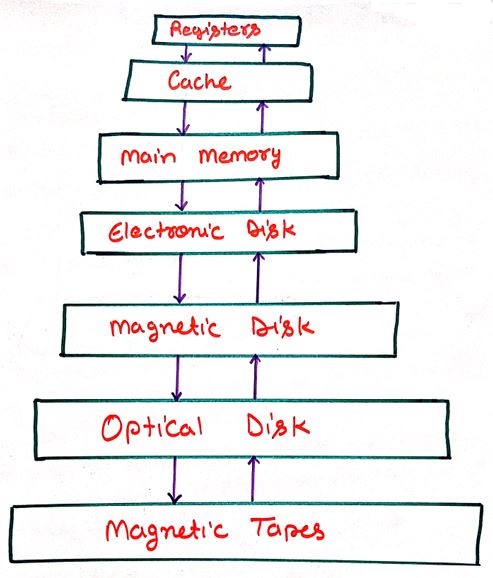
The memory hierarchy represents the organization of different storage components based on speed, cost, and capacity. The diagram below shows how memory is arranged from fastest to slowest in a computer system.
Explanation of Memory Hierarchy
The memory hierarchy is designed to achieve a balance between high performance and low storage cost. As we move upward in the hierarchy, memory becomes faster and more expensive but smaller in size. As we move downward, memory becomes slower, cheaper, and larger in capacity.
Registers
Registers are the fastest storage units located inside the CPU. They store instructions and data that are currently being executed by the processor.
Cache Memory
Cache memory stores frequently accessed data and instructions to reduce the time required to access main memory, thereby improving system performance.
Main Memory (RAM)
Main memory holds active programs and data. It is volatile in nature and loses its contents when the system is powered off.
Electronic Disk (SSD)
Electronic disks provide fast non-volatile storage and are commonly used to store operating systems and applications.
Magnetic Disk
Magnetic disks offer large storage capacity at a lower cost and are widely used for permanent data storage.
Optical Disk
Optical disks are removable storage devices mainly used for data distribution and backups.
Magnetic Tapes
Magnetic tapes are used for archival purposes where large amounts of data need to be stored for a long duration at minimal cost.
Importance of Memory Hierarchy
Memory hierarchy allows the operating system to keep frequently used data in fast memory while storing less-used data in slower storage, resulting in better system efficiency and performance.
Logical Address vs Physical Address
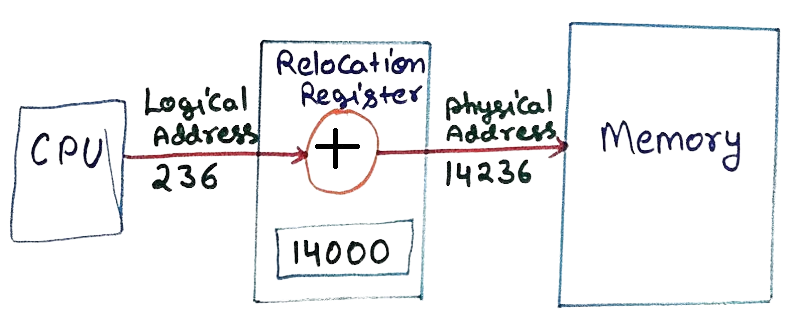
When a program runs in a computer, the CPU does not directly access the real memory location. Instead, it uses a logical address which is later converted into a physical address.
What is a Logical Address?
A logical address is generated by the CPU during program execution. It is a virtual address and does not represent the actual location in memory.
What is a Physical Address?
A physical address is the real address in RAM where the data is stored and accessed.
Role of MMU (Memory Management Unit)
The MMU converts the logical address into a physical address using a base value stored in the relocation register.
Logical Address: 236
Physical Address = Base + Logical = 14236
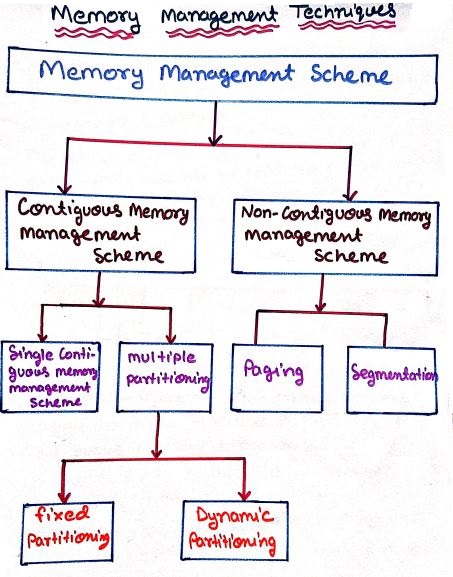
Memory Management Techniques
Contiguous Memory Allocation
Each process is allocated a single continuous block of memory. Although simple, this method suffers from fragmentation. In a computer system, main memory (RAM) is divided into small blocks. When processes are loaded into memory, each process is given a continuous (one after another) space. This method is called contiguous memory allocation.
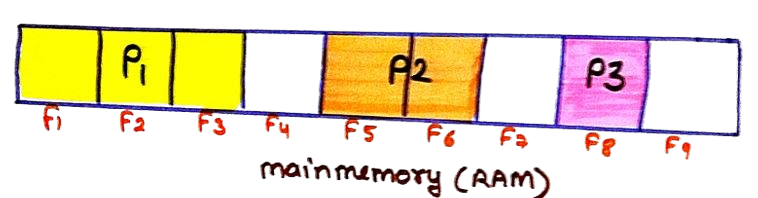
In the diagram, memory is divided into parts labeled F1 to F9. Different processes are placed inside these blocks:
- P1 is stored in the starting blocks (F1–F3)
- Some blocks (like F4) are empty
- P2 is placed in the middle (F5–F6)
- P3 is stored further ahead (F8)
Non-Contiguous Memory Allocation
Processes are divided into parts and stored in different memory locations, improving memory utilization.In a computer system, memory is not always assigned in one continuous block. Sometimes, a process is divided into smaller parts and stored in different locations in RAM. This method is called non-contiguous memory allocation.
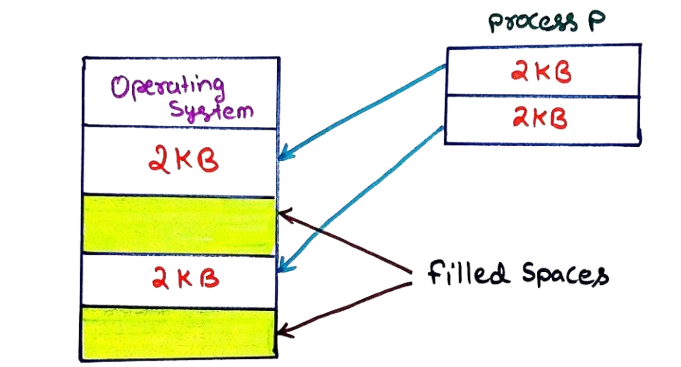
In the diagram:
- The Operating System is already using some parts of memory
- Some memory spaces are already filled (shown as colored blocks)
- A new process P requires 4 KB of memory
- Instead of placing it in one place, it is divided into two parts of 2 KB each
Dynamic Memory Allocation Strategies
In variable-partition contiguous allocation, free areas of memory are often called holes. When a new process arrives, the operating system must choose one of the available holes that is large enough to contain the process. Three classical strategies are First Fit, Best Fit, and Worst Fit. The important difference is not the size of the process; it is the rule used to select the hole.
1. First Fit
First Fit scans the free-memory list from the beginning and places the process in the first hole that is large enough. It normally stops as soon as a suitable hole is found. This makes the method simple and often quick because the complete list does not have to be examined for every request.
First Fit – Solved Example
Suppose the available memory holes are: 100 KB, 500 KB, 200 KB, 300 KB, 600 KB and the processes arrive in this order: 212 KB, 417 KB, 112 KB, 426 KB.
| Process | Size | Selected Hole | Remaining Hole |
|---|---|---|---|
| P1 | 212 KB | 500 KB | 288 KB |
| P2 | 417 KB | 600 KB | 183 KB |
| P3 | 112 KB | 288 KB | 176 KB |
| P4 | 426 KB | Not allocated | No remaining hole is large enough |
Result: P1, P2, and P3 are allocated. P4 cannot be placed because the largest remaining hole is smaller than 426 KB, even though free memory still exists.
2. Best Fit
Best Fit searches all suitable holes and selects the smallest hole that can accommodate the process. The idea is to avoid consuming a very large hole when a smaller suitable hole is available. However, repeatedly creating very small leftover holes can make later allocation difficult.
Best Fit – Solved Example
Using the same holes and process order, the allocation is performed as follows.
| Process | Size | Selected Hole | Remaining Hole |
|---|---|---|---|
| P1 | 212 KB | 300 KB | 88 KB |
| P2 | 417 KB | 500 KB | 83 KB |
| P3 | 112 KB | 200 KB | 88 KB |
| P4 | 426 KB | 600 KB | 174 KB |
Result: All four processes can be allocated in this example. Notice that the method leaves several small holes, which illustrates why Best Fit is not automatically the best strategy for every workload.
3. Worst Fit
Worst Fit selects the largest available hole that can hold the process. The intention is to leave a reasonably large remainder after an allocation. Whether this actually improves future allocation depends on the pattern and sizes of later requests.
Worst Fit – Solved Example
Again using the same initial holes and process order:
| Process | Size | Selected Hole | Remaining Hole |
|---|---|---|---|
| P1 | 212 KB | 600 KB | 388 KB |
| P2 | 417 KB | 500 KB | 83 KB |
| P3 | 112 KB | 388 KB | 276 KB |
| P4 | 426 KB | Not allocated | No remaining hole is large enough |
Result: P1, P2, and P3 are allocated, while P4 waits. The example shows that leaving a large remainder after an early allocation does not guarantee that every later request will fit.
First Fit vs Best Fit vs Worst Fit
| Strategy | Selection Rule | Main Idea | Possible Concern |
|---|---|---|---|
| First Fit | First suitable hole | Usually quick and simple | Earlier parts of the free list can become fragmented |
| Best Fit | Smallest suitable hole | Try to minimize the immediate leftover space | Can create many small unusable holes |
| Worst Fit | Largest suitable hole | Leave a larger remainder after allocation | Large holes may be consumed unnecessarily |
Fragmentation in Memory Management
Fragmentation means that available memory is not being used as one convenient, continuous space. A system may report a significant amount of free memory while still being unable to satisfy a particular request. Two commonly discussed forms are internal fragmentation and external fragmentation.
Internal Fragmentation
Internal fragmentation occurs when a process receives a memory block that is slightly larger than it needs. The unused bytes remain inside the allocated block and cannot be given independently to another process under that allocation scheme.
Internal Fragmentation – Solved Example
Assume a fixed partition has a size of 100 KB and a process needs only 72 KB.
| Partition Size | Process Requirement | Unused Space |
|---|---|---|
| 100 KB | 72 KB | 100 − 72 = 28 KB |
The 28 KB is inside the partition already assigned to the process. Therefore, it is an example of internal fragmentation.
External Fragmentation
External fragmentation occurs when free memory is scattered into separate holes between allocated regions. The total free memory may be sufficient for a new process, but no single contiguous hole may be large enough for that process.
External Fragmentation – Solved Example
Suppose the free holes are 100 KB, 50 KB, 150 KB, and 75 KB. The total free memory is:
Now suppose a process requires 300 KB of contiguous memory. The request cannot be satisfied because the largest individual hole is only 150 KB. The system has 375 KB free in total, but the free space is fragmented.
Conclusion: This is external fragmentation because the problem is the distribution of free memory between allocated areas, not the total amount of free memory.
Compaction
Compaction is a technique used to reduce external fragmentation. The OS moves allocated blocks closer together so that separate free holes can be combined into one larger contiguous region. Moving processes requires additional work and may involve address relocation, so compaction is useful only when its cost is justified by the allocation problem.
Compaction – Solved Example
Consider a 1000 KB memory area arranged conceptually as:
| Region | Size | Status |
|---|---|---|
| P1 | 200 KB | Allocated |
| Hole 1 | 100 KB | Free |
| P2 | 150 KB | Allocated |
| Hole 2 | 80 KB | Free |
| P3 | 120 KB | Allocated |
| Hole 3 | 350 KB | Free |
The total free memory is: 100 + 80 + 350 = 530 KB. The largest individual free block, however, is only 350 KB. Therefore, a new contiguous request of 450 KB cannot be placed before compaction.
After compaction, the allocated processes can be moved together. The three free areas are then combined into one larger free region:
Required Space = 450 KB
450 KB ≤ 530 KB → Request can now be allocated.
This example demonstrates an important distinction: compaction does not create additional RAM. It changes the arrangement of existing free memory so that separate holes become one usable contiguous block.
Fragmentation and Compaction at a Glance
| Concept | Meaning | Typical Situation |
|---|---|---|
| Internal Fragmentation | Unused space inside an allocated block | Fixed-size allocation gives a process more space than it needs |
| External Fragmentation | Free space scattered across separate holes | Variable-size contiguous allocation over time |
| Compaction | Rearranging allocated blocks to combine free holes | Used to make a larger contiguous free region |
How to Solve Allocation Questions
- Write the free-memory holes in their original order.
- Write the process requests in the exact order given in the question.
- For First Fit, scan from the beginning and choose the first suitable hole.
- For Best Fit, compare all suitable holes and choose the smallest suitable one.
- For Worst Fit, compare all suitable holes and choose the largest suitable one.
- Subtract the allocated process size from the selected hole.
- Use the updated hole sizes for the next process.
- At the end, check both allocation success and the remaining fragmented space.
This step-by-step method is useful because allocation questions are not solved by looking only at the initial list. Every successful allocation changes the remaining holes, so the next process must be evaluated against the updated memory state.
Practice Problems
Work through each of the following problems on paper before expanding the answer. Follow the eight-step method above: write the holes, apply the rule one process at a time, and update the remaining hole size before moving to the next process.
Practice Problem 1 — First Fit
Free holes: 150 KB, 60 KB, 250 KB, 120 KB, 300 KB
Process order: 90 KB, 110 KB, 270 KB, 40 KB
Apply First Fit and determine which processes are allocated, to which hole, and what remains after each step.
Show Answer
P2 (110 KB) → scanning from the start, 60 KB (twice) is too small, so the next suitable hole is 250 KB → remaining 140 KB.
P3 (270 KB) → none of 60, 60, 140, or 120 KB is large enough, so it takes the 300 KB hole → remaining 30 KB.
P4 (40 KB) → the first suitable hole from the start is one of the 60 KB holes → remaining 20 KB.
Result: all four processes are allocated.
Practice Problem 2 — Best Fit
Free holes: 80 KB, 180 KB, 60 KB, 300 KB, 150 KB
Process order: 70 KB, 100 KB, 50 KB, 190 KB
Apply Best Fit and determine the allocation for all four processes.
Show Answer
P2 (100 KB) → smallest suitable hole among 180, 300, 150 is 150 KB → remaining 50 KB.
P3 (50 KB) → the 50 KB hole just created is an exact fit → remaining 0 KB.
P4 (190 KB) → only the 300 KB hole is large enough → remaining 110 KB.
Result: all four processes are allocated, and P3 fits with zero leftover space.
Practice Problem 3 — Worst Fit
Free holes: 100 KB, 30 KB, 170 KB, 50 KB
Process order: 60 KB, 120 KB
Apply Worst Fit. Can both processes be allocated?
Show Answer
P2 (120 KB) → the remaining holes are now 100, 30, 110, and 50 KB — none of them is 120 KB or larger, so P2 cannot be allocated, even though the original 170 KB hole would easily have fit it before P1 was placed there.
This illustrates a real weakness of Worst Fit: consuming the largest hole first can leave nothing big enough for a later, moderately sized request.
Practice Problem 4 — Internal Fragmentation
A system uses four fixed partitions, each 256 KB in size. Four processes of sizes 200 KB, 130 KB, 255 KB, and 64 KB are loaded, one into each partition.
Calculate the internal fragmentation for each process, and the total internal fragmentation across all four partitions.
Show Answer
Process 2: 256 − 130 = 126 KB wasted.
Process 3: 256 − 255 = 1 KB wasted.
Process 4: 256 − 64 = 192 KB wasted.
Total internal fragmentation = 56 + 126 + 1 + 192 = 375 KB.
Practice Problem 5 — External Fragmentation and Compaction
Free holes scattered across memory: 40 KB, 90 KB, 20 KB, 160 KB. A process requires 250 KB of contiguous memory.
Can the process be allocated before compaction? Can it be allocated after compaction?
Show Answer
Before compaction: not possible, since the largest single hole is only 160 KB.
After compaction: the four holes are combined into one 310 KB contiguous region, and since 250 KB ≤ 310 KB, the process can now be allocated.
Memory Protection
Memory protection ensures that processes access only their allocated memory using hardware and software mechanisms.
Advantages of Memory Management
- Efficient Utilization of RAM: Memory management ensures that available main memory is used optimally without unnecessary wastage.
- Improved System Performance: Proper allocation and deallocation of memory reduce delays and allow faster execution of processes.
- Supports Multitasking: Multiple programs can run simultaneously by sharing memory efficiently.
- Prevents Memory Overlapping: Each process is given a separate memory space, avoiding interference between programs.
- Enhances System Stability: Controlled memory access reduces system crashes and unexpected behavior.
- Improved Security: Memory protection mechanisms prevent one process from accessing another process's memory.
- Supports Virtual Memory: Allows execution of large programs even when physical memory is limited.
Frequently Asked Interview Questions
-
What is memory management in an operating system?
Memory management is the set of activities the operating system performs to allocate, track, and free main memory for running processes, while keeping their memory areas isolated from one another. -
What is the difference between a logical address and a physical address?
A logical address is the address generated by the CPU during program execution, while a physical address is the actual location in RAM where the data resides; the Memory Management Unit (MMU) translates the former into the latter. -
What is the role of the MMU in address translation?
The MMU adds the value stored in the relocation register (the base address of the process) to the logical address to compute the corresponding physical address at runtime. -
What is the difference between contiguous and non-contiguous memory allocation?
In contiguous allocation, a process is placed in a single continuous block of memory, while in non-contiguous allocation, a process can be split into parts and stored in different, unconnected areas of memory. -
How do First Fit, Best Fit, and Worst Fit differ from each other?
First Fit allocates the first hole large enough for the process, Best Fit allocates the smallest suitable hole, and Worst Fit allocates the largest suitable hole; all three can be applied to the same set of holes and will often produce different allocation results. -
What is the main drawback of Best Fit, even though it sounds like the ideal strategy?
Best Fit tends to leave many very small leftover holes over time, since it always trims a suitable hole down to the smallest possible remainder, and these tiny holes often become too small to be useful for future requests. -
What is the difference between internal fragmentation and external fragmentation?
Internal fragmentation is unused space left inside a block that has already been allocated to a process, while external fragmentation is free space that exists between allocated blocks but is too scattered to satisfy a large contiguous request. -
Why can a system show a large amount of free memory but still reject a smaller request?
This happens under external fragmentation, where the total free memory is scattered into several small, non-contiguous holes, none of which individually is large enough to satisfy the request. -
What is compaction, and what is its main limitation?
Compaction rearranges allocated memory blocks so that scattered free holes are combined into one larger contiguous region; its main limitation is the extra time and processing cost involved in physically moving processes and updating their address mappings. -
Does compaction increase the total amount of free memory?
No — compaction only rearranges existing free memory into a single contiguous block; it does not create any additional RAM.
Conclusion
Memory management plays a vital role in the performance, stability, and protection of an operating system. The OS must not only track memory but also decide how available regions are assigned to processes and how released regions are reused.
In contiguous allocation, First Fit, Best Fit, and Worst Fit provide different rules for selecting a suitable free hole. The solved examples and practice problems show why the allocation decision must be updated after every process. We also saw how internal and external fragmentation describe different forms of wasted or inconveniently arranged memory, and how compaction can combine separated free regions when a larger contiguous block is needed.
These concepts provide the foundation for more advanced memory-management topics such as paging, segmentation, page replacement, and virtual memory. The important exam skill is to understand the memory state after each step rather than memorizing only the definitions.