Directory Structure in Operating System
A directory structure defines how files and directories are arranged on a storage system. An operating system uses directories to maintain information about files, folders, their locations, and relationships with other entries. Instead of requiring users to work directly with physical disk locations, the directory system provides a logical way to organize and access stored information.
For example, a computer may contain documents, programs, photographs, source-code files, videos, and configuration files. Keeping all of these items in one common location would make file management difficult. Directories allow related items to be grouped together and subdirectories can be created when additional organization is required.
The design of a directory structure also affects how files are named, searched, shared, accessed, and deleted. Simple operating systems may use a flat directory, whereas systems that manage many users and large amounts of data generally require hierarchical or link-based structures.
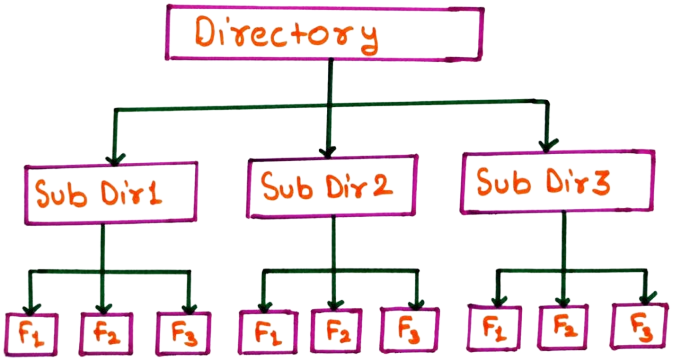
What is a Directory?
A directory is a file-system object that stores information used to organize and locate files and other directories. Depending on the operating system and file system, a directory entry may contain information such as a file name, type, location reference, ownership information, and other metadata.
A directory can contain ordinary files as well as other directories. When one directory is placed inside another directory, it is called a subdirectory. This ability to create relationships between directories forms the foundation of hierarchical file organization.
Directories are therefore not simply containers in the physical sense. They provide a logical naming system through which users and applications can refer to stored resources.
Why is Directory Structure Required?
As the number of files increases, managing files without an organizational structure becomes difficult. Directory structures solve this problem by providing a systematic way to group and locate files.
- Files can be grouped according to their purpose or application.
- Users can separate their personal files from system or application files.
- Subdirectories provide additional levels of organization.
- File names can be reused in different directories when the naming rules permit it.
- Access permissions can be associated with directories and their contents.
- Files can be located through paths instead of physical disk addresses.
- Some directory structures allow resources to be shared through links.
Types of Directory Structure
Operating systems can organize directories in several ways. The major directory structures traditionally discussed in operating system courses are shown below.
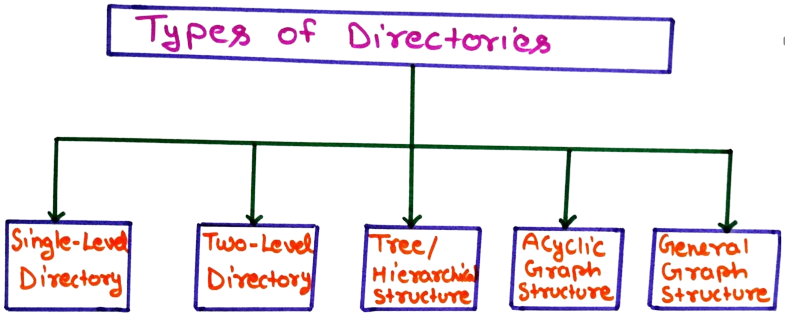
- Single-Level Directory
- Two-Level Directory
- Tree-Structured or Hierarchical Directory
- Acyclic Graph Directory
- General Graph-Structured Directory
1. Single-Level Directory
The single-level directory is the simplest directory organization. In this model, all files are placed inside one directory. There is no concept of a separate subdirectory, so every file exists at the same organizational level.
When a user wants to access a file, the operating system searches the common directory for the corresponding file name. This arrangement is easy to understand because there is only one place in which files are stored.
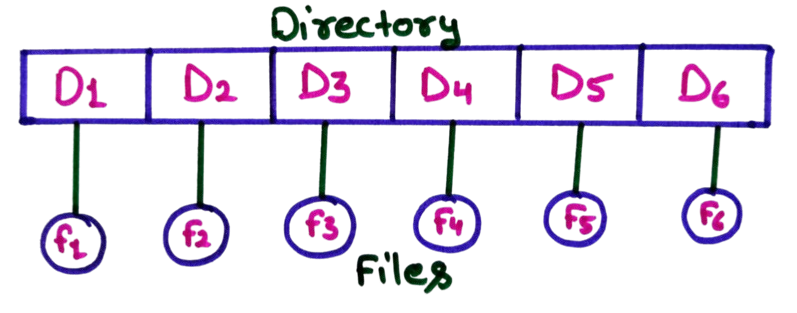
The diagram shows one directory containing entries for files such as F1, F2, F3, F4, F5 and F6. There are no folders below the main directory. Every file therefore belongs to the same directory.
Suppose a small system contains the files notes.txt, program.c, and result.pdf. All three files would be placed in the same directory. The user does not need to navigate through subdirectories to reach them.
Characteristics of Single-Level Directory
- Only one directory is maintained.
- Subdirectories are not supported.
- All files are stored at the same level.
- File access is straightforward for a small number of files.
- File-name conflicts become a major limitation as the number of files grows.
Limitations of Single-Level Directory
The main weakness of a single-level directory is that it does not provide meaningful classification of files. If hundreds or thousands of files are stored in the same directory, finding and managing them becomes inconvenient.
Another limitation is name uniqueness. Since all files belong to the same directory, two files normally cannot have the same name within that namespace. This becomes especially problematic when several users or applications need to create similarly named files.
Therefore, a single-level structure is appropriate mainly for small and simple environments where the number of files is limited.
2. Two-Level Directory
A two-level directory introduces a separate directory for each user. The first level is generally represented by a Master File Directory (MFD), while the second level contains individual User File Directories (UFDs).
The MFD maintains information about users, while each UFD contains the files associated with a particular user. This separates users' file namespaces and solves an important problem found in the single-level structure.
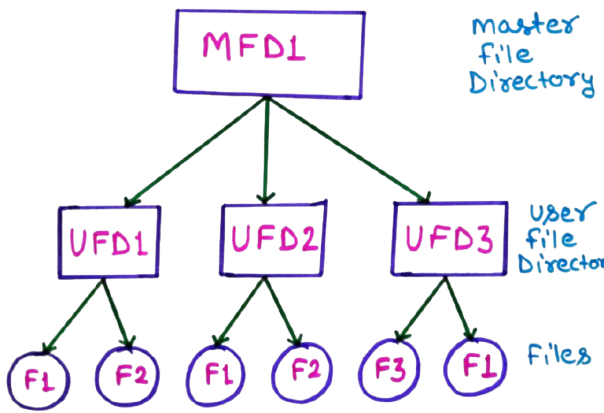
The diagram contains an MFD at the top. It points to directories such as UFD1, UFD2 and UFD3. Each UFD belongs to a particular user.
For example, UFD1 may contain F1 and F2, while UFD2 may also contain a file named F1. These two F1 files do not conflict because they belong to different user directories.
Why Two-Level Directory is Better than Single-Level Directory
The most important improvement is the separation of users. A file name needs to be unique within the relevant user's directory rather than across the entire system.
For example:
User1/F1
User2/F1
User3/F1
The same file name can therefore be used by different users while maintaining separate namespaces.
Limitations of Two-Level Directory
Although the two-level structure provides user separation, it is still restrictive because each user directory generally does not provide an arbitrary hierarchy of subdirectories. A user with hundreds of files may still have difficulty organizing them into projects, subjects, applications, or categories.
File sharing is also less flexible because the structure is primarily designed around separate user directories. More advanced directory models are required when users need shared resources and deeper organization.
3. Tree-Structured or Hierarchical Directory
A tree-structured directory extends the two-level concept by allowing directories to contain additional directories. These nested directories can continue to create further levels, producing a hierarchy similar to an inverted tree.
At the top is the root directory. Directories below the root can contain files and subdirectories. Each subdirectory can create another level whenever required. This makes the structure suitable for systems containing a large number of files.
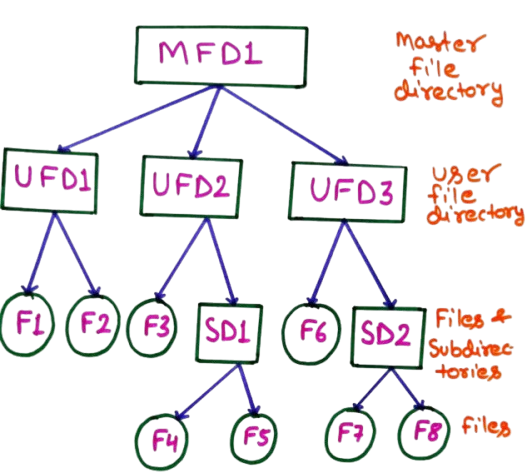
In the diagram, the top-level directory acts as the root. User directories such as UFD1, UFD2 and UFD3 can contain files and subdirectories.
For example, UFD2 may contain a subdirectory named SD1, and SD1 may contain files F4 and F5. Another user directory may contain a different subdirectory with its own files.
This arrangement makes it possible to organize files according to projects, subjects, applications, departments, or other meaningful categories.
Directory Path in a Tree Structure
A major feature of hierarchical directories is the use of a path. A path describes the sequence of directories that must be followed to reach a file.
For example:
/home/student/OS/notes/file-management.pdf
Here, home contains student, student contains OS, OS contains notes, and the notes directory contains the required file.
The exact path syntax varies between operating systems. Windows commonly uses drive letters and backslashes, while Unix-like systems generally use forward slashes.
Important Features of Tree-Structured Directories
- Directories can contain both files and subdirectories.
- Multiple levels of organization are possible.
- Files can be identified using hierarchical paths.
- Different directories can contain files having the same name.
- Permissions can be applied at different levels of the hierarchy.
Because of its flexibility, hierarchical organization is the fundamental model behind many modern file systems, although actual file systems may implement additional mechanisms such as links, mount points, special files, and other file-system features.
4. Acyclic Graph Directory Structure
An acyclic graph directory structure extends the hierarchical model by allowing a file or directory to be referenced from more than one location. The important condition is that the resulting directory relationship must not contain a cycle.
The word acyclic means that a path cannot eventually return to an object that has already been visited. In other words, circular directory relationships are not allowed.
This model is useful when several users or projects need access to the same resource. Instead of creating multiple physical copies, the system can maintain links or shared references to the same underlying object.
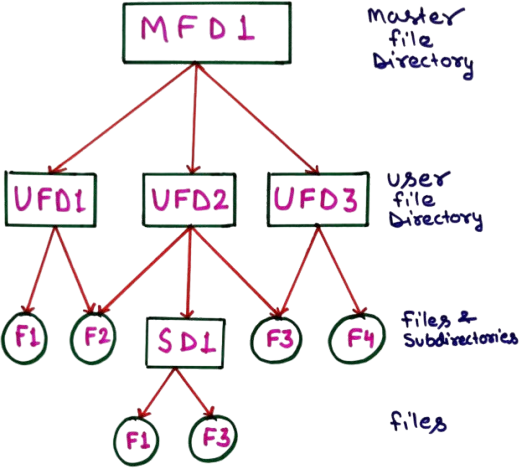
Consider a shared directory containing a common project file. User A and User B may both need access to that file. An acyclic graph structure can provide references from their directories to the same underlying file instead of creating two independent copies.
If User A modifies the shared file, User B can access the same underlying resource, subject to the permissions and sharing mechanism used by the system.
Sharing in an Acyclic Graph
The major difference between a simple tree and an acyclic graph is that a tree normally gives an object one parent in the directory hierarchy, whereas an acyclic graph can allow multiple references to the same object.
For example, suppose a common library is required by two projects:
Project-A
   |
   +----> Common-Library

Project-B
   |
   +----> Common-Library
The two projects can refer to the same resource. The system therefore does not necessarily need to maintain separate copies of the library.
Reference Management
Shared objects create an important management problem: the operating system must determine when an object can actually be removed. If one directory stops referencing a shared object, the object should not necessarily be deleted while another valid reference still exists.
File systems can use mechanisms such as reference counts or other metadata to determine whether an object is still referenced. The exact implementation depends on the file system.
Limitations of Acyclic Graph Directory
- Shared-object management: The system must keep track of multiple references to the same resource.
- Deletion requires care: Removing one reference should not unintentionally remove a resource that is still required elsewhere.
- Permission management becomes important: A shared resource may be reachable through multiple paths, so access rights must be handled correctly.
- Backup requires relationship awareness: A backup system must preserve sharing relationships rather than treating every reference as an independent copy.
5. General Graph-Structured Directory
A general graph-structured directory is a more flexible model in which directory and file relationships can form a graph. Unlike an acyclic graph, a general graph may allow relationships that eventually lead back to an earlier directory or object. Such a relationship creates a cycle.
For example, directory A may contain or reference directory B, while B eventually contains a reference that leads back to A. The resulting relationship is no longer a tree or an acyclic graph.
Directory A
    |
    +---- Directory B
              |
              +---- Directory C
                        |
                        +---- Reference to Directory A
In this example, starting from Directory A and following the references eventually leads back to A. This creates a cycle.
Why Cycles are a Problem
A cycle can create difficulties for operations that traverse directories recursively. Suppose a program searches every directory and follows every link. If the program reaches a directory that eventually points back to an already visited directory, it could continue traversing the same relationship repeatedly unless the system detects the cycle.
The same issue can affect backup, deletion, disk-usage calculation, and directory-search operations. Therefore, systems that permit graph relationships need mechanisms to detect or safely handle cycles.
Cycle Handling
A directory traversal algorithm can maintain information about objects that have already been visited. When it encounters an object that has already been processed, it can avoid traversing the same relationship again.
Another important issue is determining whether an object is still reachable. File-system implementations may use different strategies for managing references and reclaiming resources. The exact technique depends on the operating system and file-system design.
Advantages of General Graph Organization
The primary benefit of a graph-based organization is flexibility. Shared resources can be represented through multiple relationships instead of forcing every resource into a strict single-parent hierarchy.
This can be useful when files or directories logically belong to more than one project, group, or category. However, the flexibility comes at the cost of more complicated management algorithms.
Acyclic Graph vs General Graph Directory
Acyclic graph and general graph directory structures both extend the basic hierarchical model by supporting multiple references. The key difference is whether circular relationships are permitted.
| Feature | Acyclic Graph | General Graph |
|---|---|---|
| Multiple references | Supported | Supported |
| File or directory sharing | Supported | Supported |
| Cycles | Not allowed | May occur |
| Directory traversal | Relatively easier to manage | Requires cycle handling |
| Deletion management | Requires reference management | More complicated because cycles may exist |
| Main challenge | Managing shared references | Managing shared references and cycles |
Comparison of Directory Structures
| Directory Type | Subdirectories | Multiple Users | Sharing | Cycles | Complexity |
|---|---|---|---|---|---|
| Single-Level | No | Limited | Very limited | No | Very Low |
| Two-Level | Limited | Yes | Limited | No | Low |
| Tree-Structured | Yes | Yes | Limited by hierarchy | No | Moderate |
| Acyclic Graph | Yes | Yes | Yes | No | High |
| General Graph | Yes | Yes | Yes | May occur | Very High |
Path Names in Directory Structure
A path identifies the location of a file or directory within a file-system hierarchy. Paths are particularly important in tree and graph-based organizations because the same file name may exist in different directories.
Absolute Path
An absolute path starts from a root or other fixed starting point and identifies the complete route to the required resource.
/home/student/OS/notes.txt
The exact syntax depends on the operating system.
Relative Path
A relative path describes a location with respect to the current working directory. It does not necessarily start from the root.
notes/OS/notes.txt
Relative paths are useful when applications work within a particular project or directory and do not need to specify the complete location from the root.
How Directory Structures are Used in Real Systems
Modern operating systems use sophisticated file-system implementations rather than following the textbook directory models in isolation. Nevertheless, the traditional directory structures provide the conceptual foundation for understanding how files are organized.
For example, a typical computer may contain a hierarchy such as:
Root
|
+-- Users
|     |
|     +-- Student
|           |
|           +-- Documents
|           +-- Pictures
|           +-- Projects
|
+-- Applications
|
+-- System
|
+-- Shared
This example demonstrates the basic idea of hierarchical organization. Files are grouped according to their logical purpose instead of being stored in one large collection.
Key Points for Exams and Interviews
- Single-level directory: All files are maintained in one directory.
- Two-level directory: Separate user directories are maintained under a master directory.
- Tree-structured directory: Directories can contain subdirectories, creating a hierarchy.
- Acyclic graph: Multiple references are possible, but circular relationships are not allowed.
- General graph: Multiple relationships are possible and cycles may occur.
- Path: A path identifies the route to a file or directory.
- Sharing: Graph-based directory models can allow multiple users or directories to refer to the same resource.
Frequently Asked Questions
1. What is directory structure in an operating system?
Directory structure is the method used by an operating system to organize files and directories on a storage system. It defines how files are grouped, named, located, and related to other directories.
2. What is the simplest directory structure?
The single-level directory is the simplest directory structure because all files are maintained in one directory and no subdirectories are used.
3. What is the main advantage of a two-level directory?
Its main advantage is the separation of users into individual directories. Consequently, different users can generally use the same file names without creating a naming conflict between their separate directory namespaces.
4. Why is a tree directory called hierarchical?
It is called hierarchical because directories are arranged at different levels. A root directory can contain subdirectories, and those subdirectories can contain additional subdirectories.
5. What is an acyclic graph directory?
An acyclic graph directory allows a file or directory to have multiple references while preventing circular relationships. It is useful for sharing resources without requiring separate copies for every directory.
6. What is the difference between an acyclic graph and a general graph?
An acyclic graph does not permit cycles, whereas a general graph may contain cycles. Therefore, directory traversal and resource management can become more complicated in a general graph.
7. Why are cycles problematic in a directory structure?
Cycles can cause repeated traversal of the same directories. Operations such as searching, backup, deletion, and calculating storage usage may therefore require mechanisms to detect and handle already visited objects.
8. What is a subdirectory?
A subdirectory is a directory located inside another directory. Subdirectories are a fundamental part of hierarchical directory structures because they allow files to be organized into multiple levels.
Conclusion
Directory structure is an important part of file-system design because it provides the logical organization needed to manage stored data. A single-level directory offers simplicity, while a two-level directory introduces user separation. Tree-structured directories provide deeper organization through subdirectories and paths.
Acyclic graph directories extend this model by allowing shared resources without circular relationships. General graph structures provide even greater flexibility but introduce additional challenges when cycles are possible. Understanding these models helps students understand how operating systems organize, locate, share, and manage files.
For operating system examinations and interviews, the most important concepts to remember are directory hierarchy, paths, file sharing, multiple references, and cycle management. These concepts also provide the foundation for understanding practical file-system implementations used by modern operating systems.