Operating System Services
Every time a user runs a program, saves a file, connects to a printer, or simply switches between two open windows, a whole set of background services is quietly making that possible. These services are provided by the operating system, and they exist specifically so that users and application programs never have to deal directly with the raw complexity of the underlying hardware. Instead of an application needing to know how to physically position a disk head or manage memory addresses itself, it simply asks the operating system for what it needs, and the operating system's services take care of the rest.
In the previous chapter, we looked at the different types of operating systems and how each one prioritises a different way of managing jobs and users. In this chapter, we shift focus to the actual services an operating system provides once it is running, regardless of which type it belongs to. Understanding these services in detail also sets up the next chapter, where we look at system calls, which are the actual mechanism a program uses to request these services from the operating system.
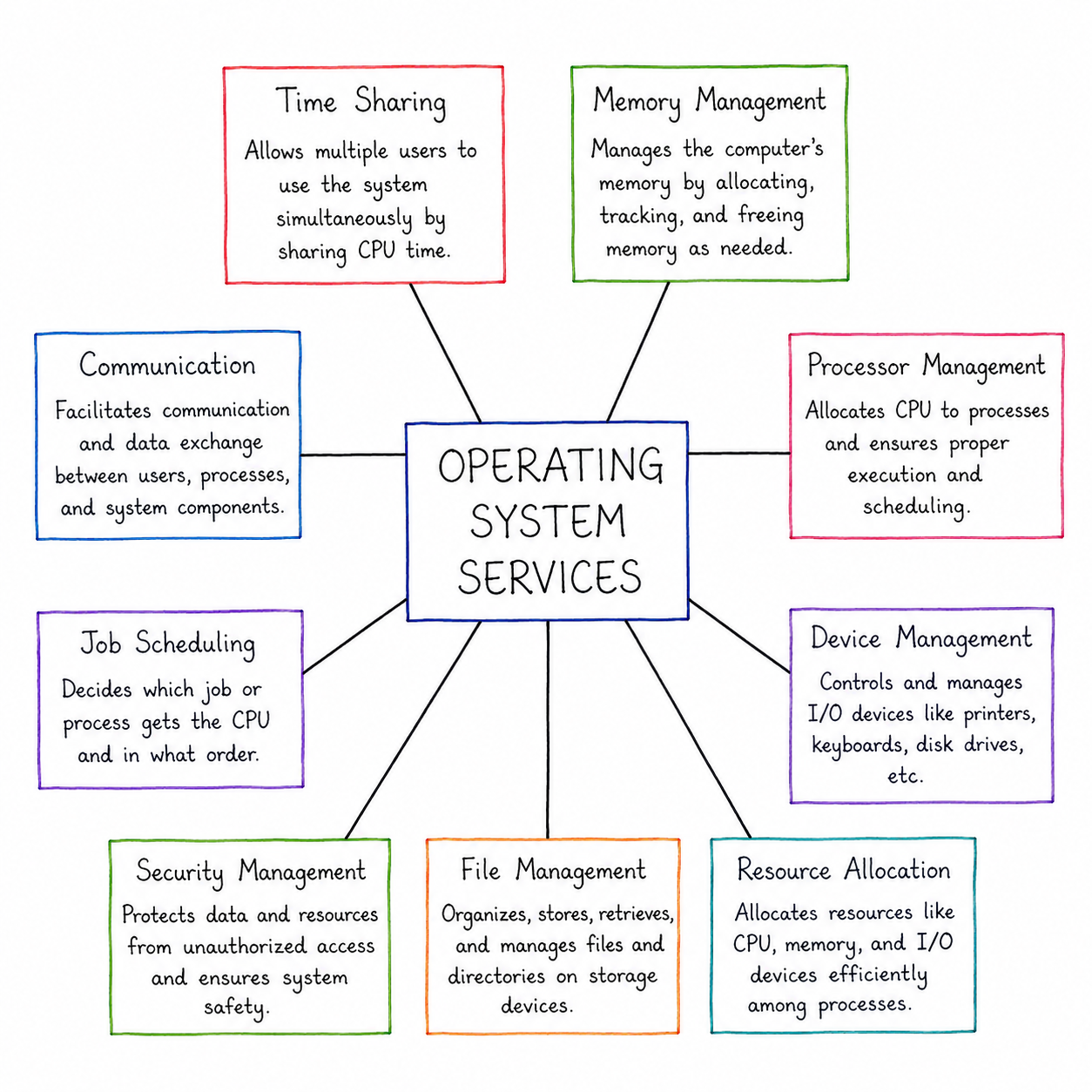
The diagram above lays out nine core services provided by an operating system, arranged around a central "Operating System Services" node: Time Sharing, Memory Management, Processor Management, Device Management, Resource Allocation, File Management, Security Management, Job Scheduling, and Communication. Each of these branches represents a distinct responsibility the operating system handles on behalf of every program running on the system, and together they cover almost everything a user or application ever needs from the operating system. The sections below walk through each of these nine services individually, in the same order shown in the diagram, explaining what each one does and why it matters.
1. Time Sharing
As shown in the diagram, Time Sharing is the service that allows multiple users to use the system simultaneously by sharing CPU time. Rather than dedicating the processor to a single user or program until it finishes, the operating system divides CPU time into short slices and rotates through every waiting user or process, so each one gets a fair turn without ever completely monopolising the system.
This service is what makes an operating system feel responsive when several programs are open at once, or when multiple people are logged into the same system. It builds directly on the Time-Sharing Operating System concept covered in the previous chapter, and it forms the underlying foundation for the CPU scheduling algorithms explained in detail later in this series.
2. Memory Management
The diagram describes Memory Management as the service that manages the computer's memory by allocating, tracking, and freeing memory as needed. Every running program requires its own space in memory to store instructions and data while it executes, and the operating system is responsible for deciding exactly which portion of memory each program is allowed to use.
Beyond simply handing out memory, this service also keeps track of which parts of memory are currently free and which are in use, and it reclaims memory automatically once a program finishes so that space can be reused by the next program that needs it. Without careful memory management, one program's data could accidentally overwrite another's, which is exactly the kind of problem this service is designed to prevent.
3. Processor Management
According to the diagram, Processor Management allocates CPU to processes and ensures proper execution and scheduling. Since a computer typically has far more processes wanting to run than it has physical processors available, the operating system must continuously decide which process gets access to the CPU next, and for how long.
This service works closely alongside Time Sharing, but it focuses specifically on the decision-making side of CPU allocation — choosing which process runs next based on factors like priority, waiting time, or the scheduling algorithm in use — rather than simply the act of switching between processes.
4. Device Management
Device Management, as described in the diagram, controls and manages I/O devices like printers, keyboards, disk drives, etc. Every device connected to a computer communicates in its own particular way, and this service ensures that applications can interact with any of these devices through a consistent, simplified interface, without needing to understand the technical details of each specific device.
This service relies on device drivers, small specialised programs that know exactly how to communicate with a particular category of hardware, allowing the operating system to support a wide range of devices from different manufacturers using the same general approach.
5. Resource Allocation
The diagram describes Resource Allocation as the service that allocates resources like CPU, memory, and I/O devices efficiently among processes. While memory management and processor management each handle one specific resource, resource allocation refers more broadly to the operating system's overall job of distributing every available resource fairly and efficiently among all the processes competing for them.
This becomes especially important when many processes are requesting the same limited resources at once, since poor resource allocation can lead to some processes being starved of what they need while others sit comfortably with more than they require. This service also plays a role in avoiding problems like deadlocks, which are covered in detail in their own dedicated chapter later in this series.
6. File Management
As shown in the diagram, File Management organizes, stores, retrieves, and manages files and directories on storage devices. Rather than requiring a user to know the exact physical location of data on a disk, this service provides a structured, human-friendly system of files and folders, along with consistent operations for creating, reading, writing, renaming, and deleting files.
This service also plays a protective role by controlling which users and programs are allowed to access or modify specific files. File management is explored in much greater depth in later chapters of this series, covering directory structures and the different methods used to allocate space to files on a disk.
7. Security Management
The diagram describes Security Management as the service that protects data and resources from unauthorized access and ensures system safety. This includes verifying who is allowed to use the system, controlling what each user or program is permitted to do, and safeguarding sensitive data from being read or modified without permission.
Security Management becomes especially critical on systems where multiple users or programs share the same hardware and storage, since without it, one user's actions could potentially interfere with another user's data, either accidentally or deliberately.
8. Job Scheduling
According to the diagram, Job Scheduling decides which job or process gets the CPU and in what order. This service determines the sequence in which waiting jobs are admitted into the system, taking into account factors such as job size, priority, and how long a job has already been waiting, so that the system runs efficiently without any job being left waiting unreasonably long.
Job Scheduling works closely with Processor Management, but the two serve slightly different purposes: Job Scheduling decides which jobs are allowed into the system and in what order, while Processor Management decides how CPU time is shared among the jobs that are already running.
9. Communication
Finally, the diagram describes Communication as the service that facilitates communication and data exchange between users, processes, and system components. Modern computer systems rarely operate as completely isolated units — programs often need to exchange data with each other, and computers frequently need to exchange data with other computers over a network.
This service provides the mechanisms that allow processes to safely share data and coordinate with one another, and it also underpins how a computer communicates with other systems over a network, a topic explored in much greater detail in the dedicated Computer Network notes elsewhere on this site.
Summary Table of Operating System Services
| Service | What It Does |
|---|---|
| Time Sharing | Allows multiple users to use the system simultaneously by sharing CPU time |
| Memory Management | Allocates, tracks, and frees memory as needed by running processes |
| Processor Management | Allocates CPU to processes and ensures proper execution and scheduling |
| Device Management | Controls and manages I/O devices such as printers, keyboards, and disk drives |
| Resource Allocation | Distributes CPU, memory, and I/O devices efficiently among competing processes |
| File Management | Organizes, stores, retrieves, and manages files and directories on storage devices |
| Security Management | Protects data and resources from unauthorized access and ensures system safety |
| Job Scheduling | Decides which job or process gets the CPU and in what order |
| Communication | Facilitates communication and data exchange between users, processes, and system components |
Why These Services Matter for Everything That Follows
Each of the nine services covered in this chapter connects directly to a dedicated chapter later in this series. Processor Management and Job Scheduling expand into the full CPU scheduling chapter, where algorithms like FCFS, SJF, and Round Robin are explained with solved numericals. Memory Management expands into the paging, segmentation, and virtual memory chapters. File Management expands into the directory structure and file allocation chapters. Security Management connects closely with process synchronization and the protection concerns discussed alongside deadlocks. Recognising these connections now will make each later chapter considerably easier to follow.
Best Practices While Learning OS Services
- Group the nine services mentally by the resource they manage — CPU (Processor Management, Job Scheduling, Time Sharing), memory (Memory Management), storage (File Management), devices (Device Management), and cross-cutting concerns (Resource Allocation, Security Management, Communication).
- Keep this diagram as a quick revision reference before exams, since questions often ask you to match a described scenario to the correct service.
- Don't confuse Job Scheduling with Processor Management — one decides which jobs are admitted, the other decides how CPU time is shared once they're running.
- Revisit this chapter before studying system calls next, since system calls are simply the mechanism programs use to actually request these services.
Common Mistakes Beginners Make
| Mistake | Correct Practice |
|---|---|
| Treating Resource Allocation as identical to Memory Management or Processor Management. | Understand that Resource Allocation refers to the broader distribution of every resource, while Memory and Processor Management each focus on one specific resource. |
| Assuming Communication only applies to networked computers. | Remember that Communication also covers data exchange between processes running on the very same machine. |
| Overlooking Security Management as a "minor" service compared to memory or file management. | Recognise that protecting data and resources is just as central to the operating system as any other service. |
Frequently Asked Interview Questions
-
What are Operating System services?
Operating System services are the set of facilities the OS provides to users and application programs, such as memory management, device management, file management, security, and communication, so that programs don't need to handle hardware complexity directly. -
What is the difference between Job Scheduling and Processor Management?
Job Scheduling decides which job or process is admitted into the system and in what order, while Processor Management decides how CPU time is actually shared among the processes that are already running. -
Why is Memory Management considered an essential OS service?
Because every running program needs its own space in memory, and without careful allocation and tracking by the operating system, one program's data could overwrite another's. -
What does Device Management handle?
Device Management controls and coordinates communication between the CPU and connected I/O devices such as keyboards, printers, and disk drives, using device drivers to handle hardware-specific details. -
How does Time Sharing relate to Processor Management?
Time Sharing is the mechanism of dividing CPU time into short slices among multiple users, while Processor Management makes the broader decisions about which process receives the CPU and for how long. -
Why is Security Management important in a multi-user system?
Security Management prevents unauthorized access to data and resources, which is essential whenever multiple users or programs share the same hardware and storage. -
What role does Communication play as an OS service?
Communication allows processes to exchange data safely with each other and allows a computer system to exchange data with other systems over a network.
Summary
Operating System services are the practical, everyday facilities that make an operating system genuinely useful, sitting on top of the core functions and system types covered in the previous two chapters. In this chapter, we looked closely at nine essential services — Time Sharing, Memory Management, Processor Management, Device Management, Resource Allocation, File Management, Security Management, Job Scheduling, and Communication — and saw how each one connects to a dedicated topic covered in much greater depth later in this series.
With a clear understanding of what these services do, you're now ready to explore system calls in the next chapter, which explains exactly how a user program actually requests these services from the operating system in practice.