System Calls in Operating System
Every application a person uses, whether it's a simple text editor, a web browser, or a full video game, eventually needs something from the underlying hardware — memory to store data, a file to read or write, or permission to create another running process. However, application programs are never allowed to talk to the hardware directly. Instead, they must go through a very specific, controlled channel provided by the operating system, and that channel is called a system call.
In the previous chapter, we looked at the nine core services an operating system provides, such as memory
management, file management, and device management. This chapter answers the natural next question: if the
operating system provides all these services, how does a running program actually ask for them? The answer
is system calls, and this chapter walks through the user mode/kernel mode boundary, the complete system-call
flow, all five categories of system calls, and finishes with real, runnable C code using
open(), read(), write(), and close(), so you can see the
theory connected directly to actual code.
What Is a System Call?
A system call is a controlled, programmatic way for a user program to request a service from the operating system's kernel. Rather than allowing every application direct access to sensitive hardware resources like memory, storage, or the CPU, the operating system exposes a fixed, well-defined set of functions that programs are allowed to call whenever they need something the kernel manages. When a program wants to open a file, create a new process, or send data over a network, it does so by invoking the appropriate system call, rather than attempting to manipulate the hardware itself.
This restriction exists for good reason. If every application could freely access memory addresses, storage devices, or the CPU directly, a single poorly written or malicious program could easily corrupt data belonging to another program, or destabilise the entire system. By forcing every request through a narrow, controlled interface, the operating system can validate each request, check permissions, and make sure one program's actions never interfere unexpectedly with another's.
User Mode and Kernel Mode
To understand why system calls exist in their particular form, it helps to understand that a computer's processor operates in two distinct modes: user mode and kernel mode. Ordinary application programs run in user mode, a restricted mode where they cannot directly execute certain sensitive instructions or access protected areas of memory. The operating system's core, called the kernel, runs in kernel mode, a privileged mode with full access to the hardware and no such restrictions.
Because an application running in user mode cannot directly perform a privileged operation, such as reading from a disk or allocating raw memory, it has to ask the kernel to do that work on its behalf. A system call is exactly this request. When a program executes a system call, the processor temporarily switches from user mode into kernel mode, allowing the kernel to safely carry out the requested operation, and then switches back to user mode once the operation is complete and control is handed back to the application. This switch between user mode and kernel mode, sometimes called a mode switch, is a core part of how system calls actually function, and it's illustrated clearly in the diagram in the next section.
Why this matters for real code
Every time a C program calls a function like open() or read(), that single line of
code is quietly triggering a mode switch — the CPU leaves user mode, the kernel performs the actual disk
access in kernel mode, and control returns to your program in user mode with the result. The practical C
examples later in this chapter make this connection concrete.
How a System Call Actually Works
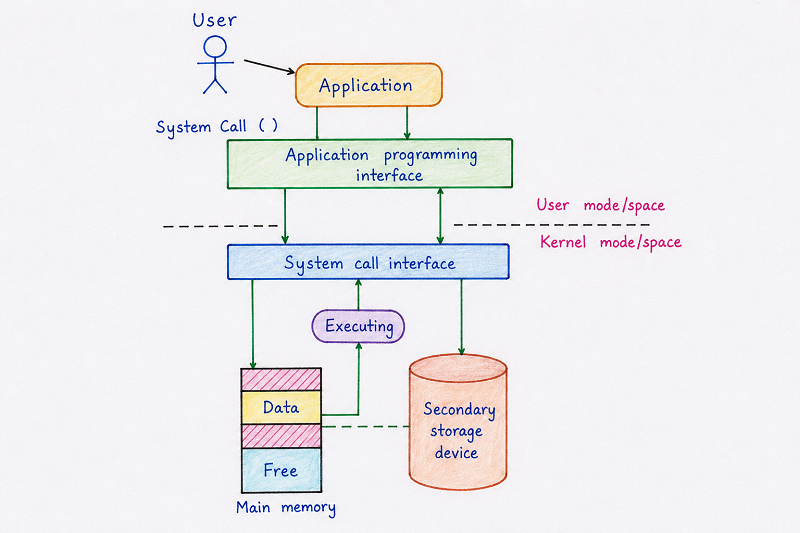
The diagram above traces the complete journey of a request from the moment a user interacts with an application, all the way down to where the operating system actually carries out the work. At the very top, a user interacts with an Application, shown as a simple stick figure pointing toward an application box. Whenever that application needs a service from the operating system, it doesn't reach out to the kernel directly. Instead, it goes through an Application Programming Interface, commonly abbreviated as an API, which provides a standard set of functions that developers use when writing software.
Below the API sits the System Call Interface, and this is exactly where the boundary between user mode and kernel mode is drawn, shown clearly in the diagram as a dashed horizontal line separating "User mode/space" above from "Kernel mode/space" below. When the application calls a function through the API, that call is translated into an actual system call, which crosses this boundary and hands control over to the kernel. Everything above the dashed line runs with restricted, user-level privileges, while everything below it runs with full, privileged kernel-level access.
Once inside kernel mode, the diagram shows the request reaching an "Executing" stage, where the kernel actually carries out the requested operation. Depending on what the system call was asking for, this might involve interacting with Main Memory, shown in the diagram divided into Data and Free sections, or reaching further down to a Secondary Storage Device, such as a hard disk, shown connected to memory by a dashed line representing the exchange of data between memory and storage. Once the kernel finishes executing the request, the result travels back up through the same path — from the kernel, back through the system call interface, back through the API, and finally back to the application, which can then continue running and present the result to the user.
This entire round trip, from an application request down into the kernel and back again, happens for something as simple as opening a file or as involved as creating an entirely new process, and it happens so quickly that a user rarely notices it occurring at all, even though it may happen thousands of times per second on a busy system.
Tracing the Flow Through a Single Line of Code
It helps to make this journey concrete with one specific line of C code. Consider the call
read(fd, buffer, 100):
- The C program calls
read(), which is a thin wrapper function provided by the C standard library — this is the "API" layer from the diagram above. - That wrapper executes a special trap instruction, crossing the dashed line from user mode into kernel mode — this is the "System Call Interface" layer.
- The kernel identifies which file the descriptor
fdrefers to, checks that the calling process actually has permission to read it, and fetches the requested bytes from the storage device or a memory cache — this is the "Executing" stage. - The kernel copies those bytes into the
bufferthe program provided, switches the CPU back to user mode, and returns the number of bytes actually read. - The C program resumes running in user mode, now holding the data it asked for.
System Call Architecture: A Simplified View
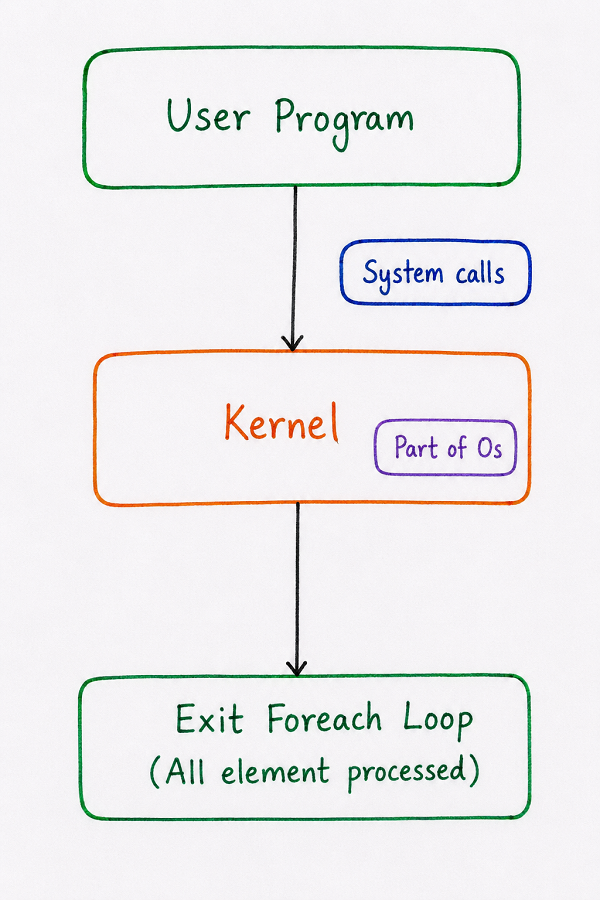
The diagram above presents a more simplified, high-level view of the same idea, useful for quickly recalling how the pieces fit together. At the top is the User Program, representing any ordinary application a person might be running. This program communicates with the Kernel, explicitly labelled in the diagram as being "Part of OS," through System Calls, shown as a separate labelled box pointing into the connection between the two.
This simplified view highlights an important idea: the kernel is not some external, separate piece of software sitting outside the operating system — it is the operating system's core, and system calls are simply the doorway through which every user program must pass to reach it. The diagram's final box, labelled "Exit Foreach Loop (All element processed)," represents the return of control back to the user program once the kernel has finished handling every part of the requested operation, echoing the same round-trip idea shown in more detail in the previous diagram. Together, these two diagrams give both a detailed and a simplified way of understanding exactly the same underlying process.
Types of System Calls
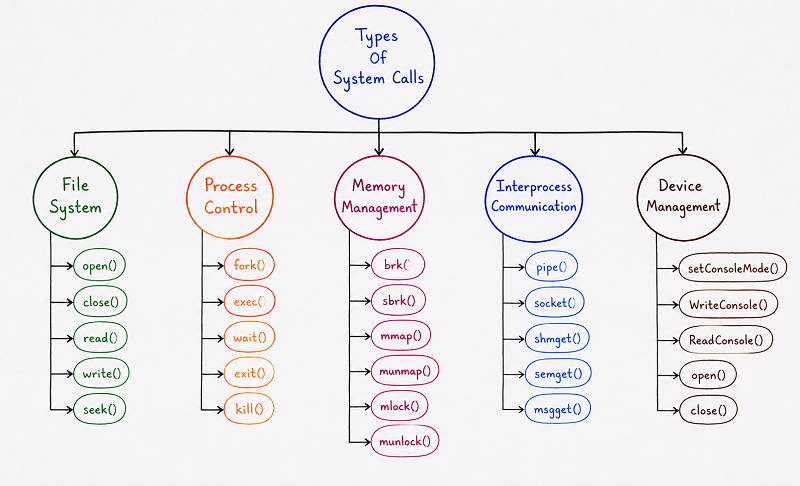
The diagram above organises system calls into five major categories, each branching out from a central "Types Of System Calls" node, with real example function names listed underneath every category. Grouping system calls this way makes them far easier to remember, since each category corresponds to one particular kind of resource or operation the kernel manages. The five categories are explained individually below, in the same order shown in the diagram, and the two most frequently used categories — File System and Process Control — include a working C example.
1. File System Calls
The File System branch in the diagram lists open(), close(), read(),
write(), and seek() as example system calls. These calls handle everything related
to working with files stored on a disk. Before a program can read data from a file or write new data into
one, it must first call open() to gain access to that file, which returns a reference the
program can use for further operations. The read() and write() calls transfer data
between the program and the file, seek() moves the current position within the file to a
specific location, and close() releases the file once the program no longer needs it, freeing
up the resources associated with keeping it open.
Practical Example: open(), read(), write(), and close() in C
The short program below opens an existing file, reads its contents into memory, writes that same content into a new file, and then closes both files. It uses the four file-system calls exactly as they would be used in a real, compilable C program on a Unix-like system.
// copy_file.c — copies input.txt into output.txt using raw system calls

#include <fcntl.h>
#include <unistd.h>

int main() {

    char buffer[100];

    // Open an existing file, read-only
    int source_fd = open("input.txt", O_RDONLY);

    // Open (or create) a file for writing; truncate it if it already exists
    int dest_fd = open("output.txt", O_WRONLY | O_CREAT | O_TRUNC, 0644);

    // Ask the kernel to read up to 100 bytes into buffer
    ssize_t bytes_read = read(source_fd, buffer, 100);

    // Ask the kernel to write those same bytes into the destination file
    write(dest_fd, buffer, bytes_read);

    // Release both file descriptors back to the operating system
    close(source_fd);
    close(dest_fd);

    return 0;

}
What is actually happening at the system-call level
open()does not return a raw memory address or a pointer to the file — it returns a small integer called a file descriptor. This integer is really just an index into a table the kernel maintains for that process, which is one reason a program cannot forge or guess a valid file descriptor for a file it hasn't opened.O_RDONLY,O_WRONLY,O_CREAT, andO_TRUNCare flags the kernel checks against the file's actual permissions before it agrees to open the file — this is exactly the "validate the request" behaviour discussed earlier in this chapter.read()triggers a mode switch into the kernel, which copies bytes from the file (or from a memory cache of the file) into thebufferarray, then reports back how many bytes it actually managed to read.write()works the same way in reverse, handing bytes from the program's memory to the kernel, which is responsible for eventually getting them onto the storage device.close()tells the kernel this program no longer needs the file descriptor, allowing the kernel to free the associated resources and, for a file opened withO_WRONLY, to make sure any buffered data is fully written out.
2. Process Control Calls
The Process Control branch lists fork(), exec(), wait(),
exit(), and kill(). These calls manage the creation, execution, and termination of
processes. The fork() call creates a brand-new process by duplicating an existing one, while
exec() replaces a process's current program with a different one entirely. The
wait() call pauses a process until one of its child processes finishes, exit()
terminates a process and returns control back to its parent, and kill() sends a signal to
another process, often used to terminate it forcefully. These calls form the backbone of process management,
a topic explored in far greater depth in the very next chapter of this series.
Practical Example: fork() and exec() in C
The example below shows the two calls working together, which is how a shell like Bash actually launches every command you type into it.
// run_ls.c — creates a child process and runs "ls -l" inside it

#include <unistd.h>
#include <sys/wait.h>

int main() {

    pid_t pid = fork(); // Ask the kernel to duplicate this process

    if (pid == 0) {
        // This branch runs only inside the newly created child process
        execlp("ls", "ls", "-l", NULL);
    } else {
        // The original (parent) process waits here for the child to finish
        wait(NULL);
    }

    return 0;

}
What is actually happening at the system-call level
fork()asks the kernel to create a near-identical copy of the calling process. Both the original process and the new one continue running from this exact same line of code — the only difference is the valuefork()returns: zero in the new child process, and the child's process ID in the original parent process.execlp()is one of theexec()family of calls; it tells the kernel to discard the child process's current program in memory and load a completely different program — here, thelscommand — in its place, while keeping the same process identity.wait()makes the parent process pause in kernel mode until the specific child process it is tracking terminates, which is how a shell knows a command has finished before it prints the next prompt.
3. Memory Management Calls
The Memory Management branch lists brk(), sbrk(), mmap(),
munmap(), mlock(), and munlock(). These calls allow a program to
request additional memory from the operating system or release memory it no longer needs. The
brk() and sbrk() calls adjust the size of a process's memory space, commonly used
when a program's data requirements grow during execution. The mmap() call maps a file or a
device directly into a process's memory, allowing it to be accessed as though it were an ordinary block of
memory, while munmap() removes such a mapping. The mlock() and
munlock() calls, meanwhile, control whether a portion of memory is locked in physical memory,
preventing it from being swapped out to disk.
4. Interprocess Communication Calls
The Interprocess Communication branch, often abbreviated as IPC, lists pipe(),
socket(), shmget(), semget(), and msgget(). These calls
allow separate processes to exchange data or coordinate their actions with one another. The
pipe() call creates a simple one-way communication channel between two related processes, while
socket() creates an endpoint for communication, commonly used for network communication between
processes on different machines. The shmget() call sets up a region of shared memory that
multiple processes can access at once, semget() creates a semaphore used to coordinate access to
shared resources safely, and msgget() creates a message queue that processes can use to send and
receive structured messages.
5. Device Management Calls
The final branch, Device Management, lists setConsoleMode(), WriteConsole(),
ReadConsole(), open(), and close(). These calls allow a program to
interact directly with input and output devices. The setConsoleMode() call configures how a
console or terminal behaves, such as whether keystrokes are displayed as they're typed. The
ReadConsole() and WriteConsole() calls read input from and write output to a
console device, while open() and close() appear here as well, this time referring
specifically to gaining and releasing access to a device rather than a file, showing how the same underlying
concept of "opening" a resource applies across different categories of system calls.
System Calls vs. Ordinary Function Calls
It's natural to wonder how a system call is different from an ordinary function call within a program, since both involve calling a named function that performs some work and returns a result. The key difference lies in where that work actually happens. An ordinary function call executes entirely within the same program, in user mode, using resources that already belong to that program. A system call, by contrast, causes the processor to switch into kernel mode, handing control temporarily to the operating system itself, which performs the requested operation using its own privileged access to hardware and system resources before handing control back.
This distinction also explains why system calls are generally slower than ordinary function calls. The mode
switch between user mode and kernel mode, along with the additional checks the kernel performs to validate
the request, introduces overhead that a purely local function call doesn't have to deal with. This is one of
the reasons well-designed programs try to minimise unnecessary system calls, batching operations together
where possible — for example, reading a large chunk of a file into a buffer with one read()
call, rather than calling read() once for every single byte.
Summary Table of System Call Categories
| Category | Purpose | Example Calls |
|---|---|---|
| File System | Creating, reading, writing, and closing files | open(), close(), read(), write(), seek() |
| Process Control | Creating, running, and terminating processes | fork(), exec(), wait(), exit(), kill() |
| Memory Management | Requesting, mapping, and releasing memory | brk(), sbrk(), mmap(), munmap(), mlock(), munlock() |
| Interprocess Communication | Allowing processes to exchange data and coordinate | pipe(), socket(), shmget(), semget(), msgget() |
| Device Management | Interacting with input and output devices | setConsoleMode(), WriteConsole(), ReadConsole(), open(), close() |
Best Practices While Learning System Calls
- Always connect a system call back to the specific OS service it supports — file system calls connect to File Management, process control calls connect to Processor and Job Scheduling, and so on.
- Keep the user mode and kernel mode boundary firmly in mind, since almost every exam and interview question about system calls eventually comes back to this distinction.
- Practice grouping unfamiliar function names into one of the five categories, since recognising the category is often more useful than memorising every individual call.
- Type out and run the
open()/read()/write()/close()example yourself on a Linux machine or online C compiler — seeing the actual returned file descriptor values makes the concept far more concrete than reading about it alone. - Revisit this chapter before studying Process Management next, since fork(), exec(), wait(), and exit() are explained there in much greater practical depth.
Common Mistakes Beginners Make
| Mistake | Correct Practice |
|---|---|
| Assuming a system call and a regular function call are essentially the same thing. | Remember that a system call causes a mode switch into the kernel, while a regular function call stays entirely within user mode. |
| Thinking the kernel is a separate program running alongside the operating system. | Understand that the kernel is the core of the operating system itself, not something external to it. |
| Confusing an API with a system call. | Remember that an API is a set of functions a developer uses, some of which internally trigger system calls to actually reach the kernel. |
| Assuming open() returns a pointer directly to the file's data. | Remember that open() returns a small integer file descriptor — an index into a table the kernel maintains — not the file's actual data. |
| Forgetting to call close() after finishing with a file descriptor. | Always close() a file descriptor once it's no longer needed, since the kernel has a limited number of descriptors it can track per process. |
Frequently Asked Interview Questions
-
What is a system call?
A system call is a controlled way for a user program to request a service from the operating system's kernel, such as accessing a file, creating a process, or allocating memory. -
What is the difference between user mode and kernel mode?
User mode is a restricted mode where ordinary applications run with limited privileges, while kernel mode is a privileged mode in which the operating system has full access to the hardware. -
What are the main categories of system calls?
The main categories are File System calls, Process Control calls, Memory Management calls, Interprocess Communication calls, and Device Management calls. -
What does open() actually return in C?
It returns a small integer called a file descriptor, which the kernel uses internally as an index to track which file that process has open, rather than returning a pointer to the file's contents. -
What does the fork() system call do?
The fork() system call creates a new process by duplicating an existing one; both the parent and the newly created child process continue executing from the same point in the code. -
Why are system calls slower than ordinary function calls?
System calls require the processor to switch from user mode into kernel mode, and this mode switch, along with the kernel's validation checks, introduces overhead that a purely local function call does not have. -
What is the purpose of interprocess communication system calls?
Interprocess communication calls, such as pipe() and socket(), allow separate processes to exchange data and coordinate their actions with one another. -
How does an application actually reach a system call?
An application typically calls a function through an Application Programming Interface, which internally invokes the appropriate system call to cross into kernel mode and reach the operating system.
Summary
System calls are the essential bridge between user programs running in a restricted user mode and the
operating system's kernel, which holds full, privileged access to the underlying hardware. We looked closely
at how a system call actually travels from a user's interaction with an application, through an API and a
system call interface, across the boundary into kernel mode, and back again once the kernel has completed
the requested work, and then traced that exact same journey through a single line of C code. We also grouped
the wide variety of individual system calls into five clear categories — File System, Process Control,
Memory Management, Interprocess Communication, and Device Management — and worked through two complete,
practical C examples: one that copies a file using open(), read(),
write(), and close(), and another that launches a new program using
fork() and exec().
With a solid understanding of what system calls are, how they work, and what they look like in real code, you're now ready to move into Process Management, where fork(), exec(), wait(), and exit() are explored in much greater practical depth, alongside process states and the Process Control Block that the kernel uses to keep track of every running process.