File Management in Operating System
File management is the part of an operating system responsible for providing a logical way to work with information stored on secondary storage. Instead of requiring a user or application to understand physical disk sectors and storage blocks, the operating system provides files, directories, names, paths, and controlled operations.
A file may contain text, source code, executable instructions, photographs, databases, audio, video, configuration information, or other forms of digital data. The operating system maintains information about these files and coordinates requests made by applications so that data can be stored and retrieved correctly.
File management is therefore more than simply creating folders. It includes defining file properties, performing operations such as open, read, write and delete, controlling access, maintaining directory information, and coordinating the use of storage resources.
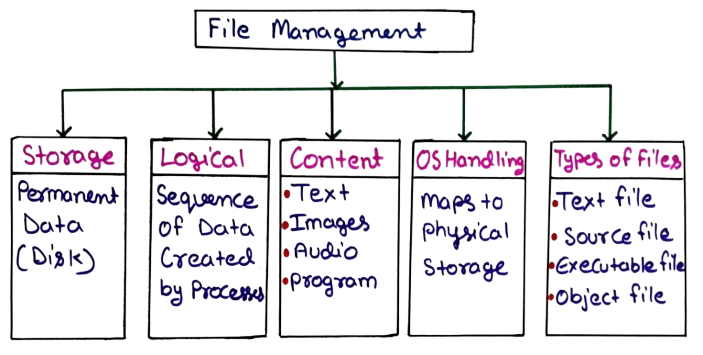
Figure: File Management in Operating System
What is a File?
A file is a named collection of related information stored on a storage device. The operating system treats the file as a logical unit so that applications can work with data without directly controlling the physical storage medium.
For example, a file named student-record.txt may contain student
information, while program.c may contain source code. Although both
are stored as data on a storage device, their contents and intended use are
different.
What is a File System?
A file system is the set of structures and rules used by an operating system to organize files and directories on a storage device. It determines how file information is recorded, how directories are maintained, and how stored data can be located.
Different operating systems and storage environments may use different file system technologies. Examples include NTFS on Windows systems, ext4 on many Linux installations, and APFS on modern Apple systems.
The file system creates a logical organization over physical storage. A user
normally works with a path such as
Documents/College/OS/notes.pdf rather than specifying the exact
disk blocks where the file is physically stored.
File Attributes
File attributes are pieces of metadata associated with a file. Metadata describes the file rather than being the main content stored inside it. The operating system uses this information during file access, protection, organization, and storage management.
| Attribute | Purpose | Example |
|---|---|---|
| File Name | Identifies the file to users and applications | report.pdf |
| File Type | Indicates the nature or format of the stored data | PDF, JPG, TXT |
| File Size | Indicates the amount of storage occupied | 25 MB |
| Location | Provides information needed to locate the file | /home/student/notes |
| Protection | Defines permitted access to the file | Read / Write |
| Time Information | Records events such as creation or modification | Modified: 25 Aug |
| Owner | Identifies the user or account associated with the file | student |
These attributes are useful because the operating system often needs information about a file before accessing its actual contents. For example, permissions may be checked before an application is allowed to modify a file.
Basic File Operations
Operating systems provide a collection of operations through which users and programs interact with files. These operations form the practical foundation of file handling.
1. Create
The create operation establishes a new file. The operating system records the file information and prepares the required structures so that data can later be stored in the file.
Example: Creating assignment.txt generates a new
file that can subsequently receive data.
2. Open
Before many file operations can be performed, an application requests the operating system to open the file. The system verifies the request and prepares information needed for subsequent access.
3. Read
A read operation transfers existing file data to the requesting program. For example, when a text editor displays the contents of a document, it performs read-related operations.
4. Write
A write operation places new information into a file or changes existing information. Saving modifications to a document is a common example.
5. Reposition
An application may need to move its current position within a file. This allows it to access a particular portion of the data without necessarily processing everything from the beginning.
6. Close
After completing its work, an application can close the file. Closing releases operating-system resources associated with the open file and completes the application's current file session.
7. Rename
Rename changes the logical name of a file while retaining its stored data. Meaningful names are especially useful when many files belong to the same project.
8. Delete
Delete removes a file from the file system's active directory structure. The storage associated with the file can subsequently become available for reuse, depending on the file system and operating system.
Open File Concept
When a program opens a file, the operating system generally maintains information about that open instance. This may include the current access position, access mode, associated file information, and other management data.
Instead of repeatedly specifying the complete file name during every operation, an application normally works through an operating-system-managed identifier associated with the opened file.
File Descriptor
In Unix and Unix-like systems, a file descriptor is a small integer used by a process to refer to an open file or another I/O resource. Standard input, standard output, and standard error are familiar examples of descriptor-based interfaces.
The exact mechanism differs between operating systems. The important concept is that an operating system maintains a controlled association between an application and the resource it has opened.
File Access Methods
File access method describes how an application obtains information from a file. Different access patterns are useful for different types of applications.
1. Sequential Access
In sequential access, information is processed in an ordered sequence. The application normally moves from one portion of the file to the next.
Example: Reading a log file from the first record to the last record is naturally suited to sequential access.
2. Direct Access
Direct access allows an application to move to a particular position and access data there without processing every preceding item.
Example: An application working with fixed-size records may directly move to the record associated with a particular position.
3. Indexed Access
Indexed access uses an additional indexing structure to help locate records efficiently. The index acts as a guide that reduces the amount of searching required to locate desired information.
This approach is useful when files contain a large number of records and applications frequently need to locate particular entries.
| Access Method | Main Idea | Suitable Example |
|---|---|---|
| Sequential | Process data in order | Log processing |
| Direct | Jump to a required position | Random record access |
| Indexed | Use an index to locate information | Large record collections |
File Sharing in Operating System
File sharing allows more than one user or process to access a file according to the rules established by the operating system and the underlying file system. Sharing is useful in multi-user environments where several programs or users need common information.
However, unrestricted sharing can create problems. If two processes modify the same data without appropriate coordination, one update may interfere with another. Operating systems therefore provide permissions and, depending on the platform, additional mechanisms for controlling concurrent access.
Example
Consider a project folder containing a shared report. One user may be permitted to edit the report while another user may only be allowed to read it. Such access rules help prevent accidental changes.
File Protection and Access Control
File protection determines which users or processes are permitted to perform particular operations on a file. Protection is important because files may contain private information, system configuration data, application code, or other resources that should not be freely modified.
Common Permission Types
- Read: Allows the contents of a file to be viewed or obtained.
- Write: Allows file data to be changed.
- Execute: Allows an executable file to be run when supported by the system.
Unix-like operating systems commonly associate permissions with an owner, a group, and other users. Windows systems provide access control mechanisms through security descriptors and access control lists.
Role of Directories and Paths
A directory provides a logical structure for organizing files. Instead of keeping every file in a single location, directories allow related information to be grouped into meaningful collections.
A path identifies the location of a file within that structure. Paths may be absolute or relative depending on the operating system and the context in which they are used.
Example
Suppose a student stores operating system notes as:
College/Subjects/Operating-System/File-Management/notes.pdf
The directory hierarchy makes the file easier to locate and separates it from unrelated documents.
File System Mounting
A storage device or file system must be made available to the operating system before applications can normally use its files through the system's directory hierarchy. This process is commonly referred to as mounting.
For example, when an external storage device is connected, the operating system may detect its file system and make its contents available through a designated location. The exact process varies between operating systems.
Mounting is particularly important in systems where several storage devices or file systems are combined into one logical directory structure.
Practical Example of File Management
Consider a student preparing a semester project. The student creates a directory
named Semester-Project and stores source code, documentation,
images, and presentation files inside separate folders.
- Create the project directory.
- Create subdirectories for source code and documents.
- Create files inside the appropriate directories.
- Open files using suitable applications.
- Read existing information when editing.
- Write updated information and save the changes.
- Apply appropriate access permissions where required.
- Back up important project files to another storage location.
- Remove unnecessary temporary files after the project is completed.
This example demonstrates that file management involves an entire collection of activities rather than one isolated operation.
Simple File Handling Example in C
The following example demonstrates basic file operations from an application's point of view. The program opens a file, writes text into it, and then closes the file.
#include <stdio.h>

int main() {
    FILE *fp;

    fp = fopen("notes.txt", "w");

    if (fp == NULL) {
        printf("Unable to open file.");
        return 1;
    }

    fprintf(fp, "Operating System File Management");

    fclose(fp);

    return 0;
}
How the Example Works
fopen()requests the file to be opened.- The
"w"mode opens the file for writing. fprintf()writes text into the file.fclose()closes the file.
The C library provides this programming interface, while the underlying operating system ultimately performs the required I/O through its own services.
Common File Management Problems
File management can encounter several practical problems when storage, access, or application behavior is not handled correctly.
- Insufficient Storage: A file operation may fail when the available storage space is inadequate.
- Permission Denied: A process may be prevented from accessing a file because it lacks the required permission.
- File Not Found: An application may request a file using an incorrect name or path.
- Concurrent Modification: Multiple processes accessing the same data can create consistency problems if suitable coordination is not used.
- File Corruption: Unexpected shutdowns, faulty storage, software errors, or other failures can damage stored information.
Common Mistakes Students Make
- Confusing a file with a directory.
- Assuming a file extension alone guarantees the actual file format.
- Using "file access method" and "file operation" as if they mean the same thing.
- Forgetting that permissions can restrict read, write, or execute operations.
- Assuming deleting a file always means its physical storage is immediately overwritten.
- Memorizing file operations without understanding the role of the operating system.
File, Directory and File System: Difference
| Term | Meaning | Example |
|---|---|---|
| File | Named collection of stored information | notes.pdf |
| Directory | Logical structure used to organize files and other directories | Operating-System |
| File System | Rules and structures used to manage stored files and directories | NTFS, ext4, APFS |
Frequently Asked Questions (FAQ)
1. What is file management in an operating system?
File management is the operating system function that provides mechanisms for creating, organizing, accessing, modifying, protecting, and deleting files.
2. What is a file?
A file is a named logical collection of information stored on a storage device.
3. What are the basic file operations?
Common operations include create, open, read, write, reposition, close, rename, and delete.
4. What is a file attribute?
A file attribute is metadata associated with a file, such as its name, type, size, ownership, location, permissions, and time information.
5. What is a file access method?
A file access method describes how an application obtains data from a file. Common approaches include sequential, direct, and indexed access.
6. What is a file descriptor?
In Unix-like systems, a file descriptor is an integer identifier used by a process to refer to an open file or another I/O resource.
7. Why is file protection required?
File protection prevents unauthorized or inappropriate operations on stored information by applying access rules and permissions.
8. What is file system mounting?
Mounting makes a file system available to the operating system at a location within its directory structure.
Exam-Oriented Short Notes
File Management: An operating system service responsible for organizing and controlling files and directories stored on secondary storage.
File: A named logical collection of related information stored on a storage medium.
File Attributes: Metadata such as name, type, size, location, permissions, ownership, and timestamps.
File Operations: Create, open, read, write, reposition, close, rename, and delete are common file operations.
File Access Methods: Sequential access processes information in order, direct access allows movement to a required position, and indexed access uses an index to locate information.
File Protection: Controls which users or processes can perform operations on a file.
Key Takeaways
- A file is a logical unit used to represent stored information.
- A file system defines structures and rules for organizing stored data.
- File attributes describe important metadata associated with files.
- Applications use file operations such as open, read, write, close, and delete.
- Sequential, direct, and indexed access represent different ways of obtaining file data.
- Directories provide a logical hierarchy for organizing files.
- File permissions help control operations performed by users and processes.
- File descriptors provide a convenient reference to open files in Unix-like systems.
- Mounting makes a file system available through the operating system's directory structure.
Conclusion
File management provides the operating system with a structured interface for handling persistent information. It connects application-level requests such as opening or modifying a document with the mechanisms used to organize data on storage devices.
Understanding file management requires more than memorizing a list of functions. Students should understand how files are described through attributes, how applications access them, how directories organize them, how permissions control them, and how different access methods suit different workloads.
These concepts form the foundation for advanced operating system topics such as file allocation methods, directory implementation, disk management, storage virtualization, and file-system design.