Types of Operating System
Not every computer runs the same kind of workload, and not every operating system is designed to solve the same kind of problem. A supercomputer processing millions of scientific calculations, a factory robot arm that has to respond within a fraction of a second, and a personal laptop running a browser and a code editor at the same time all rely on very different design priorities from their operating system. This is exactly why operating systems are grouped into distinct types, each built around a particular way of managing the CPU, memory, and the jobs waiting to be executed.
In the previous chapter, we looked at what an operating system is and the seven core functions it performs. In this chapter, we build directly on that foundation by exploring how those functions are applied differently depending on the type of operating system in use. For every type below, you will find how it actually works, where it is used in the real world, its concrete advantages and limitations, and named real-world examples, so that you can confidently identify which category a given system belongs to and why.
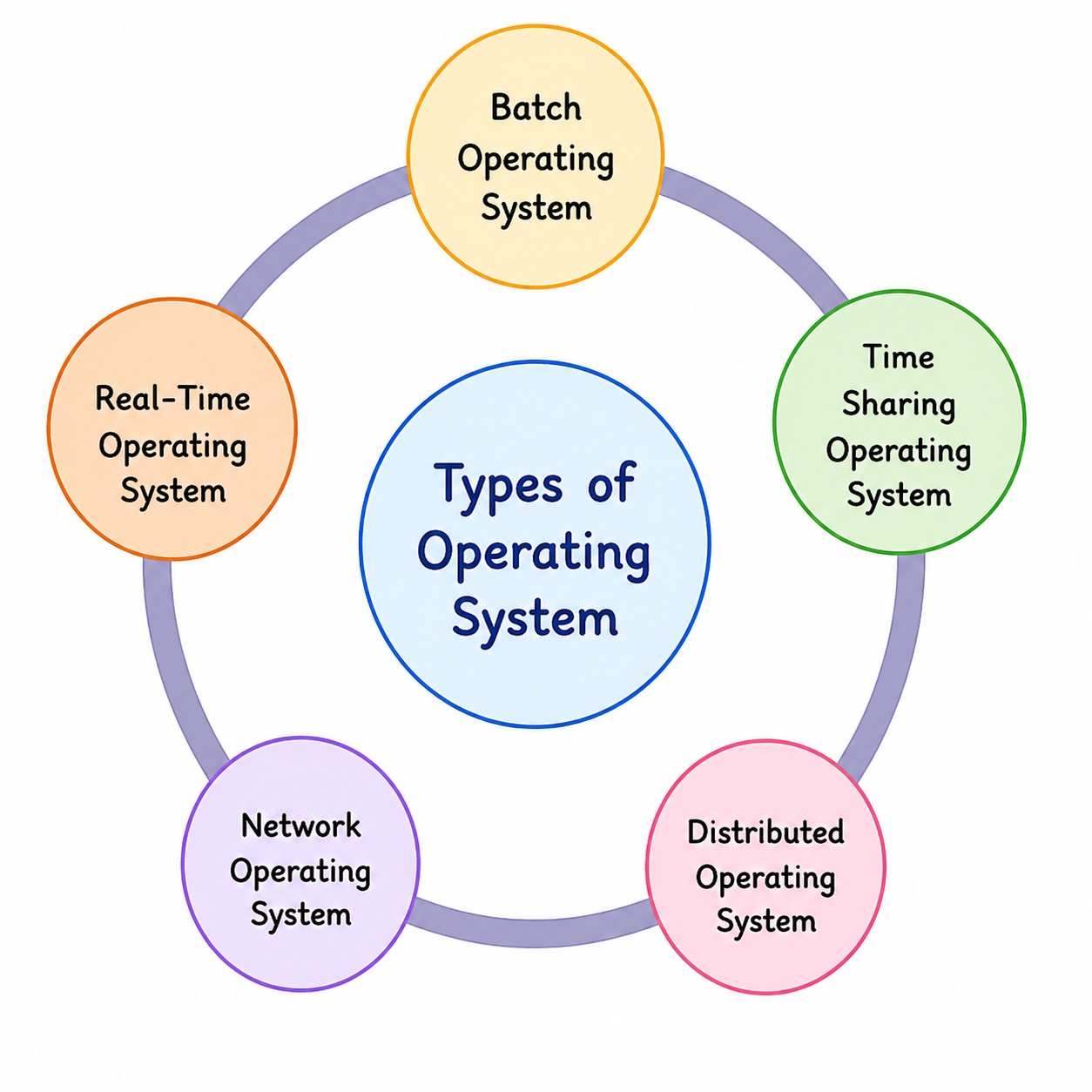
The diagram above gives a quick overview of the five major categories covered in this chapter: Batch, Time-Sharing, Distributed, Network, and Real-Time Operating Systems. Each of these represents a different answer to the same underlying question — how should the operating system decide what runs, when it runs, and who it runs for. The sections below explain each type individually, in the same order shown in the diagram, with a dedicated diagram and explanation for every type.
1. Batch Operating System
A Batch Operating System groups similar jobs together and executes them one after another as a single batch, without requiring a user to interact with the system while a job is running. Early computers were extremely expensive and could only run one job at a time, so operators would collect several jobs from different users, group them into a batch based on similar resource requirements, and then feed that entire batch to the computer to be processed automatically, one job after the other.
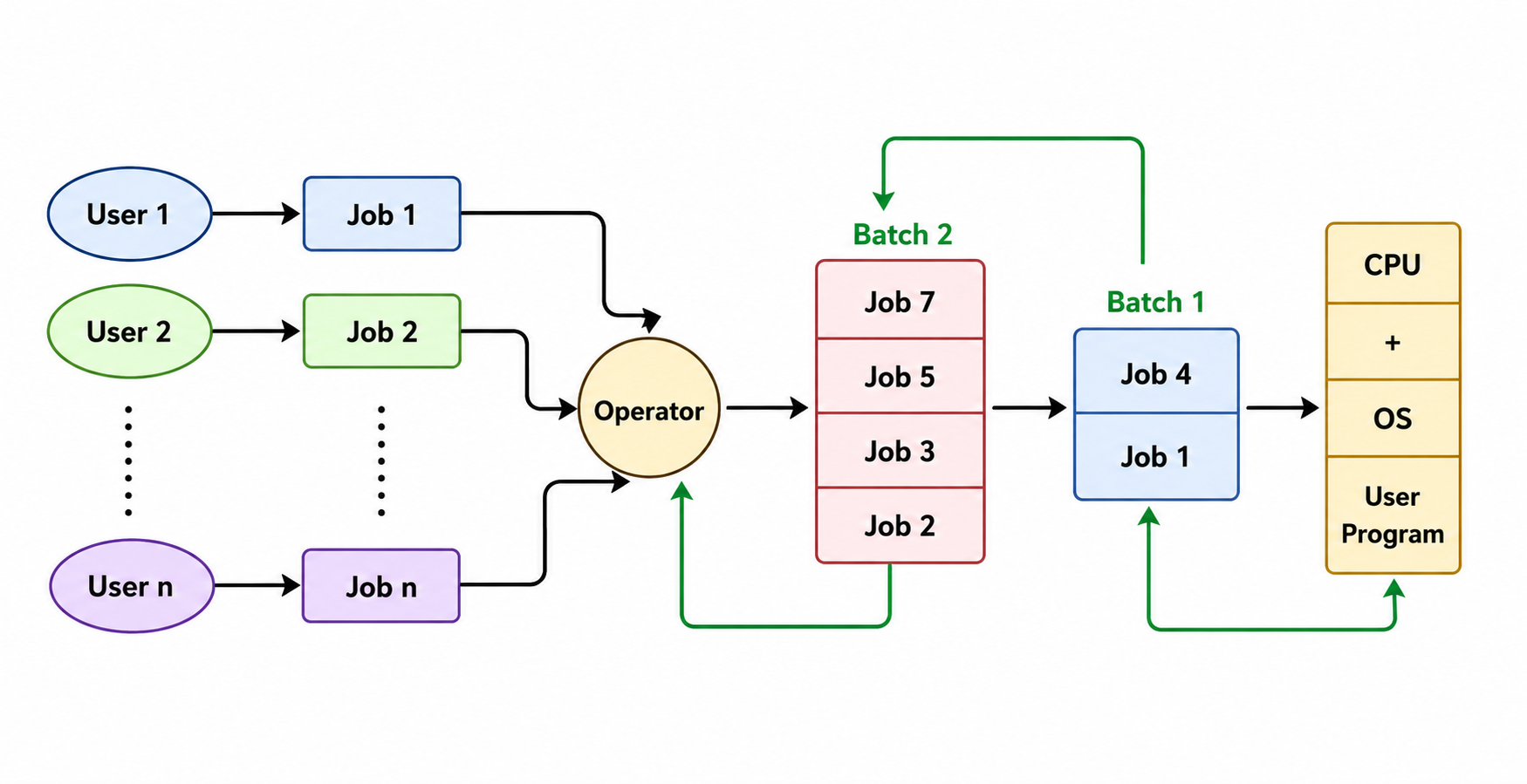
The diagram above shows how this process actually works. Individual users submit their jobs, which are collected by an operator rather than being sent directly to the CPU. The operator groups jobs with similar requirements into batches, shown here as Batch 1 and Batch 2, and these batches are then handed off one at a time to the CPU, where the operating system executes each job in the batch in sequence. Because there is no direct interaction between the user and the running job, the user simply submits the job and waits for the output to be produced later, rather than watching the job execute in real time.
This approach improved efficiency compared to running jobs completely manually, since the CPU could move from one job to the next without waiting for a human operator to set up each one individually. However, batch systems still suffer from a major limitation: if a job earlier in the batch takes far longer than expected, or encounters an error, every job queued behind it has to wait, since there is no way to jump ahead or interact with a stuck job while it is running.
Where Batch OS Is Used
- End-of-day and end-of-month payroll processing in companies, where salary slips for hundreds of employees are generated together.
- Bank cheque clearing and bulk bank-statement generation, run during off-peak hours.
- Bulk printing jobs, such as printing exam admit cards or result sheets for an entire batch of students at once.
- Large offline data jobs, such as nightly log processing or scheduled backups on servers.
Advantages
- Makes efficient use of CPU time for large volumes of similar jobs without needing constant supervision.
- Reduces the idle time of expensive computing hardware between jobs.
- Well suited to jobs that don't need an immediate result, freeing up interactive systems for other work.
Limitations
- Offers no interactivity — a user cannot intervene once a job has started running.
- A single slow or faulty job delays every job queued behind it in the batch.
- Debugging is difficult, since errors are usually discovered only after a job finishes, not while it runs.
Real-World Examples
Early mainframe computers from the 1950s and 1960s that processed stacks of punched cards are the classic historical example of batch computing. In modern computing, the same underlying idea appears in scheduled, unattended jobs such as nightly payroll runs, automated report generation, and large offline ETL (extract, transform, load) jobs that businesses run on their servers after working hours.
2. Time-Sharing Operating System
A Time-Sharing Operating System allows multiple users, or multiple programs, to share a single CPU by dividing processor time into very short intervals and rapidly switching between them. Instead of a job running from start to finish before the next one begins, as happens in a batch system, each job is given only a small slice of CPU time before the operating system switches to the next one, cycling through every waiting job so quickly that each one appears to be running continuously.
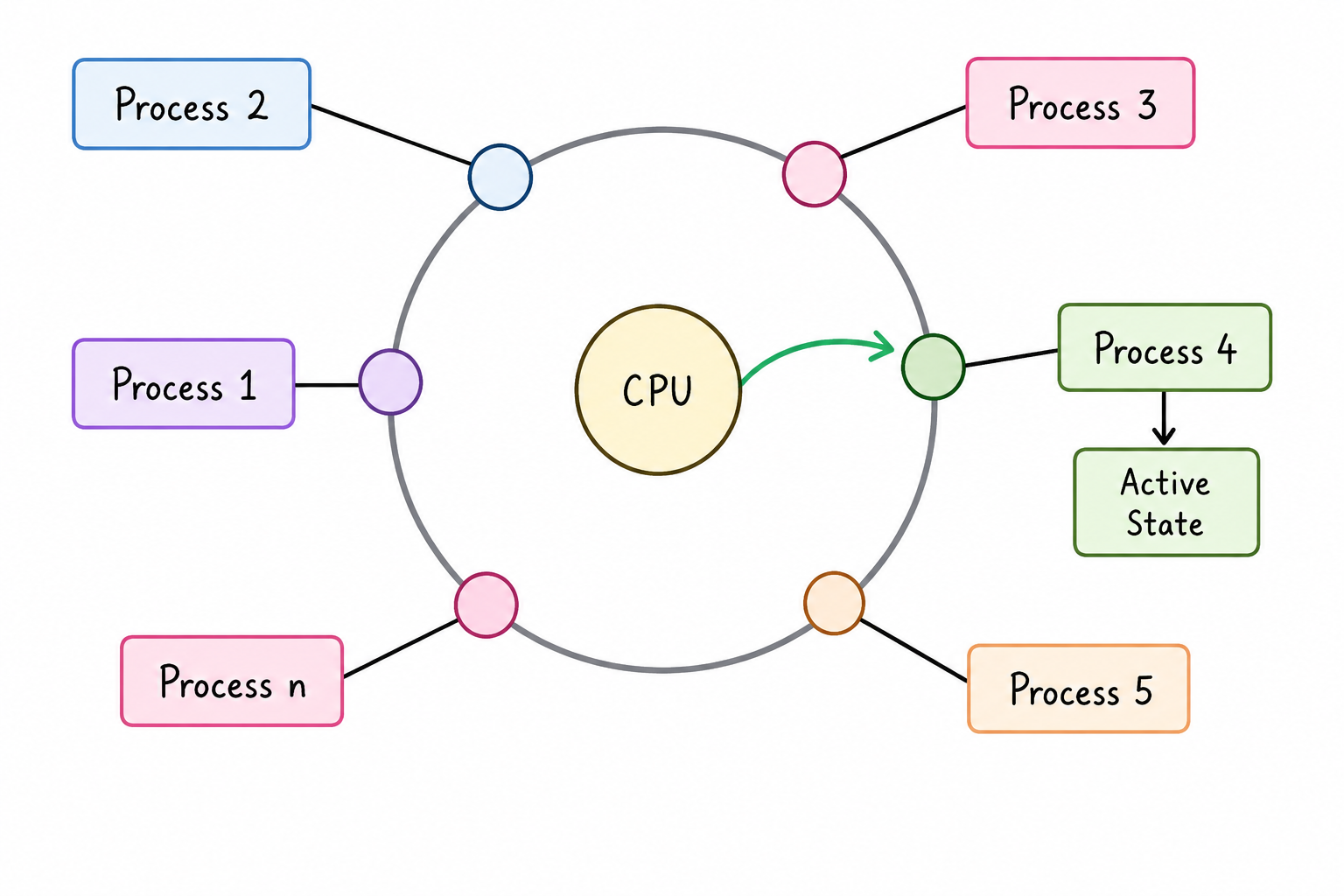
The diagram above illustrates this idea. Several processes, labelled Process 1 through Process n, are arranged around a single CPU, each waiting for its own turn to be executed. At any given moment, only one process is actually receiving CPU attention, shown here as the "Active State" connected to Process 4, while every other process waits its turn. A moment later, the CPU moves on to a different process in the same way, and this switching happens so rapidly and so frequently that every user sharing the system experiences what feels like continuous, uninterrupted access, even though only one process is genuinely executing at any single instant.
Time-sharing systems were a major improvement over batch systems because they allowed direct interaction between the user and the running program, letting a user type a command and see the result almost immediately rather than waiting for an entire batch to finish.
Where Time-Sharing OS Is Used
- General-purpose desktop and laptop computers, where a browser, editor, and music player all appear to run at once.
- Multi-user servers accessed remotely by many people at the same time, such as a university's shared computing server.
- Cloud-based virtual terminals and remote development environments, where several sessions share the same underlying hardware.
Advantages
- Provides interactive, near-immediate responses, unlike the long wait times of batch systems.
- Improves CPU utilisation, since the processor switches to another ready task instead of idling.
- Allows many users to share the same expensive hardware fairly and simultaneously.
Limitations
- Frequent switching between processes introduces scheduling and context-switching overhead.
- Requires careful, fair scheduling, or some users or processes may face noticeable delays.
- Needs strong isolation between users sharing the same system, to prevent one user's process from affecting another's.
Real-World Examples
Multics and early UNIX systems from the 1960s and 1970s were among the first operating systems built specifically around time-sharing. Today, virtually every general-purpose desktop and server operating system — including Windows, Linux, and macOS — applies time-sharing principles internally to divide CPU time among the many processes and applications running at once.
3. Distributed Operating System
A Distributed Operating System manages a group of physically separate computers and makes them appear to users and applications as though they were a single unified system, even though the actual processing, memory, and storage may be spread across many independent machines connected by a network. Rather than one computer doing all the work alone, the workload is divided among several machines, which communicate with each other and coordinate their actions to complete tasks together.
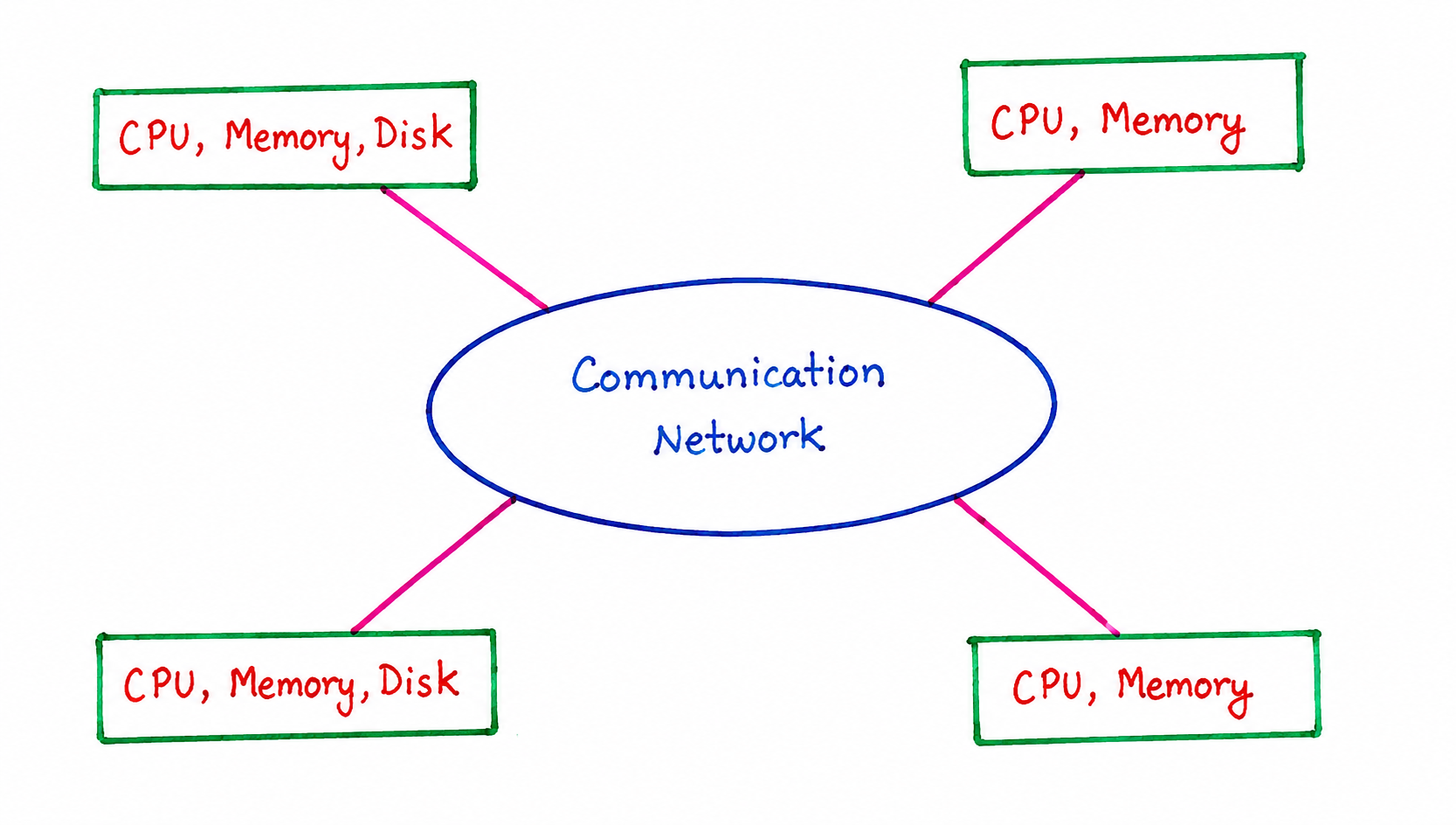
The diagram above shows four independent computing nodes, each with its own CPU and memory, and some with their own disk storage, all connected through a shared communication network rather than being physically combined into one machine. Each node is capable of processing its own tasks independently, but the communication network allows these nodes to exchange data and share the workload whenever needed, so that from the outside, the whole arrangement can be used as though it were one larger, more powerful system.
This approach offers several practical advantages: if one machine in the group fails, the remaining machines can often continue operating, which improves overall reliability compared to relying on a single computer. Distributed systems also make it possible to scale up processing power simply by adding more machines to the network, rather than needing to replace an entire system with a more powerful single computer.
Where Distributed OS Is Used
- Cloud computing platforms, where workloads are spread across many physical servers in a data centre.
- Large-scale data processing and analytics clusters, which split massive datasets across multiple machines.
- Content delivery and scientific research grids, where computers in different physical locations cooperate on a shared task.
Advantages
- Improves reliability and fault tolerance, since the failure of one node doesn't necessarily stop the whole system.
- Makes it possible to scale processing power by simply adding more machines to the network.
- Allows resources and workload to be shared across geographically separated locations.
Limitations
- Considerably more complex to design, coordinate, and secure than a single-machine system.
- Network delays or failures between nodes can affect the reliability and speed of the overall system.
- Keeping data consistent across multiple independent nodes is a genuinely hard technical problem.
Real-World Examples
Amoeba, an early research distributed operating system developed at a Dutch university, is a classic academic example of this category. In practical terms today, the distributed-computing principles this chapter describes form the foundation of how modern cloud infrastructure and large data-centre clusters manage and coordinate work across thousands of interconnected machines.
4. Network Operating System
A Network Operating System runs on a server and manages data, users, groups, security, applications, and other networking functions for a set of connected client computers, commonly called terminals. Unlike a distributed system, where every node shares processing more equally, a network operating system typically places most of the control and resource management on a central server, while individual terminals connect to that server to access shared resources such as files, printers, or applications.
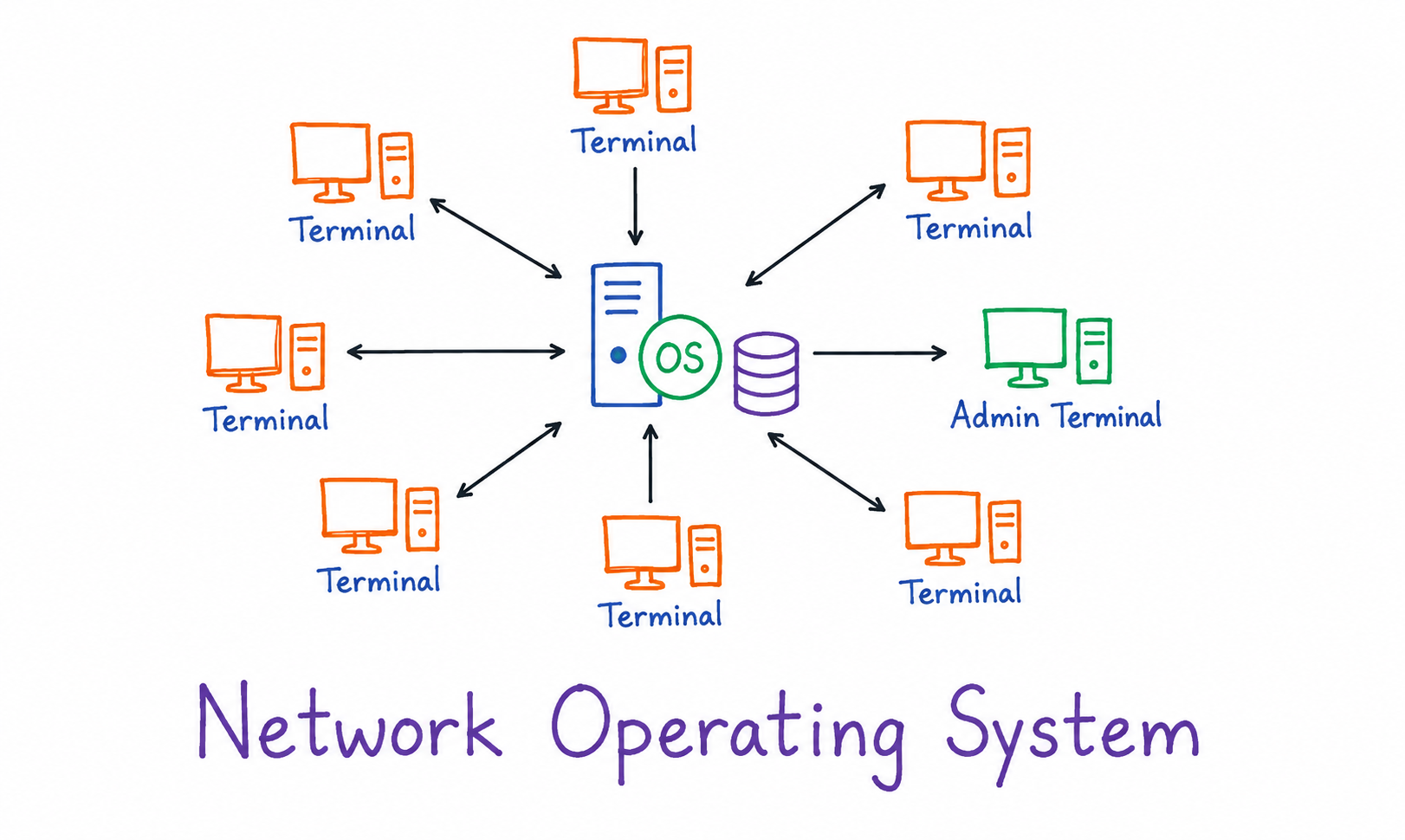
The diagram above shows this arrangement clearly. Several ordinary terminals surround a central server, which runs the operating system and is connected to a shared storage database. Each terminal communicates directly with this central server rather than with the other terminals, and a separate admin terminal is shown with a slightly elevated role, typically used for managing user accounts, permissions, and overall network configuration. Every request from a terminal, whether it's opening a shared file or printing a document, passes through the central server, which coordinates access and keeps the shared resources consistent for everyone connected to it.
Network operating systems are commonly used in organisations such as schools, offices, and small businesses, where many computers need controlled, shared access to the same files, printers, and applications, but where full distributed processing is not necessary.
Where Network OS Is Used
- School and college computer labs, where student terminals share the same files and printers.
- Small and medium business offices, where employees need shared access to documents and applications.
- Department-level setups in larger organisations, managed through a central file or domain server.
Advantages
- Simplifies central management of users, permissions, and security policies from one location.
- Reduces cost by allowing many terminals to share expensive resources such as printers and storage.
- Makes it easier to back up and protect data, since it is concentrated on the central server.
Limitations
- Creates a single point of failure — if the central server goes down, connected terminals lose access to shared resources.
- Overall performance is limited by the capacity of the central server as more terminals are added.
- Terminals are dependent on a stable network connection to the server to function normally.
Real-World Examples
Novell NetWare was historically one of the most widely used network operating systems for managing office and school networks. Windows Server, configured with a central domain controller, and Linux-based file and print servers are common modern examples of the same network-OS approach used in offices today.
5. Real-Time Operating System
A Real-Time Operating System, often abbreviated as RTOS, is designed to process input and produce a response within a strictly defined and predictable time limit, rather than simply trying to respond as quickly as possible on average. In systems where a delayed response could cause a malfunction, a safety issue, or a failed operation entirely, guaranteeing a maximum response time matters far more than achieving a fast average response time.
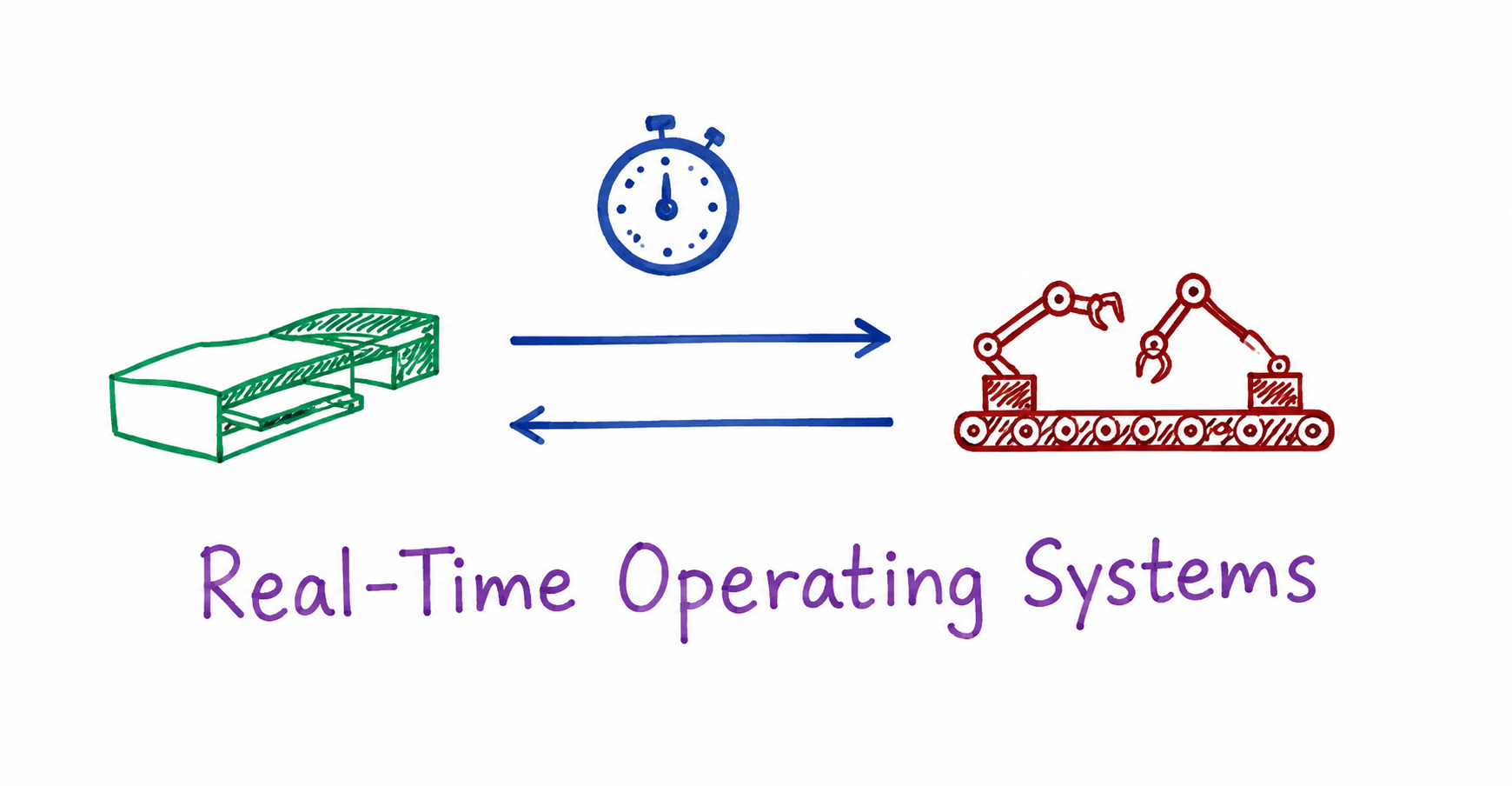
The diagram above illustrates this idea using a sensor device on the left and a robotic arm on the right, exchanging signals back and forth, with a stopwatch shown above them to represent the strict timing constraint involved. In a real setting such as a factory assembly line, a sensor might detect that an object has reached a certain position, and the robotic arm must receive that signal and respond within a guaranteed time window to correctly pick up or process the object. If the response arrives even slightly late, the entire operation could fail, regardless of how "fast" the system might be on average.
Real-time operating systems are generally divided into hard real-time systems, where missing a deadline is considered a complete system failure, such as in medical devices or aircraft control systems, and soft real-time systems, where an occasional missed deadline causes reduced quality but not outright failure, such as in video streaming or online gaming.
Where Real-Time OS Is Used
- Industrial automation and robotics, including factory assembly-line control.
- Medical devices such as patient-monitoring equipment and implantable devices, where a delayed response could endanger a patient.
- Automotive safety systems such as anti-lock braking (ABS) and airbag deployment controllers.
- Aerospace, defence, and telecommunications switching systems, where guaranteed timing is a strict requirement.
Advantages
- Guarantees predictable, bounded response times, which is essential for safety-critical applications.
- Deterministic, consistent behaviour makes the system's timing easy to verify and certify.
- Typically lightweight, with minimal overhead compared to general-purpose operating systems.
Limitations
- Less flexible, with far fewer general-purpose features than a typical desktop or server OS.
- Development and testing are more demanding, since hard real-time guarantees must be rigorously validated.
- Usually designed for a narrow, specific purpose rather than everyday general computing.
Real-World Examples
VxWorks is a widely used real-time operating system in aerospace and embedded industrial systems. QNX is commonly used in automotive infotainment and industrial control equipment, and FreeRTOS is a popular lightweight choice for real-time tasks on small embedded microcontrollers.
Multiprogramming, Multitasking, and Multiprocessing
Alongside the five major types covered above, three closely related terms are frequently used when describing how an operating system handles multiple programs, and it's easy to confuse them if they aren't clearly separated.
Multiprogramming refers to keeping several programs in memory at the same time so that whenever one program has to pause, for example while waiting for input or output, the CPU can immediately switch to another program instead of sitting idle. The main goal of multiprogramming is maximising CPU utilisation, rather than necessarily giving users a fast, interactive experience.
Multitasking builds on multiprogramming but places greater emphasis on giving each user or each running program the impression of simultaneous execution, typically through the same rapid CPU switching used in time-sharing systems. In everyday use, multitasking is what allows someone to have a music player, a browser, and a document editor all appearing to run at once on a single computer.
Multiprocessing is different from both of the above because it involves a system with more than one physical processor, allowing genuinely simultaneous execution of multiple instructions rather than just the appearance of it. A multiprocessing system can divide work directly across multiple CPUs, which can significantly increase performance for workloads that can be split into independent, parallel pieces.
Summary Table of Operating System Types
| Type | Core Idea | Typical Use Case | Real-World Examples |
|---|---|---|---|
| Batch OS | Groups similar jobs and runs them one after another without user interaction | Payroll processing, large report generation | Early mainframe punched-card systems, modern nightly batch/ETL jobs |
| Time-Sharing OS | Divides CPU time into short slices shared among multiple users or programs | General-purpose desktop and multi-user systems | Multics, early UNIX, Windows/Linux/macOS internal scheduling |
| Distributed OS | Coordinates several independent computers so they act as one unified system | Cloud computing, large-scale data processing | Amoeba (research OS), modern cloud data-centre clusters |
| Network OS | Runs on a central server managing shared resources for connected terminals | Office and school computer networks | Novell NetWare, Windows Server, Linux file/print servers |
| Real-Time OS | Guarantees a response within a strict, predictable time limit | Industrial automation, medical devices, embedded systems | VxWorks, QNX, FreeRTOS |
Advantages and Limitations of Different OS Types
| Advantages | Limitations |
|---|---|
| Batch systems make efficient use of CPU time for large, similar jobs without needing constant supervision. | Batch systems offer no interactivity, and a single stuck job delays every job queued behind it. |
| Time-sharing systems allow many users to interact with a system at once, each with a responsive experience. | Time-sharing systems require careful scheduling to remain fair, or some users may face noticeable delays. |
| Distributed systems improve reliability, since the failure of one node doesn't necessarily stop the whole system. | Distributed systems are considerably more complex to design, coordinate, and secure than a single machine. |
| Network systems simplify central management of shared resources, users, and permissions. | Network systems depend heavily on the central server, so a server failure can disrupt every connected terminal. |
| Real-time systems guarantee predictable response times, which is essential for safety-critical applications. | Real-time systems are usually less flexible and support fewer general-purpose features than other OS types. |
Best Practices While Learning Types of Operating System
- Focus on the underlying goal of each type first — efficiency for Batch, interactivity for Time-Sharing, unity for Distributed, centralised control for Network, and predictability for Real-Time — before memorising definitions.
- Don't confuse Multiprogramming, Multitasking, and Multiprocessing; keep them separated by asking whether the emphasis is on CPU utilisation, user experience, or the number of physical processors involved.
- Connect this chapter back to the layered view and core functions covered in the previous chapter, since every OS type still performs the same seven functions, just with different priorities.
- Keep real-world examples in mind for each type, since exam and interview questions often ask you to classify a described scenario rather than just define a term.
- Revisit this chapter briefly before studying CPU scheduling next, since time-sharing concepts form the direct foundation for that topic.
Common Mistakes Beginners Make
| Mistake | Correct Practice |
|---|---|
| Assuming a Distributed OS and a Network OS are the same thing. | Remember that a Network OS centralises control on one server, while a Distributed OS coordinates several independent, more equal nodes. |
| Believing Real-Time systems are simply "very fast" operating systems. | Understand that Real-Time systems prioritise a guaranteed, predictable response time over raw average speed. |
| Treating Multitasking and Multiprocessing as interchangeable terms. | Remember that Multitasking creates the appearance of simultaneous execution on one CPU, while Multiprocessing uses multiple physical CPUs for genuine parallel execution. |
| Assuming Batch systems are entirely obsolete and no longer relevant. | Recognise that batch-style processing still appears today in tasks like scheduled reports and large offline data jobs. |
Frequently Asked Interview Questions
-
What is a Batch Operating System?
A Batch Operating System groups similar jobs together and executes them one after another automatically, without requiring direct user interaction while each job runs. -
How does a Time-Sharing Operating System differ from a Batch Operating System?
A Time-Sharing Operating System divides CPU time into short slices to allow interactive, near-immediate responses for multiple users, while a Batch Operating System processes jobs sequentially with no interaction until a job finishes. -
What is the main goal of a Distributed Operating System?
The main goal is to coordinate several independent, networked computers so that they function together as a single, unified system from the user's perspective. -
What role does the server play in a Network Operating System?
The server centrally manages shared resources such as files, printers, applications, and user permissions for every terminal connected to the network. -
What is the difference between a hard real-time system and a soft real-time system?
In a hard real-time system, missing a deadline is treated as a complete system failure, while in a soft real-time system, an occasional missed deadline reduces quality without causing outright failure. -
What is the difference between Multiprogramming and Multitasking?
Multiprogramming focuses on keeping the CPU busy by switching to another program whenever one is waiting, while Multitasking focuses on giving users the impression of several programs running simultaneously. -
How is Multiprocessing different from Multiprogramming?
Multiprocessing involves more than one physical CPU working in parallel, while Multiprogramming involves a single CPU switching between multiple programs kept in memory. -
Why is understanding OS types important before studying CPU scheduling?
CPU scheduling algorithms are built directly on time-sharing concepts, so understanding how time-sharing systems divide CPU time makes the scheduling algorithms covered next much easier to follow.
Summary
Operating systems are not a single, uniform category — they are shaped by the specific problem they need to solve. Batch systems prioritise efficient, unattended processing of similar jobs. Time-sharing systems prioritise interactive, responsive access for multiple users on a single CPU. Distributed systems prioritise unifying several independent computers into a single cooperative system. Network systems prioritise centralised control over shared resources for connected terminals. Real-time systems prioritise guaranteed, predictable response times above all else.
Each type also comes with its own trade-offs: what makes Batch systems efficient for large unattended jobs is the same lack of interactivity that makes them unsuitable for everyday use, and what makes Real-Time systems reliable for safety-critical work is the same specialisation that makes them unsuitable as general-purpose desktop systems. Recognising these trade-offs, along with named real-world examples like Multics, Novell NetWare, and VxWorks, is what turns a memorised definition into practical understanding.
We also looked at Multiprogramming, Multitasking, and Multiprocessing, three closely related but distinct concepts describing how an operating system handles multiple programs, whether on one CPU or across several. Together, these categories give you a complete map of how operating systems are classified, setting up the foundation needed for the next chapter, which looks closely at the specific services an operating system provides.