Functions in Python
In the previous chapter, we looked at Control Statements and how they let a Python program make decisions and repeat blocks of code. As programs grow larger, though, you'll often find yourself needing to perform the exact same task, such as a particular calculation or a piece of decision-making logic, in several different places. Rewriting that same block of code every single time it's needed quickly becomes repetitive and hard to maintain, which is exactly the problem functions are designed to solve.
A function is a named, reusable block of code designed to perform a specific task. Instead of writing the same set of instructions repeatedly throughout a program, you define that logic once inside a function, and then simply call that function by name whenever you need to perform that task again. This chapter covers how functions work in Python, from the built-in functions already available to you, to writing your own user-defined functions, working with arguments, and understanding how variable scope affects where a value can actually be used.
Types of Functions in Python
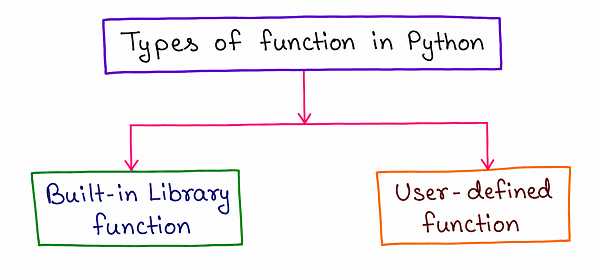
As shown in the diagram, functions in Python are broadly divided into two categories: Built-in Library Functions, which come ready to use as part of Python itself, and User-defined Functions, which are custom functions that a programmer writes to perform a specific task needed by their own program.
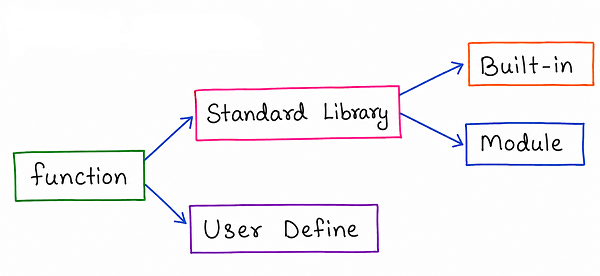
Looking a little closer, Built-in functionality itself actually comes from two related sources, as shown in the second diagram. Standard Library functions are the functions that ship together with Python, and these are further split into Built-in functions, which are available automatically in every Python program without needing anything extra, and Module functions, which require importing a specific module before they become available for use. On the other side sits User Define functions, the custom functions a programmer writes themselves using the def keyword, which is the main focus of the second half of this chapter.
Built-in Functions in Python
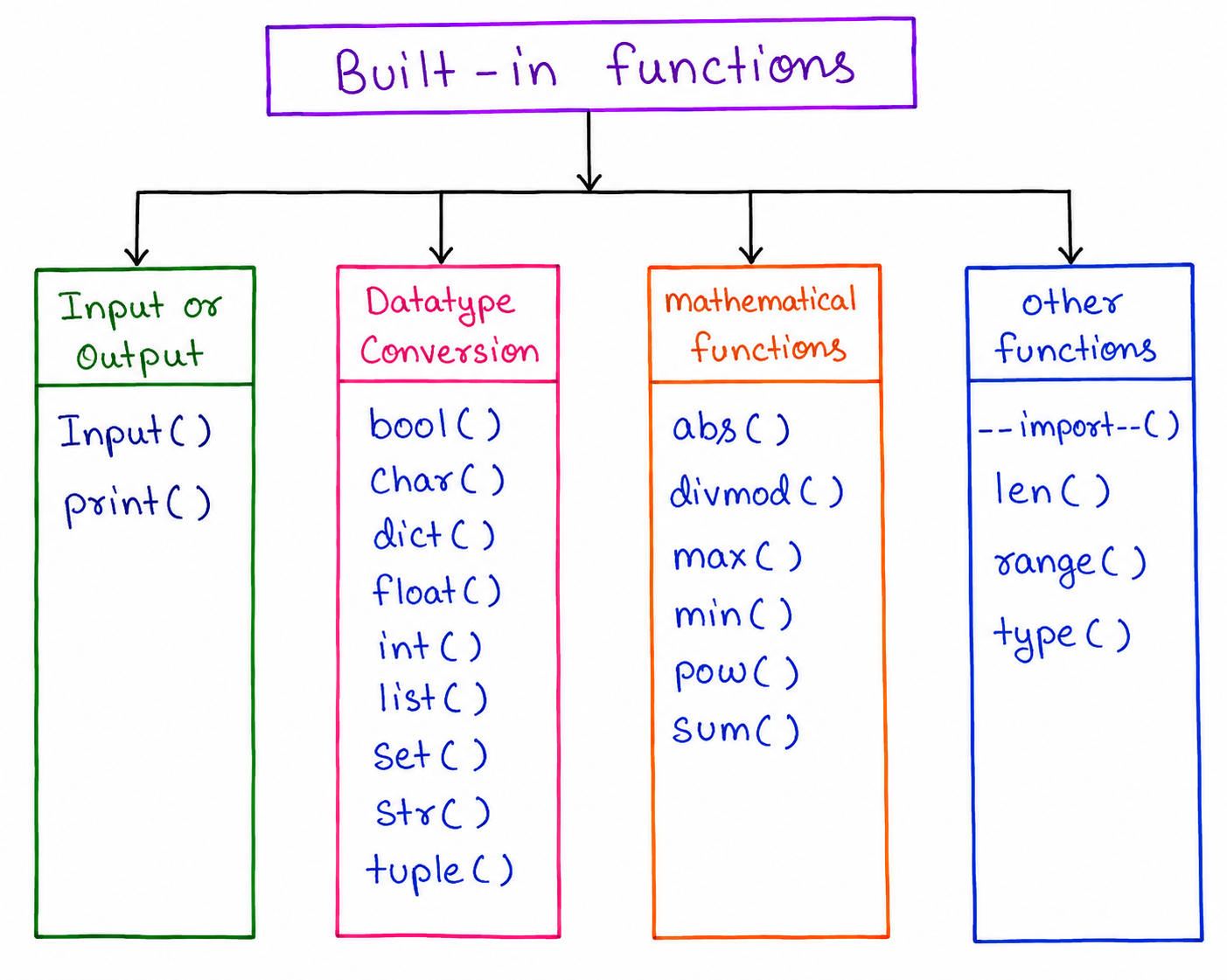
As shown in the diagram, Python's built-in functions can be grouped into a few broad categories based on what they're used for. Input or Output functions, such as input() and print(), handle reading data from the user and displaying data on the screen. Datatype Conversion functions, such as int(), float(), str(), and list(), convert a value from one data type into another. Mathematical functions, such as abs(), max(), min(), and sum(), perform common numeric calculations, and Other functions, such as len(), range(), and type(), cover a variety of general-purpose tasks used throughout everyday Python code.
Example
channel = "CS Engineering Gyan"
weeklyViews = [1200, 1500, 1800, 2100, 2400]

print(channel, "total views:", sum(weeklyViews))
print(channel, "highest daily views:", max(weeklyViews))
print(channel, "number of days recorded:", len(weeklyViews))
Output
CS Engineering Gyan total views: 9000
CS Engineering Gyan highest daily views: 2400
CS Engineering Gyan number of days recorded: 5
Here, sum() and max() are Mathematical functions, while len() is one of the general-purpose Other functions, and none of them needed to be written from scratch, since they're already built directly into Python.
User-Defined Functions
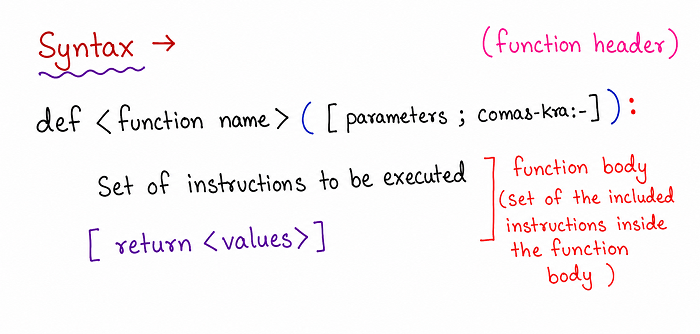
A User-defined function is created using the def keyword, followed by the function's name and a pair of parentheses that may optionally contain parameters. As shown in the diagram, this first line is called the function header, and it always ends with a colon. Every line that makes up the function's actual logic, referred to as the function body, must be indented consistently underneath this header. A function can optionally end with a return statement, which sends a value back to wherever the function was called from.
Example
def greet_subscriber(channel):
    print("Welcome to", channel, "- thanks for subscribing!")

greet_subscriber("CS Engineering Gyan")
Output
Welcome to CS Engineering Gyan - thanks for subscribing!
Here, greet_subscriber is a user-defined function that accepts one parameter, and the function is called by writing its name followed by parentheses containing the actual value to be used.
Types of Python Function Arguments
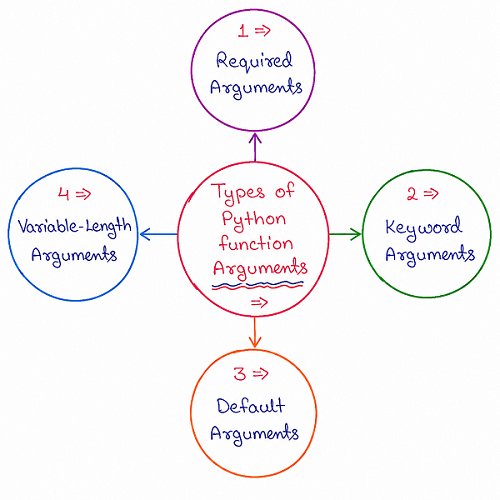
As shown in the diagram, Python supports four different ways of passing arguments into a function, each suited to a slightly different situation.
Required Arguments
Required Arguments must be passed to a function in the exact order the function's parameters are defined, and every one of them must be supplied, or Python will raise an error.
Example
def show_upload(channel, title):
    print(channel, "just uploaded:", title)

show_upload("CS Engineering Gyan", "Python Functions Explained")
Output
CS Engineering Gyan just uploaded: Python Functions Explained
Keyword Arguments
Keyword Arguments are passed by explicitly naming the parameter they correspond to when calling the function, which allows the arguments to be listed in any order, since Python matches each value to its named parameter directly rather than relying on position.
Example
def show_upload(channel, title):
    print(channel, "just uploaded:", title)

show_upload(title="Python Functions Explained", channel="CS Engineering Gyan")
Output
CS Engineering Gyan just uploaded: Python Functions Explained
Default Arguments
Default Arguments allow a parameter to be given a fallback value directly in the function's definition, so that if the caller doesn't provide a value for that particular parameter, the default value is used automatically instead.
Example
def show_upload(title, channel="CS Engineering Gyan"):
    print(channel, "just uploaded:", title)

show_upload("Python Functions Explained")
Output
CS Engineering Gyan just uploaded: Python Functions Explained
Variable-Length Arguments
Variable-Length Arguments allow a function to accept any number of extra arguments, without needing to define a fixed number of parameters ahead of time. In Python, this is done by placing an asterisk before the parameter name, which collects all of the extra positional values passed into the function.
Example
def total_weekly_views(channel, *dailyViews):
    print(channel, "total weekly views:", sum(dailyViews))

total_weekly_views("CS Engineering Gyan", 1200, 1500, 1800, 2100, 2400)
Output
CS Engineering Gyan total weekly views: 9000
Here, *dailyViews collects however many extra numeric values are passed in, whether it's three of them or thirty, and makes them all available inside the function as a single tuple.
The return Statement
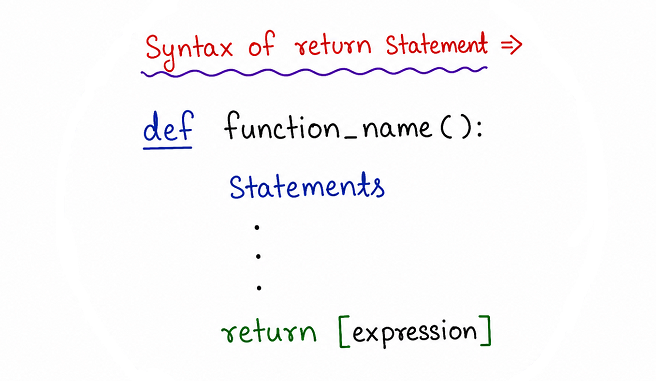
As shown in the diagram, the return statement is used inside a function to send a value back to whatever part of the program called that function, and it also immediately ends the function's execution the moment it runs, meaning any code written after a return statement inside the same block will never actually execute.
Example
def calculate_average(dailyViews):
    total = sum(dailyViews)
    average = total / len(dailyViews)
    return average

channel = "CS Engineering Gyan"
weeklyViews = [1200, 1500, 1800, 2100, 2400]
result = calculate_average(weeklyViews)

print(channel, "average daily views:", result)
Output
CS Engineering Gyan average daily views: 1800.0
Here, the function calculate_average computes a value internally and then returns it using the return statement, allowing that value to be stored in the variable result and used later in the program.
Variable Scope
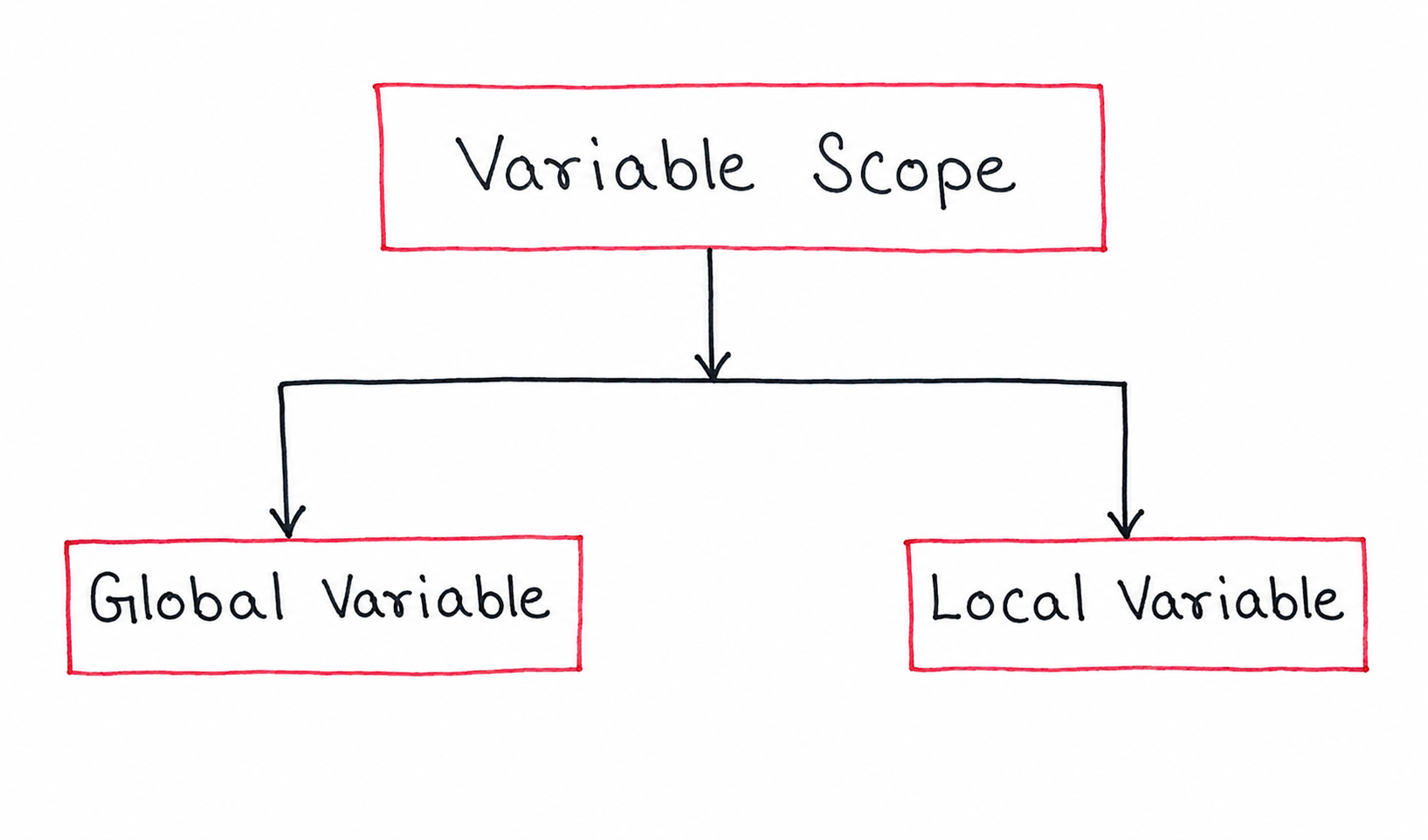
As shown in the diagram, every variable in a Python program has a scope, which determines exactly where in the program that variable can actually be accessed. Python recognises two main kinds of scope: Global Variables and Local Variables.
Global Variable
A Global Variable is defined outside of any function, at the main body level of the program, which means it can be accessed from anywhere in the program, including from inside any function, unless a function happens to define its own local variable using the exact same name.
Example
channel = "CS Engineering Gyan"

def show_channel_name():
    print("This video is from", channel)

show_channel_name()
Output
This video is from CS Engineering Gyan
Local Variable
A Local Variable, by contrast, is defined inside a function, and it only exists and can only be accessed while that particular function is actually running. Once the function finishes executing, its local variables are discarded, and they cannot be accessed from anywhere outside that function.
Example
def show_upload_count():
    uploads = 4
    print("CS Engineering Gyan uploaded", uploads, "videos this week.")

show_upload_count()
print(uploads)
Output
CS Engineering Gyan uploaded 4 videos this week.
Traceback (most recent call last):
NameError: name 'uploads' is not defined
Here, uploads is a local variable that only exists inside show_upload_count, so trying to access it from outside the function results in an error, since it no longer exists once the function has finished running.
Why Functions Support Code Reusability
Once a task has been written as a function, that same logic can be called as many times as needed throughout a program, or even reused across entirely different programs, without ever needing to be rewritten. This not only saves time but also makes a program considerably easier to maintain, since fixing a bug or improving the logic inside a function automatically applies everywhere that function is called, rather than requiring the same fix to be repeated in multiple different places scattered throughout the code.
Comparison of Function Argument Types
| Argument Type | How It Works |
|---|---|
| Required Arguments | Must be passed in the exact order the parameters are defined |
| Keyword Arguments | Passed by explicitly naming the parameter, allowing any order |
| Default Arguments | Use a fallback value automatically if no value is provided |
| Variable-Length Arguments | Accept any number of extra values using an asterisk before the parameter name |
Best Practices While Learning Functions
- Give every function a clear, descriptive name that reflects exactly what task it performs.
- Keep each function focused on doing just one specific task, rather than trying to handle several unrelated tasks inside the same function.
- Use default arguments for parameters that usually have one common value, so callers only need to override it when necessary.
- Remember that a return statement immediately ends a function, so any code written after it inside the same block will never run.
- Be mindful of variable scope, since a local variable created inside a function cannot be accessed once that function has finished running.
Common Mistakes Beginners Make
| Mistake | Correct Practice |
|---|---|
| Trying to access a local variable from outside its function. | Remember that local variables only exist while their function is running and cannot be used outside it. |
| Assuming a function automatically prints its result. | A function only sends a value back using return; you still need a separate print() call to display it. |
| Mixing up positional and keyword arguments incorrectly. | Positional required arguments must come before any keyword arguments in a function call. |
| Forgetting the asterisk when trying to accept variable-length arguments. | Use an asterisk before the parameter name so Python knows to collect any number of extra values. |
Frequently Asked Interview Questions
-
What is the difference between a built-in function and a user-defined function?
A built-in function is already available as part of Python itself, while a user-defined function is a custom function written by a programmer using the def keyword to perform a specific task. -
What is the difference between required arguments and keyword arguments?
Required arguments must be passed in the exact order the function's parameters are defined, while keyword arguments are passed by explicitly naming the parameter, allowing them to be listed in any order. -
What happens if a function has both default and required arguments?
The required arguments without a default value must be listed first in the function definition, and the default arguments must come after them. -
How do variable-length arguments work in Python?
By placing an asterisk before a parameter name, a function can accept any number of extra positional values, which are collected together as a single tuple inside the function. -
What does the return statement actually do?
The return statement sends a value back to wherever the function was called from, and it immediately ends the function's execution at that point. -
What is the difference between a global variable and a local variable?
A global variable is defined outside any function and can be accessed from anywhere in the program, while a local variable is defined inside a function and can only be accessed while that function is running. -
Why are functions important for code reusability?
Because once a task is written as a function, it can be called repeatedly throughout a program, or reused across different programs, without needing to rewrite the same logic every time.
Summary
Functions let a Python program organise code into reusable, named blocks instead of repeating the same logic throughout a program. We looked at the difference between built-in and user-defined functions, how to define a function using the def keyword, the four types of function arguments — required, keyword, default, and variable-length — how the return statement sends a value back to the caller, and how global and local variable scope determines where a variable can actually be accessed.
With a solid understanding of how to write and use functions, you are now ready to move on to Object-Oriented Programming in Python, which builds on these same ideas of reusability and organisation using classes and objects.