Control Statements in Python
In the previous chapter, we looked at Operators in Python and how they let a program perform calculations, comparisons, and logical checks on data. On their own, though, operators only produce a result — they don't decide what the program should actually do with that result. This is where Control Statements come in. Control statements allow a Python program to make decisions, repeat a block of code multiple times, or alter its normal execution flow, instead of simply running every line from top to bottom in a fixed, unchanging order.
Without control statements, every Python program would be limited to a single straight-line sequence of instructions, with no way to react differently based on changing data, and no way to repeat a task without writing out the same lines of code over and over again. Control statements are what actually give a program its logic and intelligence, and they form one of the most important building blocks you'll use in almost every Python program you write from this point onward.
Types of Control Flow Statements
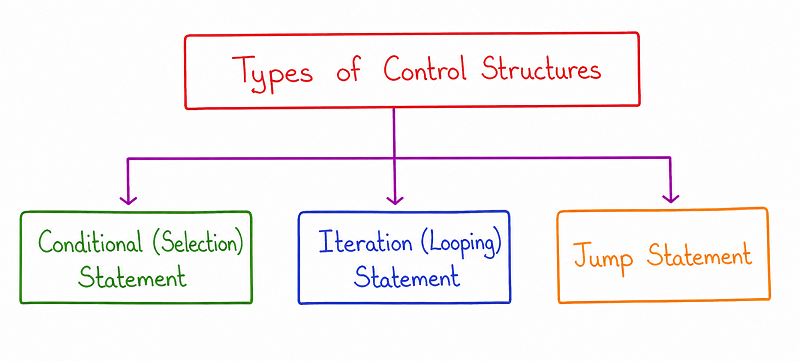
As shown in the diagram, control flow statements in Python fall into three broad categories. Conditional or Selection Statements allow a program to choose between different blocks of code based on whether a condition is true or false. Iteration, Looping, or Repetition Statements allow a block of code to be executed repeatedly, either a fixed number of times or until a certain condition is met. Jump Statements allow the normal flow of a loop to be altered directly, skipping or exiting parts of it early. Each of these categories is explained in detail in the sections below.
Selection Statements (Decision-Making Statements)
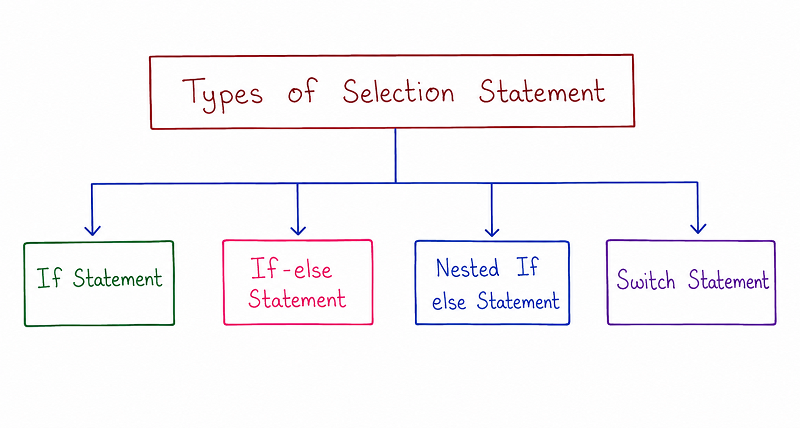
Selection statements let a Python program evaluate a condition and choose exactly which block of code should run based on the result of that condition. As shown in the diagram, Python offers four main forms of selection statements: the if statement, the if-else statement, the nested if-else statement, and the elif ladder. Each of these is covered individually below, along with its flowchart and a working example.
The if Statement
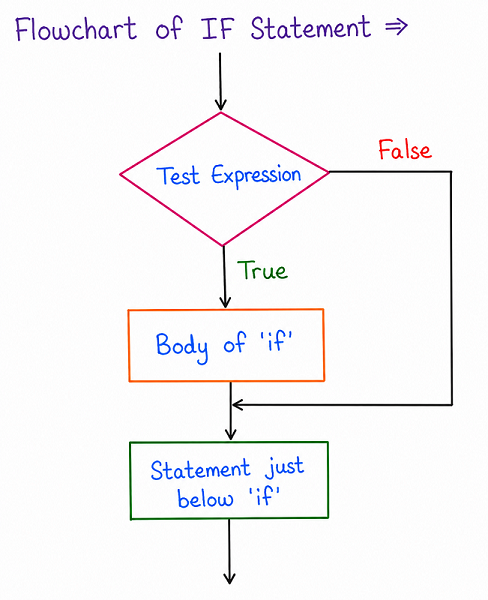
The if statement is the simplest form of decision-making in Python. As shown in the flowchart, a test expression is first evaluated. If that expression turns out to be true, the body of the if block is executed, and the program then continues on to the statement just below the if block. If the test expression is false instead, the body of the if block is skipped entirely, and the program jumps straight to the statement just below it.
Example
channel = "CS Engineering Gyan"
subscribers = 45000

if subscribers > 40000:
    print(channel, "has crossed 40,000 subscribers!")

print(channel, "subscriber count:", subscribers)
Output
CS Engineering Gyan has crossed 40,000 subscribers!
CS Engineering Gyan subscriber count: 45000
Here, since the test expression subscribers > 40000 evaluates to true, the body of the if block runs and prints the congratulatory message, before the program continues on to the final print statement, which always runs regardless of the condition.
The if-else Statement
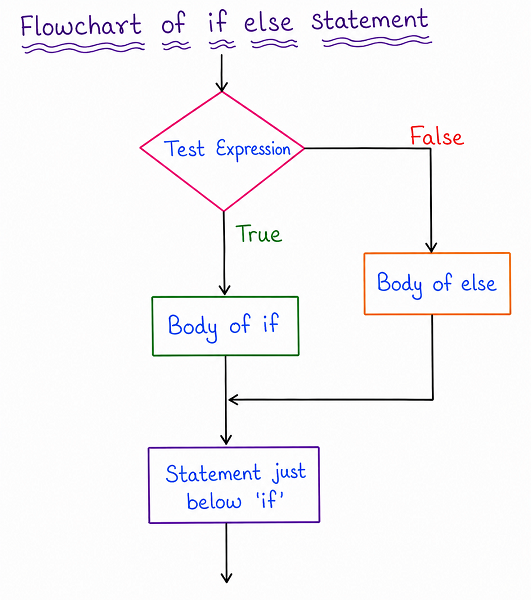
The if-else statement extends the basic if statement by adding a second block of code that runs specifically when the test expression turns out to be false. As shown in the flowchart, if the test expression is true, the body of the if block executes; if it is false instead, the body of the else block executes. Either way, once the appropriate block finishes running, the program continues on to the same statement just below the entire if-else structure.
Example
channel = "CS Engineering Gyan"
videoLikes = 320

if videoLikes >= 500:
    print(channel, "video has strong engagement!")
else:
    print(channel, "video needs more promotion.")
Output
CS Engineering Gyan video needs more promotion.
Since videoLikes is 320, which is less than 500, the test expression evaluates to false, so the body of the else block runs instead of the body of the if block.
Nested if-else Statement
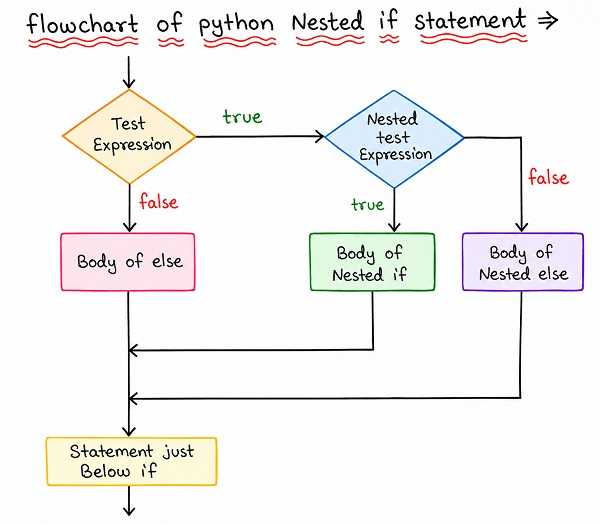
A Nested if-else statement is simply an if-else statement placed inside another if or else block, allowing a program to check a second, more specific condition only after the first condition has already been satisfied. As shown in the flowchart, if the first test expression is false, the body of else runs directly. If the first test expression is true instead, a second nested test expression is then checked, determining whether the body of the nested if or the body of the nested else actually runs.
Example
channel = "CS Engineering Gyan"
weeklyUploads = 4

if weeklyUploads > 0:
    if weeklyUploads >= 3:
        print(channel, "is uploading consistently this week.")
    else:
        print(channel, "uploaded, but less than usual.")
else:
    print(channel, "has not uploaded anything this week.")
Output
CS Engineering Gyan is uploading consistently this week.
The outer condition weeklyUploads > 0 is true, so the program moves on to check the nested condition weeklyUploads >= 3, which is also true, so the body of the nested if block runs.
Elif Ladder
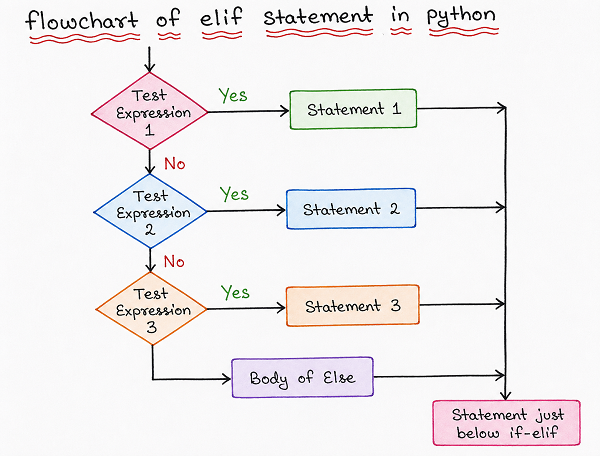
The elif ladder, short for "else if," allows a Python program to check several distinct conditions one after another, in a clean, readable sequence, rather than nesting multiple if-else statements inside each other. As shown in the flowchart, each test expression is checked in order; as soon as one of them evaluates to true, its corresponding statement block runs, and none of the remaining conditions are checked at all. If none of the test expressions turn out to be true, the body of the final else block runs instead.
Example
channel = "CS Engineering Gyan"
dailyViews = 1800

if dailyViews >= 3000:
    print(channel, "had an exceptional day!")
elif dailyViews >= 1500:
    print(channel, "had a solid day of views.")
elif dailyViews >= 500:
    print(channel, "had an average day.")
else:
    print(channel, "had a slow day today.")
Output
CS Engineering Gyan had a solid day of views.
Python checks the first condition, dailyViews >= 3000, which is false, then moves on to dailyViews >= 1500, which is true, so that block runs and the remaining conditions are never even evaluated.
Loops in Python
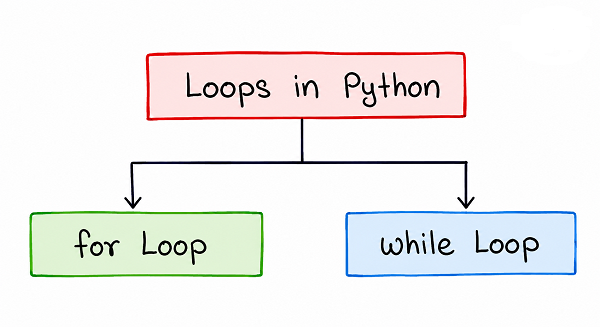
Loops allow a block of code to be executed repeatedly, without the programmer needing to write that same block out multiple times. As shown in the diagram, Python provides two main types of loops: the for loop, generally used when the number of repetitions is known or based on a defined sequence, and the while loop, generally used when repetition should continue for as long as a certain condition remains true.
The for Loop
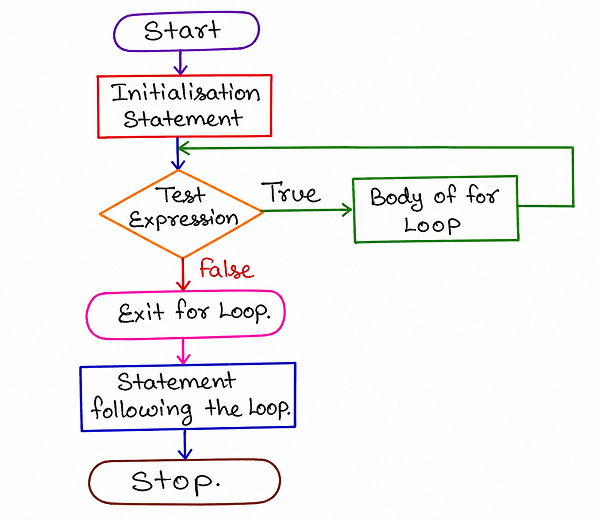
As shown in the flowchart, a for loop begins with an initialisation statement, and then repeatedly checks a test expression before running the body of the loop. As long as the test expression remains true, the body of the loop keeps executing, and once it becomes false, the loop exits, moving on to the statement following the loop.
Example
channel = "CS Engineering Gyan"
weeklyUploads = [2, 3, 1, 4, 2]

for uploads in weeklyUploads:
    print(channel, "uploads this week:", uploads)
Output
CS Engineering Gyan uploads this week: 2
CS Engineering Gyan uploads this week: 3
CS Engineering Gyan uploads this week: 1
CS Engineering Gyan uploads this week: 4
CS Engineering Gyan uploads this week: 2
This for loop automatically goes through every value inside the weeklyUploads list one by one, running the body of the loop once for each value, without the programmer needing to manually track an index.
The while Loop
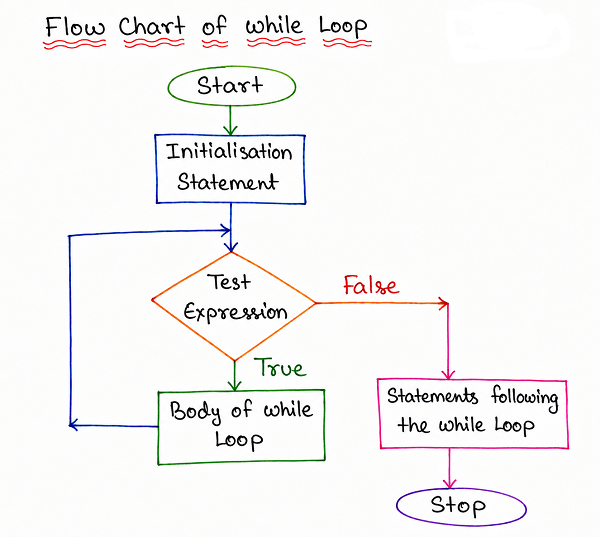
As shown in the flowchart, a while loop also begins with an initialisation statement, but unlike a for loop, it is generally used when the exact number of repetitions isn't known in advance. The test expression is checked before every repetition, and the body of the loop continues running for as long as that test expression remains true, only exiting once it finally becomes false.
Example
channel = "CS Engineering Gyan"
subscribers = 38000

while subscribers < 40000:
    subscribers += 500
    print(channel, "subscriber count:", subscribers)
Output
CS Engineering Gyan subscriber count: 38500
CS Engineering Gyan subscriber count: 39000
CS Engineering Gyan subscriber count: 39500
CS Engineering Gyan subscriber count: 40000
The loop keeps running, adding 500 subscribers on every repetition, for as long as subscribers < 40000 remains true, and stops as soon as the subscriber count actually reaches 40000.
Jump Statements
Jump statements allow the normal flow of a loop to be altered directly, letting a program skip part of a loop's body or exit the loop early, instead of always running every repetition all the way through in the usual order. Python provides three main jump statements: break, continue, and pass.
The break Statement
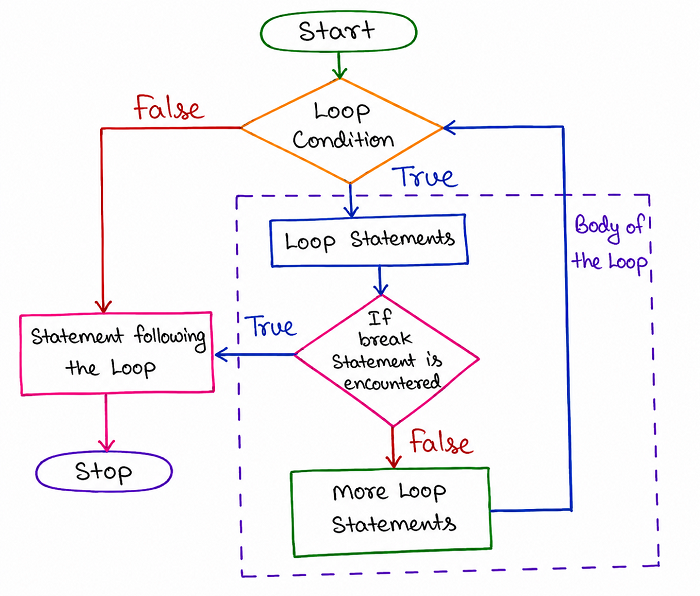
As shown in the flowchart, the break statement immediately exits the loop it is placed inside the moment it is encountered, skipping any remaining repetitions entirely and jumping straight to the statement following the loop, regardless of whether the loop's original condition would have otherwise remained true.
Example
channel = "CS Engineering Gyan"
dailyViews = [1200, 1500, 1800, 900, 2100]

for views in dailyViews:
    if views < 1000:
        print(channel, "views dropped below 1000, stopping check.")
        break
    print(channel, "daily views:", views)
Output
CS Engineering Gyan daily views: 1200
CS Engineering Gyan daily views: 1500
CS Engineering Gyan daily views: 1800
CS Engineering Gyan views dropped below 1000, stopping check.
As soon as the loop reaches the value 900, which is less than 1000, the break statement runs, and the loop exits immediately, meaning the final value, 2100, is never even checked.
The continue Statement
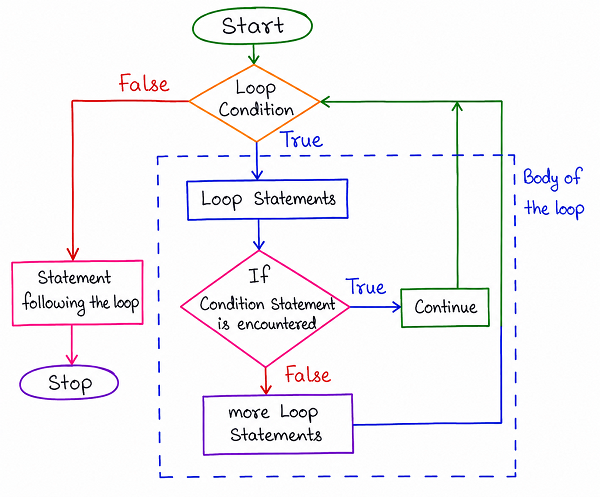
As shown in the flowchart, the continue statement works differently from break. Instead of exiting the loop entirely, it simply skips the rest of the current repetition's body and jumps back to re-check the loop's condition, moving straight on to the next repetition rather than stopping the loop altogether.
Example
channel = "CS Engineering Gyan"
weeklyUploads = [2, 0, 3, 0, 4]

for uploads in weeklyUploads:
    if uploads == 0:
        continue
    print(channel, "uploaded", uploads, "videos this week.")
Output
CS Engineering Gyan uploaded 2 videos this week.
CS Engineering Gyan uploaded 3 videos this week.
CS Engineering Gyan uploaded 4 videos this week.
Whenever uploads equals 0, the continue statement skips the print statement for that particular repetition and moves straight on to the next value in the list, rather than stopping the loop entirely.
The pass Statement
The pass statement is used when Python's syntax requires a statement to be present, such as inside a loop, function, or conditional block, but there is nothing that actually needs to happen at that point yet. Unlike break or continue, pass doesn't alter the flow of the loop at all; it simply does nothing and lets execution continue on to the next line as normal, acting as a placeholder while a piece of code is still being planned or written.
Example
channel = "CS Engineering Gyan"
weeklyUploads = [2, 3, 1, 4, 2]

for uploads in weeklyUploads:
    if uploads > 3:
        pass  # special handling to be added later
    print(channel, "uploads recorded:", uploads)
Output
CS Engineering Gyan uploads recorded: 2
CS Engineering Gyan uploads recorded: 3
CS Engineering Gyan uploads recorded: 1
CS Engineering Gyan uploads recorded: 4
CS Engineering Gyan uploads recorded: 2
Here, the pass statement simply acts as a placeholder inside the if block, allowing the program to run without errors even though no specific action has been written for that condition yet.
Comparison of Control Statements
| Statement | Category | What It Does |
|---|---|---|
| if / if-else / elif | Selection | Chooses which block of code to run based on a condition |
| for loop | Iteration | Repeats a block of code over a known sequence of values |
| while loop | Iteration | Repeats a block of code while a condition remains true |
| break | Jump | Exits the loop immediately, skipping any remaining repetitions |
| continue | Jump | Skips the rest of the current repetition and moves to the next one |
| pass | Jump | Does nothing; acts as a placeholder where a statement is required |
Best Practices While Learning Control Statements
- Start with the three broad categories — Selection, Iteration, and Jump — before memorising the individual statements within each one.
- Practice tracing through each flowchart by hand with a sample value, since predicting the output builds a much stronger understanding than just reading the code.
- Use an elif ladder instead of deeply nested if-else statements whenever you're checking several related conditions, since it keeps the code far more readable.
- Keep break and continue clearly separated in your mind — break exits the loop entirely, while continue only skips the current repetition.
- Remember that Python relies on indentation, not curly braces, to define the body of every control statement, so consistent indentation is essential.
Common Mistakes Beginners Make
| Mistake | Correct Practice |
|---|---|
| Using inconsistent indentation inside if, loop, or elif blocks. | Always use consistent indentation, since Python relies on it to determine which lines belong to a block. |
| Confusing break with continue. | Remember that break exits the loop completely, while continue only skips ahead to the next repetition. |
| Writing multiple deeply nested if-else statements instead of using elif. | Use an elif ladder for a cleaner, more readable way to check several related conditions in sequence. |
| Forgetting that a while loop can run forever if its condition never becomes false. | Always make sure something inside the while loop's body eventually causes the test expression to become false. |
Frequently Asked Interview Questions
-
What are the three main types of control flow statements in Python?
The three main types are Selection Statements, Iteration Statements, and Jump Statements. -
What is the difference between an if-else statement and an elif ladder?
An if-else statement checks only one condition with two possible outcomes, while an elif ladder checks several conditions one after another, running the block for the first one that turns out to be true. -
When should you use a for loop instead of a while loop?
A for loop is generally used when the number of repetitions or the sequence to iterate over is already known, while a while loop is generally used when repetition should continue until a certain condition becomes false. -
What is the difference between break and continue?
The break statement exits the loop immediately, skipping all remaining repetitions, while the continue statement only skips the rest of the current repetition and moves on to the next one. -
What is the purpose of the pass statement?
The pass statement acts as a placeholder where Python's syntax requires a statement to be present but no action is actually needed yet, allowing the code to run without errors. -
What happens if a nested if-else statement's outer condition is false?
The nested condition inside it is never checked at all, and the program runs the body of the outer else block instead. -
Why does Python use indentation instead of curly braces for control statements?
Python relies on indentation to define which lines belong to a block, making the structure of the code visually clear and enforcing consistent formatting across programs.
Summary
Control Statements give a Python program the ability to make decisions, repeat tasks, and adjust its flow of execution instead of always running in one fixed order. We looked at the four selection statements — if, if-else, nested if-else, and the elif ladder — the two main types of loops, for and while, and the three jump statements, break, continue, and pass, each offering a different way to alter how a loop behaves.
With a solid understanding of how to control the flow of a Python program, you are now ready to move on to functions, which explains how blocks of code can be organised into reusable, named units that can be called whenever they're needed.