Network Devices in Computer Networks
In the previous chapter, we looked at Error Detection and Correction, which explained how a network identifies whether the data it receives has been corrupted during transmission. All of these detection techniques, along with every packet, frame, and signal we've discussed so far, ultimately have to travel through real physical hardware to actually reach their destination. This chapter looks at exactly that hardware — the everyday devices that connect computers together, move data between them, and link a local network out to the wider internet.
Every computer network, no matter how large or small, is built out of a small set of essential hardware components working together. Understanding what each of these devices actually does, and how they differ from one another, makes it much easier to understand how a network is physically put together, and is also one of the most frequently tested areas in both exams and technical interviews.
Components of a Computer Network
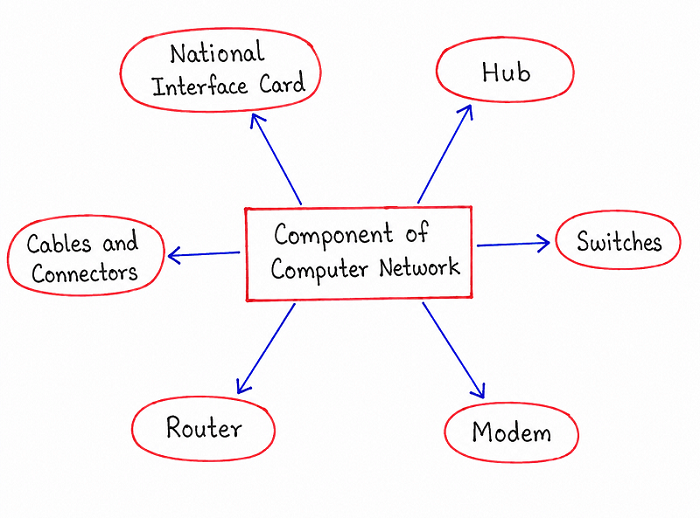
The diagram above lays out the major hardware components that together make up a typical computer network: the Network Interface Card, Hub, Switches, Router, Modem, and Cables and Connectors. Along with these, a closely related device called a Bridge is also commonly studied alongside Hubs and Switches, since it plays a similar role in connecting network segments together. Each of these components is explained individually below, starting from the device closest to an individual computer and working outward toward the wider network.
Network Interface Card (NIC)
A Network Interface Card, usually abbreviated as NIC, is the hardware component installed inside a computer or other device that physically allows it to connect to a network in the first place. Every device that wants to send or receive data over a network, whether over a wired cable or a wireless signal, needs some form of NIC to actually interface with that network. Modern computers and laptops almost always come with a NIC built directly into the motherboard, though separate NIC expansion cards are still used in some desktop systems and servers.
Every NIC is assigned a unique hardware address, called a MAC address, which is permanently burned into the card during manufacturing and is used to identify that specific device at the data link layer of the network. Without a NIC, a computer has no way of physically transmitting or receiving network signals at all, which makes it the most fundamental starting point of any device's network connectivity.
Hub
A Hub is one of the simplest devices used to connect multiple computers together within a small local network. Physically, a hub is a box with several ports, and any device connected to one of these ports can be plugged in using a standard network cable. When a hub receives an electrical signal on any one of its ports, it doesn't inspect that signal or make any decisions about where it should go — it simply copies the signal and broadcasts it out to every other port on the hub, regardless of which device the data was actually meant for.
Because a hub treats all connected devices as if they are sharing one single communication channel, only one device can successfully transmit data at a time without causing a collision with another device's signal, which limits how efficiently the available bandwidth is actually used as more devices are added. This simple, unintelligent broadcasting behavior is exactly why hubs have mostly been replaced by switches in modern networks, though they remain useful for understanding the basic building blocks of network hardware.
Switch
A Switch performs a similar physical role to a hub, connecting multiple devices together within a local network, but it does so far more intelligently. Instead of blindly broadcasting every incoming signal to every port, a switch keeps track of which device is connected to which of its ports by learning and storing their MAC addresses. When data arrives at the switch intended for a specific device, the switch forwards that data only to the port that specific device is actually connected to, rather than sending it everywhere.
This targeted forwarding behavior means that multiple pairs of devices connected to the same switch can communicate with each other at the same time without their signals interfering, since each conversation is effectively kept separate from the others. This makes far more efficient use of the available network bandwidth compared to a hub, particularly as the number of connected devices grows, which is why switches have become the standard device used to build local area networks today.
Bridge
A Bridge is a device used to connect two separate network segments together, allowing them to function as though they were a single combined network. Like a switch, a bridge examines the MAC address of incoming data and makes a decision about whether that data needs to be forwarded across to the other connected segment, or whether it can simply be ignored because both the sender and the intended recipient already belong to the same segment.
By filtering out data that doesn't need to cross between segments, a bridge helps reduce unnecessary network traffic and can improve overall performance, particularly in larger networks that have grown out of several smaller, previously separate segments. A switch is often thought of as essentially a bridge with many ports, since both devices rely on the same underlying idea of forwarding data based on learned MAC addresses, though switches are generally used for connecting individual devices while bridges are more commonly associated with joining two larger network segments together.
Router
A Router is the device responsible for connecting entirely separate networks together and directing data between them, which is a fundamentally different job from what a hub, switch, or bridge does within a single local network. While those devices operate mainly using MAC addresses to move data around inside one network, a router examines the IP address of incoming data to determine which network that data actually needs to be sent to next, and then forwards it along the most appropriate path toward its final destination.
The most familiar example of a router in everyday life is the home or office router that connects a local network of personal devices to the wider internet, deciding how data leaving those devices should be routed out toward its destination, and how data coming back in from the internet should be delivered to the correct device inside the local network. Because routers are responsible for choosing paths across multiple interconnected networks rather than just forwarding within one, they are considered significantly more intelligent than hubs, switches, or bridges, and are essential to how the internet, which is fundamentally a network of many smaller networks connected together, actually functions.
Modem
A Modem is the device responsible for converting data between the digital form used by computers and the analog form often required for transmission over certain types of communication lines, such as telephone lines or cable television lines. The word modem itself comes from combining "modulator" and "demodulator," reflecting its two core functions: modulating outgoing digital data into an analog signal suitable for transmission, and demodulating incoming analog signals back into digital data a computer can understand.
In a typical home setup, a modem connects a local network to an internet service provider's external line, translating data in both directions so that devices inside the home can communicate with servers and services out on the wider internet. Many modern home networking devices actually combine a modem and a router into one single physical unit, which is why the two terms are sometimes used loosely in everyday conversation, even though they technically perform two distinct jobs — one converting signal formats, and the other directing data between networks.
Cables and Connectors
Cables and Connectors form the physical transmission medium that actually carries signals between all of the devices described above. Common cable types used in wired networks include twisted pair cables, which are widely used to connect individual computers to switches and routers over relatively short distances, and fiber optic cables, which are used for high-capacity, long-distance connections, such as internet backbones. Connectors, such as the familiar RJ45 connector used with twisted pair cables, are the physical fittings on the ends of these cables that allow them to be plugged securely into a device's network port.
While it's easy to overlook cables and connectors compared to the more "intelligent" devices like switches and routers, the quality and type of cabling used in a network directly affects how much data can be transmitted and how far it can travel before the signal weakens, connecting this topic directly back to the earlier discussion of transmission media and its role in determining a network's overall performance.
Comparison of Network Devices
| Device | Main Role | Works With |
|---|---|---|
| Network Interface Card (NIC) | Allows a single device to connect to a network | MAC address of its own device |
| Hub | Connects devices by broadcasting signals to every port | No addressing — simple electrical repetition |
| Switch | Connects devices and forwards data only to the correct port | MAC addresses of connected devices |
| Bridge | Connects two network segments and filters traffic between them | MAC addresses of devices on each segment |
| Router | Connects separate networks and directs data between them | IP addresses of destination networks |
| Modem | Converts data between digital and analog signal formats | Signal type conversion, not addressing |
Best Practices While Learning Network Devices
- Group devices by the layer of addressing they use — a hub uses no addressing at all, a switch and bridge use MAC addresses, and a router uses IP addresses.
- Remember the switch versus hub comparison as a common exam favorite, focusing on broadcasting versus targeted forwarding.
- Keep bridge and switch closely linked in your mind, since a switch is often described as a multi-port bridge.
- Separate the jobs of a router and a modem clearly — a router chooses a path between networks, while a modem converts the signal format needed to travel over a specific type of line.
- Connect this chapter back to transmission media, since cables and connectors are the physical foundation every other device in this chapter ultimately relies on.
Common Mistakes Beginners Make
| Mistake | Correct Practice |
|---|---|
| Assuming a hub and a switch do the same job. | A hub broadcasts data to every port, while a switch forwards data only to the specific port it belongs to. |
| Treating a router and a modem as identical devices. | A router directs data between networks using IP addresses, while a modem converts data between digital and analog signal formats. |
| Confusing a bridge with a router. | A bridge connects segments of the same network using MAC addresses, while a router connects entirely separate networks using IP addresses. |
| Overlooking cables and connectors as unimportant. | Remember that cabling quality directly affects the bandwidth and range of every connected device. |
Frequently Asked Interview Questions
-
What is the main difference between a hub and a switch?
A hub broadcasts every incoming signal to all of its ports, while a switch learns which device is connected to which port and forwards data only to the intended destination. -
What is the role of a Network Interface Card?
A Network Interface Card allows a computer or device to physically connect to a network and is identified using a unique MAC address. -
How is a bridge different from a switch?
A bridge is typically used to connect two separate network segments together, while a switch is generally used to connect multiple individual devices, though both rely on the same MAC-address-based forwarding concept. -
What does a router actually do?
A router connects separate networks together and directs data between them by examining the destination IP address of that data. -
Why is a modem needed if a router already connects a network to the internet?
A modem performs signal conversion between the digital format used by computers and the analog format often required by external lines such as telephone or cable lines, a job the router itself does not perform. -
Why do switches use MAC addresses while routers use IP addresses?
Switches operate within a single local network and only need to identify individual devices using MAC addresses, while routers connect multiple networks together and need IP addresses to determine which network data should be sent to. -
Why are cables and connectors considered part of network devices?
Because they form the physical transmission medium that actually carries signals between every other network device, directly affecting the available bandwidth and transmission range.
Summary
Network Devices are the physical building blocks that turn the concepts covered earlier in this series, like multiplexing, switching, and error detection, into an actual working network. We looked at the Network Interface Card, which connects an individual device to a network, Hubs and Switches, which connect devices within a local network with very different levels of intelligence, Bridges, which link network segments together, Routers, which connect entirely separate networks using IP addresses, Modems, which convert data between digital and analog formats, and finally Cables and Connectors, the physical medium underlying all of these devices.
With a clear picture of the hardware that makes up a network, you are now ready to move on to network protocols, which explains the rules and standards these devices follow to actually communicate with one another correctly.