Functional Units of a Computer System
A computer does not perform a task through one component alone. When you enter a value, run a program, open a file, or display a result on the screen, several hardware units cooperate to complete that operation. Each unit has a particular responsibility, while communication between the units allows the complete system to function as one machine.
These major components are commonly studied as the functional units of a computer system. The basic functional units are the input unit, memory unit, central processing unit (CPU), and output unit. Inside the CPU, the Arithmetic Logic Unit (ALU) performs calculations and logical operations, while the Control Unit (CU) coordinates the execution of instructions.
The purpose of studying functional units is not simply to memorize the names of hardware components. The important idea is to understand what happens to data after it enters a computer, where it is stored, how instructions are executed, and how the final result reaches the user.
Functional Units: The Basic Structure of a Computer
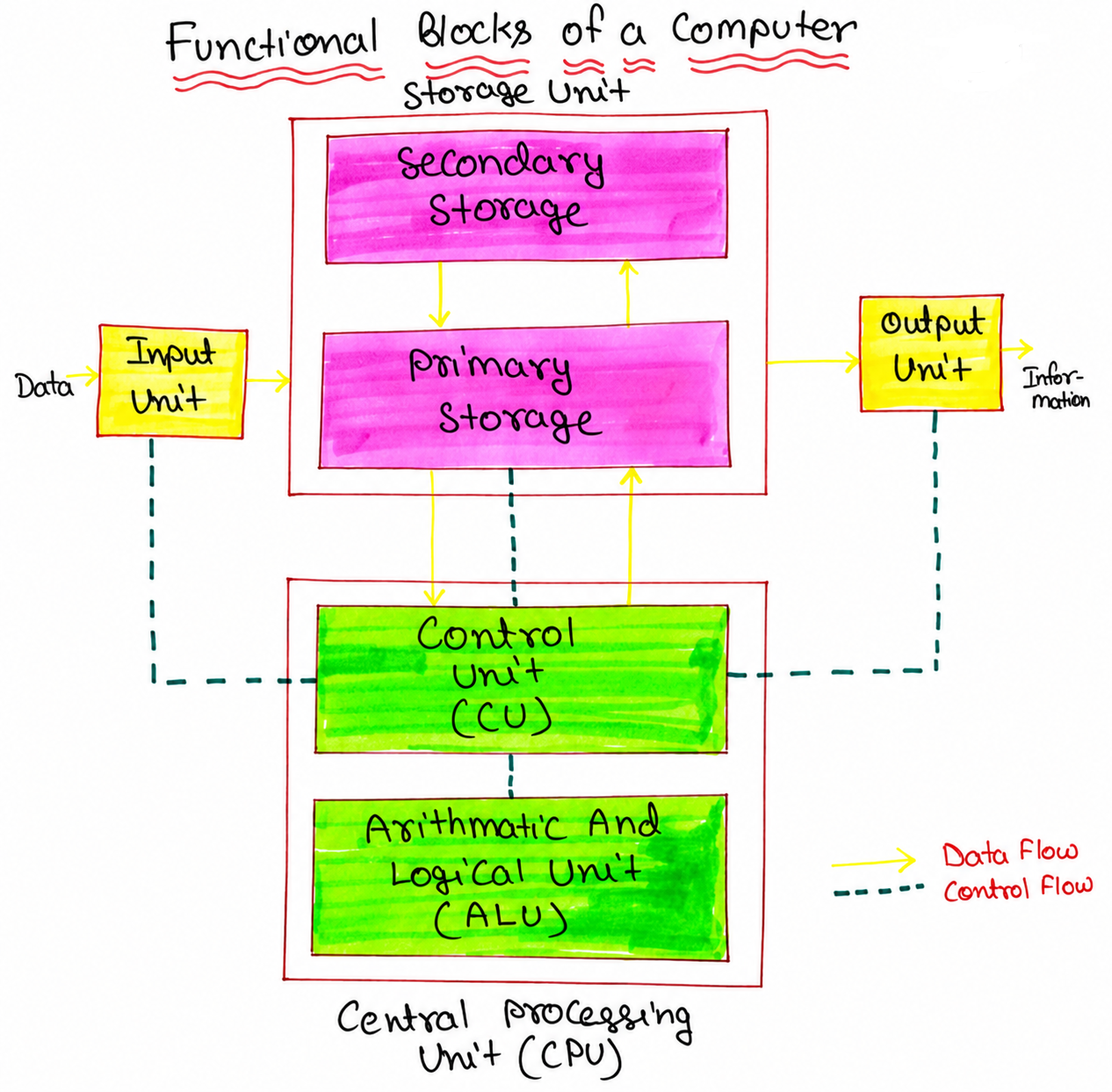
The diagram represents the basic organization of a computer. Data and instructions enter through an input device and are made available to the computer for processing. Memory holds the instructions, input data, intermediate values, and results required during execution. The CPU obtains the required information, performs the requested operations, and controls the sequence in which those operations take place. Finally, the output unit presents the useful result to the user.
The arrows in such a block diagram are important because they represent the movement of information between functional units. A computer therefore should not be viewed as a collection of independent devices. Its usefulness comes from the coordinated flow of data, instructions, addresses, and control signals between these units.
1. Input Unit
The input unit provides a way for the computer system to receive data and instructions from an external source. A user may enter text through a keyboard, select an item using a mouse, capture an image through a scanner, or provide sound through a microphone. The input hardware converts the physical action or signal into electrical and digital information that the computer can process.
The input unit does not normally perform the complete computation requested by the user. Its primary responsibility is to make the supplied information available to the rest of the computer system in an appropriate form.
Examples of Input Devices
- Keyboard
- Mouse
- Scanner
- Microphone
- Touchscreen
- Webcam
- Barcode reader
Example: Entering a Number
Suppose a student enters the number 25 using a keyboard. The keyboard generates signals corresponding to the keys that were pressed. The computer's input hardware and associated software make this information available to the system as digital data. The CPU can then use that data when executing the relevant program.
This distinction is useful: the keyboard is an input device, while the input unit represents the functional role responsible for accepting information from outside the computer.
2. Memory Unit
The memory unit provides storage for information that the computer needs while performing its work. A running program needs more than just the instruction currently being executed. It may also require input values, intermediate results, addresses, and previously stored instructions. Memory provides a place where this information can be kept and retrieved.
In a simplified computer organization model, memory is often discussed as a single functional unit. In an actual computer, however, storage is organized into several levels with different capacities, speeds, and purposes.
Primary Memory
Primary memory is directly involved in the execution of programs by the CPU. RAM is the most important example. When a program is running, its required instructions and data are normally brought into RAM so that the processor can access them.
RAM is volatile, meaning that the information stored in it is normally lost when the system is powered off.
Secondary Storage
Devices such as SSDs and hard disk drives provide long-term storage. Programs and user files can remain stored on these devices even when the computer is turned off. When a program needs to run, the operating system loads the required portions from secondary storage into main memory.
Secondary storage is therefore important for persistence, while primary memory provides the working area required during program execution.
What Does Memory Store?
During the execution of a program, memory may contain several kinds of information:
- Program instructions
- Input data
- Intermediate values
- Addresses used during execution
- Results waiting to be used or displayed
This is why memory should not be thought of merely as a place for storing files. In computer organization, memory is an active part of the instruction-execution process.
3. Central Processing Unit (CPU)
The Central Processing Unit (CPU) is responsible for executing program instructions. It repeatedly obtains an instruction, determines what operation the instruction represents, obtains the required operands, performs the operation, and updates the appropriate results or processor state.
At the introductory level, the CPU can be understood through three closely related elements: the Arithmetic Logic Unit (ALU), the Control Unit (CU), and a collection of registers.
These parts should not be treated as three independent processors. They cooperate during instruction execution.
4. Arithmetic Logic Unit (ALU)
The Arithmetic Logic Unit, or ALU, performs arithmetic and logical operations required by instructions. Depending on the processor architecture, these operations can include addition, subtraction, comparisons, bitwise operations, shifts, and other related functions.
For example, if a program needs to calculate:
18 + 7
the processor supplies the appropriate operands and operation to the ALU. The ALU produces the result:
18 + 7 = 25
The ALU itself does not decide which program instruction should be executed next. That responsibility belongs to the processor's control mechanisms.
Arithmetic Operations
- Addition
- Subtraction
- Multiplication
- Division
Logical and Bit-Level Operations
- AND
- OR
- XOR
- NOT
- Comparison
- Bit shifting
The exact operations available depend on the instruction set and processor architecture, but the central idea remains the same: the ALU provides the hardware needed to perform the computation specified by an instruction.
5. Control Unit (CU)
The Control Unit coordinates the activities required to execute instructions. It interprets the instruction currently being processed and produces control signals that cause the appropriate CPU components and other system components to perform their required actions.
For example, consider a simplified instruction:
ADD R1, R2
The control unit must ensure that the processor treats the instruction as an addition operation and that the required registers and ALU participate at the correct time. The ALU performs the addition, while the control unit coordinates the sequence of actions.
This is why it is useful to remember the roles as follows:
- ALU: performs the specified arithmetic or logical operation.
- Control Unit: coordinates the actions needed to execute the instruction.
- Registers: provide very fast temporary storage inside the processor.
6. Registers and Their Role in the CPU
Registers are small, high-speed storage locations located within the CPU. They hold information that the processor needs immediately during instruction execution.
Different processors provide different registers, but common educational examples include the Program Counter (PC), Instruction Register (IR), Memory Address Register (MAR), and Memory Data Register (MDR).
Program Counter (PC)
The Program Counter keeps track of the address associated with the next instruction to be fetched. After an instruction is fetched, the processor updates the PC according to the instruction sequence and architecture.
Instruction Register (IR)
The Instruction Register holds the instruction currently being processed. The control unit uses the information in the instruction to determine the required operation.
Memory Address Register (MAR)
The MAR is used in the traditional model to hold the memory address involved in a memory access.
Memory Data Register (MDR)
The MDR is used in the traditional model to hold data being transferred to or from memory.
These registers illustrate an important point: processing is not simply “CPU calculates something.” The CPU must continually move and manage instructions and data while executing a program.
How the Functional Units Work Together
The easiest way to understand functional units is to follow a simple operation from input to output. Consider a program that asks the user to enter two numbers and display their sum.
Example: Adding Two Numbers
User enters:

First number  = 15
Second number = 25

        ↓

Input Unit

Receives the values from the input device

        ↓

Memory

Stores the required program instructions and input data

        ↓

CPU

Fetches and interprets the required instructions

        ↓

Control Unit

Coordinates the required operations

        ↓

ALU

Performs:

15 + 25 = 40

        ↓

Memory / CPU

Result 40 is retained as required by the program

        ↓

Output Unit

Displays:

40
This example is intentionally simplified. A real processor may involve cache memory, multiple registers, buses, instruction pipelines, and many additional control mechanisms. Nevertheless, the simplified flow provides a useful foundation for understanding the purpose of each functional unit.
Data Flow and Control Flow Are Not the Same
One useful distinction in computer organization is the difference between data movement and control.
Data may move between memory, registers, the ALU, and input/output components. At the same time, control signals determine when and how those transfers and operations should occur.
For example, when an instruction requires an addition, the processor needs both the numerical operands and the control information specifying that an addition operation should be performed. The ALU uses the operands to calculate the result, while the control logic coordinates the operation.
Understanding this separation makes later topics such as buses, instruction cycles, CPU organization, and control signals much easier to follow.
Functional Units vs Physical Devices
A common beginner mistake is to assume that every functional unit corresponds to one physically separate device. That is not necessarily true.
A functional unit describes a role performed within the computer system. A physical component can contain multiple functional elements, and several physical components can cooperate to provide one overall function.
For example, the input function may involve a keyboard controller, operating-system software, and the physical keyboard. Similarly, modern processors contain many structures beyond the simplified ALU and control-unit model used in introductory computer organization.
Therefore, the functional-unit model should be understood as a conceptual model that helps us explain what the computer does, rather than as a complete physical diagram of every component inside a modern computer.
Difference Between ALU and Control Unit
| ALU | Control Unit |
|---|---|
| Performs arithmetic and logical operations. | Coordinates the execution of instructions. |
| Works with operands supplied by the processor. | Interprets instruction information and generates control actions. |
| Produces computational results. | Controls when and how different operations take place. |
| Examples include addition, subtraction, comparison and logical operations. | Examples include controlling register transfers and directing execution steps. |
The two units therefore have complementary responsibilities. The ALU provides computation, while the control unit provides coordination.
Primary Functional Units at a Glance
| Functional Unit | Main Responsibility | Typical Examples |
|---|---|---|
| Input Unit | Accepts information from outside the computer and makes it available to the system. | Keyboard, mouse, scanner, microphone |
| Memory Unit | Stores instructions, data and intermediate information required during processing. | RAM, cache, memory hierarchy |
| ALU | Performs arithmetic, logical and related data-processing operations. | Addition, subtraction, comparison, bitwise operations |
| Control Unit | Coordinates instruction execution and directs operations within the system. | Control signals, instruction sequencing |
| Registers | Provide very fast temporary storage within the CPU. | PC, IR, MAR, MDR |
| Output Unit | Converts processed information into a form suitable for presentation to the user. | Monitor, printer, speaker |
A Practical Example: Opening a Calculator Application
Consider a simple situation in which a user opens a calculator application and enters 50 + 30. Even this small operation involves several functional activities.
First, the input device captures the user's actions. The operating environment makes the corresponding information available to the running program. The instructions and required data are held in memory while the program executes.
The CPU fetches instructions and uses its control mechanisms to determine what actions are required. Values are moved into processor registers as necessary, and the ALU performs the addition operation. The resulting value is then used by the program, which eventually requests that the result be presented to the user.
The output system finally presents the value:
50 + 30 = 80
Although the user sees only “80” on the screen, the result is produced through cooperation between input, memory, processor, and output functions.
Why the Functional-Unit Model Is Important
The functional-unit model provides a foundation for understanding more detailed computer architecture. Once the roles of input, memory, processing, control, and output are clear, topics such as the instruction cycle, CPU registers, buses, cache memory, pipelining, and input/output organization become easier to connect.
It also gives students a useful way to analyze a computer operation. Instead of treating the computer as a black box, we can ask:
- Where did the information enter the system?
- Where was the required information stored?
- Which part of the CPU performed the operation?
- Which component coordinated the operation?
- Where was the result stored?
- How was the result delivered to the user?
These questions turn a general description of a computer into a sequence of understandable operations.
Common Misconceptions About Functional Units
Misconception 1: The CPU and computer are the same thing
The CPU is an important part of a computer, but it is not the entire computer system. A complete computer also includes memory, input/output mechanisms, storage, communication components, and other hardware.
Misconception 2: The ALU controls the entire computer
The ALU performs specified calculations and logical operations. It does not independently decide which program instruction should be executed. Control logic coordinates the execution.
Misconception 3: Memory only stores files
During program execution, memory also holds instructions, input values, temporary information, and results required by active programs.
Misconception 4: Input devices directly perform computation
An input device supplies information to the system. The actual processing is carried out by the processor and other supporting hardware.
Misconception 5: Every functional unit is a separate physical box
Functional units describe responsibilities within a computer system. Modern hardware can combine many functions into integrated components.
Frequently Asked Questions
What are the functional units of a computer?
The basic functional units are the input unit, memory unit, CPU, and output unit. The CPU is commonly described using the ALU, control unit, and registers.
What is the function of the input unit?
The input unit accepts data and instructions from external sources and makes them available to the computer system for processing.
What is the function of the memory unit?
The memory unit stores instructions, data, intermediate information, and results needed during program execution.
What is the function of the ALU?
The ALU performs arithmetic, logical, comparison, and related operations specified by processor instructions.
What is the function of the control unit?
The control unit coordinates instruction execution by generating control actions that direct the operation of processor and system components.
Why are registers important?
Registers provide very fast temporary storage for information that the CPU needs while executing instructions.
What is the function of the output unit?
The output unit makes processed information available to the user in an understandable form, such as text, images, printed information, or sound.
How do functional units work together?
Input provides information, memory holds the required instructions and data, the CPU executes the instructions, and output presents the resulting information. Control signals coordinate the activities of these units.
Key Takeaway
A computer system can be understood as a coordinated flow of information rather than as a collection of unrelated hardware components. The input unit brings information into the system, the memory unit provides storage for instructions and data, the CPU executes instructions, and the output unit communicates useful results to the outside world.
Inside the CPU, the ALU performs the required computations, the control unit coordinates the execution process, and registers provide extremely fast temporary storage. Together, these functional roles explain the basic path followed by information during computer operation.
Summary
Functional units provide a simple but powerful model for understanding the internal operation of a computer. The input unit accepts information, memory holds the instructions and data needed by programs, the CPU performs instruction execution, and the output unit presents the resulting information to the user.
The CPU itself contains several important functional elements. The ALU handles arithmetic and logical operations, the control unit coordinates instruction execution, and registers temporarily hold information needed immediately by the processor. These elements work together rather than operating independently.
Once this basic organization is understood, the next step is to examine how the CPU actually executes one instruction. That process is explained through the instruction execution cycle, including instruction fetch, decoding, execution, and related processor activities.