File Directory Structure
In an operating system, a directory is a special type of file used to store information about other files and subdirectories. It works as a container that maintains file names, locations, and related details, allowing the system to identify and access stored data efficiently. Directories help users manage files without interacting with the physical storage directly.
Without directories, all files would exist at a single level, making file management complex and confusing as the number of files grows. Directories provide a logical structure that allows files to be grouped based on purpose, user, or application. This structured approach reduces file name conflicts and improves overall system usability.
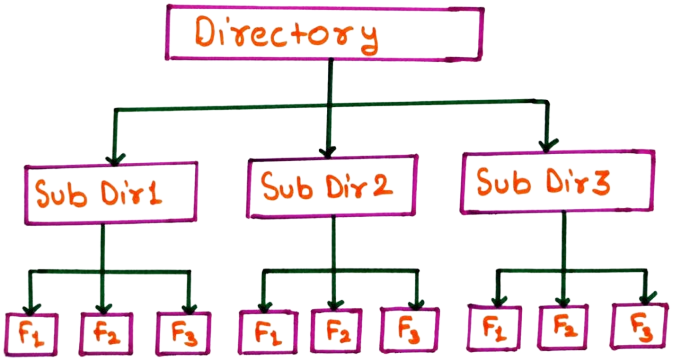
Directory structures define how files and folders are organized and accessed on storage devices. A well-designed directory structure improves file organization, speeds up file searching, and simplifies file management for both users and applications, resulting in better performance and a smoother user experience.
Types of Directory Structure
Operating systems support different types of directory structures based on system requirements, complexity, and user needs. The most common directory structures are explained below.
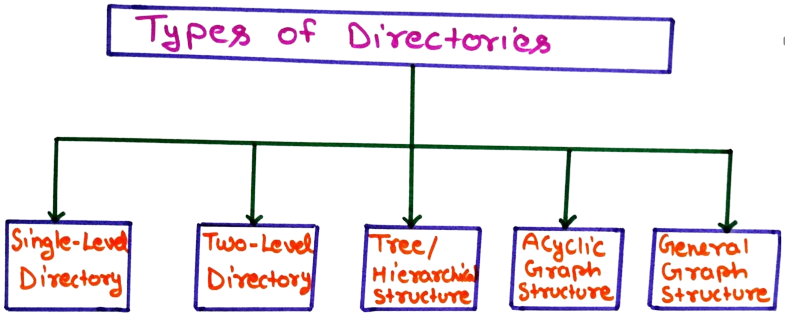
1. Single-Level Directory
In a single-level directory structure, all files are stored within a single directory maintained by the operating system. There are no subdirectories, and every file is placed at the same level. This makes the structure very simple and easy to implement.
Because all files exist in one directory, users can directly access files without navigating through folders. This approach works well for small systems with a limited number of files. It also reduces directory management complexity for the operating system.
However, as the number of files increases, this structure becomes inefficient. File name conflicts may occur, and searching for a specific file becomes time-consuming. Due to poor organization, single-level directories are not suitable for large or multi-user systems.
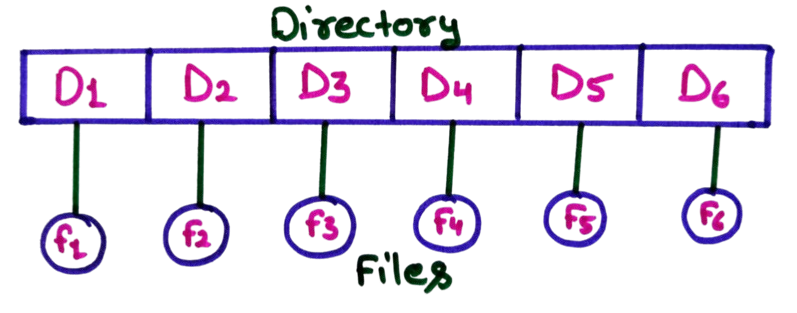
The given diagram represents a Single-Level Directory Structure. In this structure, the operating system maintains only one directory that contains all the files. There are no subdirectories, and every file is placed directly under the same directory.
In the diagram, the top rectangular block labeled Directory represents the only directory present in the system. Inside this directory, entries such as D1, D2, D3, D4, D5, and D6 are shown. Each directory entry is directly linked to a file represented as f1, f2, f3, f4, f5, and f6. This shows that every file is stored at the same level and is accessed directly through the single directory.
Since all files exist in one directory, file access is simple and fast for a small number of files. However, as the number of files increases, managing them becomes difficult. File name conflicts may occur, and searching for a specific file can take more time because the operating system has to search within the same directory.
The single-level directory structure is easy to implement and understand, which makes it suitable for small systems or simple applications. However, due to poor organization and lack of scalability, it is not suitable for modern operating systems that handle large amounts of data.
Advantages of Single-Level Directory Structure
-
Simple Implementation:
The single-level directory structure is very easy to design and implement because only one directory is maintained by the operating system. There is no complexity involved in handling multiple directories or paths. -
Easy to Understand:
Since all files are stored in a single directory, users can easily understand how files are organized. This structure is suitable for beginners and small systems with limited file usage. -
Fast File Access for Small Systems:
In systems with a small number of files, accessing a file is quick because the operating system searches within only one directory. -
Low Directory Overhead:
Maintaining only one directory requires less memory and fewer system resources, making this structure lightweight. -
Useful for Simple Applications:
This structure is suitable for small or single-user systems where file organization requirements are minimal.
Disadvantages of Single-Level Directory Structure
-
File Name Conflicts:
Since all files are stored in one directory, no two files can have the same name. This creates conflicts when multiple users or programs attempt to create files with identical names. -
Difficult File Searching:
As the number of files increases, searching for a specific file becomes time- consuming because the operating system must scan the entire directory. -
Poor File Organization:
There is no way to group related files together. This results in a cluttered directory that is difficult to manage. -
Not Scalable:
The single-level directory structure does not scale well for large systems. It becomes inefficient when handling a large number of files. -
Unsuitable for Multi-User Systems:
In multi-user environments, users may interfere with each other’s files, leading to security and privacy issues.
2. Two-Level Directory
In a two-level directory structure, the operating system maintains two directory levels. The first level contains a separate directory for each user, and the second level stores the files belonging to that user. This structure improves file organization compared to a single-level directory.
Since each user has their own directory, files with the same name can exist for different users without causing conflicts. Users can manage their files independently, and privacy is improved because one user cannot easily interfere with another user’s files.
However, the two-level directory structure does not support subdirectories within user directories. This limits further organization of files and may become restrictive when users need to manage a large number of related files. Despite this limitation, it is more efficient than a single-level directory.
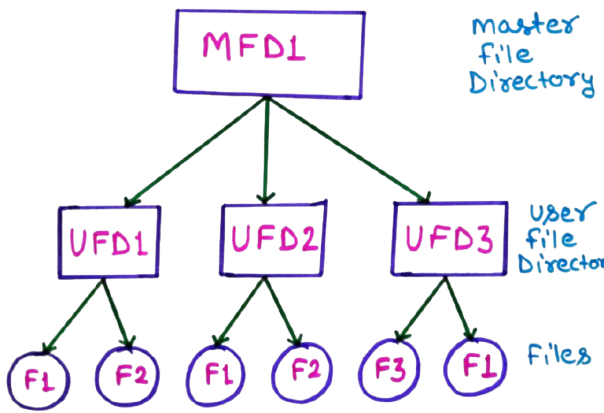
The given diagram illustrates a Two-Level Directory Structure. In this structure, the operating system uses two directory levels to organize files. The top level is called the Master File Directory (MFD), and the second level contains User File Directories (UFDs).
In the diagram, the MFD is shown at the top. It stores entries for each user in the system, such as UFD1, UFD2, and UFD3. Each UFD represents a separate directory for a specific user. This means every user gets their own private directory to store files.
Below each UFD, files are stored independently. For example, UFD1 contains files F1 and F2, UFD2 also contains F1 and F2, and UFD3 contains F3 and F1. This shows that files with the same name (such as F1) can exist for different users without any conflict.
Advantages of Two-Level Directory Structure
-
Eliminates File Name Conflicts:
In a two-level directory structure, each user has a separate directory. This allows different users to create files with the same name without any conflict, since files are stored in individual user directories. -
Improved File Organization:
Files are organized based on users, which makes management easier than a single-level directory. Each user can manage their own files independently without affecting others. -
Better User Privacy:
Since each user has a separate directory, unauthorized access to another user’s files is restricted. This improves data privacy and security in multi-user systems. -
Simpler File Searching:
File searching becomes faster because the operating system searches only within the user’s directory instead of scanning all system files. -
Suitable for Multi-User Systems:
This structure works well in environments where multiple users share the same system, such as computer labs or time-sharing operating systems.
Disadvantages of Two-Level Directory Structure
-
No Subdirectory Support:
Users cannot create subdirectories inside their directories. This limits further classification and organization of files. -
Limited Scalability:
As the number of files grows, managing all files within a single user directory can become difficult and less efficient. -
Restricted File Sharing:
Sharing files between users is not straightforward, as files are stored in separate directories without shared access. -
Increased Directory Management Overhead:
The operating system must maintain both the Master File Directory (MFD) and multiple User File Directories (UFDs), which increases system complexity compared to a single- level directory. -
Less Flexible than Tree Structure:
Compared to tree-structured directories, the two-level directory offers less flexibility and is not suitable for modern systems that require deep file hierarchies.
3. Tree-Structured / Hierarchical Directory Structure
The tree-structured directory is one of the most widely used directory structures in modern operating systems. It organizes files and folders in a hierarchical manner, where each directory can contain files as well as subdirectories. This structure resembles an inverted tree with a single root directory at the top.
In this structure, users can create multiple levels of directories to group related files together. This improves file organization and makes navigation easier, especially when dealing with a large number of files. Each file or directory has a unique path from the root, which helps the system locate it efficiently.
The tree-structured directory provides flexibility, better organization, and improved scalability compared to single-level and two-level directories. Because of these advantages, it is commonly used in operating systems such as Windows, Linux, and macOS for managing files effectively.
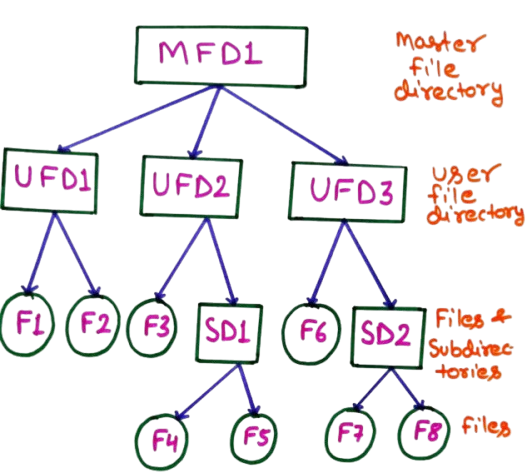
The given diagram represents a Tree-Structured (Hierarchical) Directory. At the top of the structure is the Master File Directory (MFD), labeled as MFD1. This is the root of the directory tree and acts as the main entry point for all files and directories in the system.
Below the MFD, there are multiple User File Directories (UFDs) such as UFD1, UFD2, and UFD3. Each UFD belongs to a different user and can store both files and subdirectories. For example, UFD1 directly contains files F1 and F2, while UFD2 contains file F3 and a subdirectory named SD1.
The diagram also shows that subdirectories can further contain files, forming multiple levels. For instance, SD1 contains files F4 and F5, and SD2 under UFD3 contains F7 and F8. This clearly demonstrates a hierarchical structure where directories branch into subdirectories and files, just like an inverted tree.
This tree-structured directory allows better organization, easier navigation, and improved scalability. Each file has a unique path from the root directory, which helps the operating system locate files efficiently. Due to its flexibility and clarity, this directory structure is widely used in modern operating systems.
Advantages of Tree-Structured (Hierarchical) Directory Structure
-
Excellent File Organization:
The tree-structured directory allows files to be organized into directories and subdirectories based on their purpose, user, or application. This clear hierarchy makes it easy to manage large numbers of files efficiently. -
Supports Scalability:
New files and directories can be added at any level of the hierarchy without disturbing existing data. This makes the structure suitable for both small and large systems. -
Efficient File Searching:
Since each file has a unique path from the root directory, the operating system can locate files faster by following the directory path instead of searching the entire storage. -
Better Access Control:
Permissions can be applied at directory and subdirectory levels. This allows administrators to control access to entire groups of files, improving security. -
Widely Used and User-Friendly:
This structure closely matches how humans naturally organize information. Due to its simplicity and flexibility, it is widely used in modern operating systems such as Windows, Linux, and macOS.
Disadvantages of Tree-Structured (Hierarchical) Directory Structure
-
Complex Implementation:
Compared to single-level and two-level directory structures, the tree-structured directory is more complex to implement and manage due to multiple directory levels. -
Path Dependency:
Users must remember or navigate long directory paths to access deeply nested files, which can be time-consuming and confusing. -
Limited File Sharing:
Files typically belong to a single directory. Sharing the same file across multiple directories is difficult without duplicating the file. -
Risk of Data Loss:
If a parent directory is accidentally deleted, all its subdirectories and files may be lost, leading to significant data loss. -
Higher Storage Overhead:
Maintaining directory information for multiple levels requires additional storage space and system resources.
4. Acyclic Graph Directory Structure
An acyclic graph directory structure is an extension of the tree-structured directory that allows directories and files to be shared among multiple parent directories. Unlike a tree structure, a file or directory can have more than one path, but cycles are not allowed. This means no directory can be its own ancestor.
This structure supports file sharing without duplication of data. A single file can be accessed from different directories using links, which helps save storage space and ensures consistency. Because cycles are avoided, the system can still manage paths and search operations efficiently.
However, managing an acyclic graph directory is more complex than a tree structure. The operating system must track shared files carefully and handle deletion operations safely. Despite this complexity, acyclic graph directories are useful in systems where controlled file sharing is required.
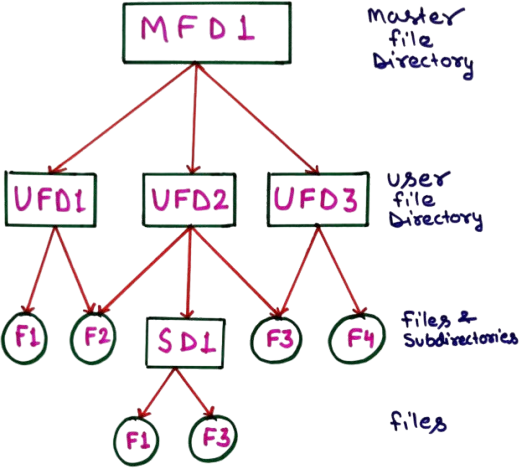
The above diagram represents an Acyclic Graph Directory Structure used in operating systems. At the top level, MFD1 (Master File Directory) acts as the root directory. It contains entries for different users in the system and provides a starting point for accessing all user-related directories.
Below the master directory are multiple User File Directories such as UFD1, UFD2, and UFD3. Each UFD belongs to a specific user and stores that user’s files and subdirectories. For example, UFD1 contains files F1 and F2, while UFD3 contains files F3 and F4. This separation helps avoid file name conflicts between different users.
The special feature of this structure is file and directory sharing, shown using the subdirectory SD1 under UFD2. SD1 points to files F1 and F3, which are also present in other user directories. This means the same file can be shared by multiple users without creating duplicate copies. Since no circular links are allowed, the structure remains acyclic, preventing infinite loops during file traversal.
Advantages of Acyclic Graph Directory Structure
- Efficient File Sharing: This directory structure allows files and subdirectories to be shared among multiple users or directories. A single file can appear in different locations without creating duplicate copies, which saves storage space and improves collaboration.
- Reduced Storage Redundancy: Since shared files are not physically copied, the same data does not need to be stored multiple times. This significantly reduces disk space usage, especially for large and commonly used files.
- Flexible Directory Organization: Users can organize files in a logical and convenient manner while still accessing shared resources. This flexibility makes the system more user-friendly compared to strict tree-structured directories.
- Consistency of Shared Data: Any modification made to a shared file is immediately visible to all users who have access to it. This ensures data consistency and avoids version mismatch problems.
- No Cycles in Directory Structure: The absence of cycles prevents infinite loops during directory traversal. This makes file searching and system maintenance easier and safer for the operating system.
Disadvantages of Acyclic Graph Directory Structure
- Complex Implementation: Managing shared files and directories increases system complexity. The operating system must maintain additional information such as reference counts to track how many directories point to a shared file.
- Deletion Complexity: Deleting a shared file is difficult because the system must check whether other directories are still using it. Improper deletion may lead to dangling references or accidental data loss.
- Security and Access Control Issues: When files are shared across users, maintaining proper access permissions becomes more challenging. A mistake in permission management can lead to unauthorized access.
- Backup and Recovery Difficulty: Creating backups is more complicated because shared files must be copied carefully to avoid duplication or missing links. Restoring such structures also requires special handling to preserve sharing relationships.
- Higher System Overhead: The system needs extra processing to manage links, reference counts, and access checks. This additional overhead can slightly reduce performance compared to simpler directory structures.
5. Graph-Structured Directory
A graph-structured directory is an advanced directory organization method in which files and directories are allowed to have more than one parent directory. Unlike a tree-structured directory, this structure supports sharing, meaning the same file or folder can appear in multiple locations without being duplicated on the storage device.
This type of directory structure is especially useful in multi-user environments where common resources such as documents, libraries, or application files need to be accessed by different users. By using links, the operating system ensures that changes made to a shared file are reflected everywhere it is referenced, maintaining data consistency.
However, managing a graph-structured directory is more complex for the operating system. Special mechanisms are required to avoid cycles, handle file deletion safely, and maintain proper access permissions. Despite these challenges, graph-structured directories offer greater flexibility and efficient storage utilization.
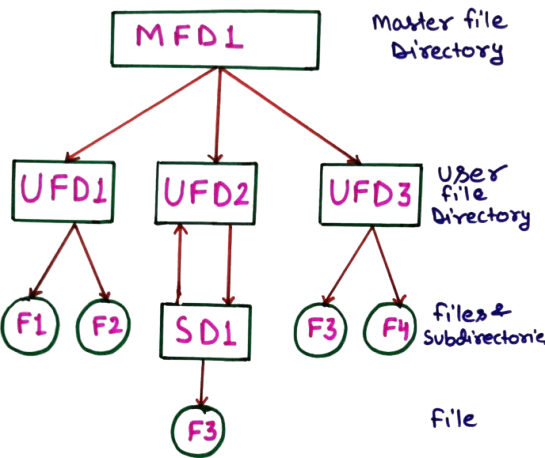
The above diagram represents a graph-structured directory in an operating system. In this type of directory structure, a file or subdirectory can be shared among multiple directories by using links. This allows the same file to appear in more than one location without creating duplicate copies.
In the diagram, MFD1 (Master File Directory) is the root directory that contains references to user file directories such as UFD1, UFD2, and UFD3. Each UFD represents a separate user’s working space where files and subdirectories are stored.
A special feature shown is the subdirectory SD1, which is linked to UFD2 and also contains a file F3 that exists in UFD3. This shared access forms a graph-like structure rather than a simple tree. While this approach improves file sharing and saves storage space, it also increases complexity in file deletion and access control.
Advantages of Graph-Structured Directory
-
Efficient File Sharing:
A graph-structured directory allows the same file or subdirectory to be shared among multiple directories using links. This avoids creating multiple copies of the same file and ensures that all users always access the most updated version. -
Better Utilization of Storage Space:
Since files are shared instead of duplicated, storage space is used more efficiently. This is especially beneficial in systems where large files are commonly accessed by multiple users or applications. -
Reduced Data Redundancy:
Graph-structured directories minimize unnecessary duplication of data. Reducing redundancy helps maintain data consistency because changes made to a file are reflected everywhere it is linked. -
Flexible Directory Organization:
Users can organize files logically without being restricted to a strict hierarchical path. A file can appear in different logical locations based on usage or project requirements. -
Improved Collaboration:
This structure supports teamwork by allowing multiple users or departments to access shared files and folders easily, making it ideal for collaborative environments.
Disadvantages of Graph-Structured Directory
-
Complex File Deletion:
Deleting a file becomes complicated because the system must check whether the file is linked in other directories. Removing it from one location may affect users who still need access. -
Risk of Cycles:
If not carefully managed, graph-structured directories may form cycles. Cycles can cause infinite loops during directory traversal, searching, or backup operations. -
Difficult Access Control:
Managing permissions becomes more complex because the same file may have different access rights depending on the directory path used to reach it. -
Increased System Overhead:
Maintaining links, reference counts, and consistency checks increases the operating system’s overhead and requires more processing power. -
Complex Backup and Recovery:
Backup and restoration processes are harder to implement because shared files must be handled carefully to avoid duplication or accidental data loss.
Conclusion
Directory structures play a vital role in organizing files within an operating system. From simple single-level directories to advanced graph-structured systems, each type serves a specific purpose. A well-planned directory structure improves efficiency, security, and usability, making file management easier for both users and the system.