Database Languages in DBMS
Database languages are specialized languages that provide a formal and systematic way to interact with a Database Management System (DBMS). They act as a communication medium between users, applications, and the database itself. Using these languages, users can define the structure of the database, store and retrieve data, modify existing records, and control access to data.
In a DBMS, data is not accessed directly from storage files. Instead, all operations are performed through database languages, which ensure that data remains consistent, secure, and reliable. These languages help the DBMS understand what operation needs to be performed and how it should be executed internally.
Database languages play a crucial role in managing both data and metadata. They allow database administrators to design schemas, define relationships between tables, enforce constraints, and maintain data integrity. At the same time, they allow end users and applications to retrieve meaningful information from large volumes of stored data.
With the help of database languages, users can:
- Create and modify database structures such as tables, views, and indexes
- Insert new records, update existing data, and remove unwanted data
- Retrieve specific information using queries
- Control user permissions and database security
- Manage transactions to ensure data consistency and reliability
Most modern database systems rely on SQL (Structured Query Language) as the standard database language. SQL is widely supported by relational database systems and provides a simple yet powerful way to perform complex database operations. Because of its standardized nature, SQL allows users to work with different DBMS platforms with minimal changes.
Database languages are broadly classified into the following types:
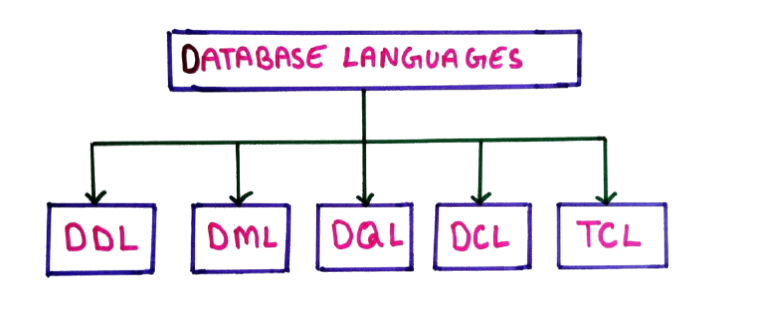
- DDL – Data Definition Language
- DML – Data Manipulation Language
- DQL – Data Query Language
- DCL – Data Control Language
- TCL – Transaction Control Language
1. Data Definition Language (DDL)
Data Definition Language (DDL) is used to define, modify, and manage the structure of a database. It deals with database schema, tables, columns, constraints, indexes, and other structural objects.
DDL commands do not work on actual data records. Instead, they define how data is stored and organized inside the database. Any change made using DDL commands is usually permanent and automatically committed.
Common DDL Commands:
- CREATE
- ALTER
- DROP
- TRUNCATE
- RENAME
1. CREATE Command
The CREATE command is used to create new database objects such as tables, databases, views, and indexes.
Syntax:
CREATE TABLE table_name (
    column1 datatype constraint,
    column2 datatype constraint,
    ...
);
Example:
CREATE TABLE Student (
    RollNo INT PRIMARY KEY,
    Name VARCHAR(50),
    Age INT,
    Course VARCHAR(30)
);
This command creates a table named Student with four columns.
2. ALTER Command
The ALTER command is used to modify the structure of an existing table. It allows adding, deleting, or modifying columns.
Syntax (Add Column):
ALTER TABLE table_name
ADD column_name datatype;
Example:
ALTER TABLE Student
ADD Email VARCHAR(50);
Syntax (Modify Column):
ALTER TABLE table_name
MODIFY column_name new_datatype;
Example:
ALTER TABLE Student
MODIFY Name VARCHAR(100);
Summary of DDL
DDL commands define the foundation of a database by controlling its structure. They are mainly used by database administrators (DBAs) during database design and maintenance.
3. DROP Command
The DROP command is used to permanently delete database objects such as tables or databases.
Syntax:
DROP TABLE table_name;
Example:
DROP TABLE Student;
This command removes the table along with all its data and structure.
4. TRUNCATE Command
The TRUNCATE command removes all records from a table but keeps the table structure intact.
Syntax:
TRUNCATE TABLE table_name;
Example:
TRUNCATE TABLE Student;
After execution, the table becomes empty but can still be reused.
5. RENAME Command
The RENAME command is used to change the name of a database object, such as a table.
Syntax:
RENAME TABLE old_table_name TO new_table_name;
Example:
RENAME TABLE Student TO Student_Details;
This command changes the table name without affecting its data.
2. Data Manipulation Language (DML)
Data Manipulation Language (DML) is used to manage and manipulate data stored inside database tables. Unlike DDL, which defines the structure of the database, DML works directly on the records (rows) of tables.
DML commands allow users to insert new data, retrieve existing data, modify records, and remove unwanted data. These commands are frequently used by application programs and end users.
Common DML Commands:
- INSERT
- SELECT
- UPDATE
- DELETE
1. INSERT Command
The INSERT command is used to add new records (rows) into a table. Each inserted record must follow the table's structure and data types.
Syntax (Insert all values):
INSERT INTO table_name
VALUES (value1, value2, value3, ...);
Example:
INSERT INTO Student
VALUES (101, 'Amit', 20, 'B.Tech');
Syntax (Insert selected columns):
INSERT INTO table_name (column1, column2)
VALUES (value1, value2);
Example:
INSERT INTO Student (RollNo, Name)
VALUES (102, 'Neha');
2. UPDATE Command
The UPDATE command is used to modify existing records in a table. It is usually used with a WHERE clause to update specific rows.
Syntax:
UPDATE table_name
SET column1 = value1, column2 = value2
WHERE condition;
Example:
UPDATE Student
SET Age = 21
WHERE RollNo = 101;
If the WHERE clause is omitted, all records in the table will be updated.
3. DELETE Command
The DELETE command is used to remove one or more records from a table. It removes data but keeps the table structure unchanged.
Syntax:
DELETE FROM table_name
WHERE condition;
Example:
DELETE FROM Student
WHERE RollNo = 101;
Delete all records:
DELETE FROM Student;
Important Points about DML
- DML commands work on table data, not on structure
- Changes can be rolled back if transactions are used
- Used by both end users and application programs
- Plays a key role in day-to-day database operations
Summary
Data Manipulation Language (DML) forms the core of database usage. It allows users to store, access, modify, and manage data efficiently, making it essential for real-world database applications.
3. Data Query Language (DQL)
Data Query Language (DQL) is used to retrieve data from the database without making any changes to the stored data. It focuses only on querying and fetching information according to user requirements.
Although DQL is often considered part of DML in many DBMS textbooks, it is commonly treated as a separate category because its purpose is strictly limited to data retrieval.
DQL is heavily used in reporting systems, dashboards, analytics, and decision-making applications where data accuracy and readability are critical.
Main DQL Command:
- SELECT
SELECT Command
The SELECT command is used to fetch data from one or more tables in a database. It allows users to specify which columns to retrieve and which records to display using conditions.
Basic Syntax:
SELECT column1, column2
FROM table_name;
Example:
SELECT Name, Course
FROM Student;
This query retrieves only the Name and Course columns from the Student table.
Select All Columns
To retrieve all columns from a table, the wildcard character * is used.
SELECT *
FROM Student;
This command displays all records and all columns present in the table.
SELECT with WHERE Clause
The WHERE clause is used to filter records based on specific conditions. It ensures that only relevant data is returned.
Syntax:
SELECT column_name
FROM table_name
WHERE condition;
Example:
SELECT *
FROM Student
WHERE Age > 20;
This query retrieves details of students whose age is greater than 20.
SELECT with AND / OR Conditions
Multiple conditions can be combined using logical operators AND and OR.
SELECT *
FROM Student
WHERE Course = 'B.Tech' AND Age >= 21;
SELECT with ORDER BY
The ORDER BY clause is used to sort the result set in ascending or descending order.
Syntax:
SELECT column_name
FROM table_name
ORDER BY column_name ASC|DESC;
Example:
SELECT Name, Age
FROM Student
ORDER BY Age DESC;
SELECT with DISTINCT
The DISTINCT keyword is used to remove duplicate values from the result set.
SELECT DISTINCT Course
FROM Student;
This query lists all unique courses available in the Student table.
SELECT with LIMIT
The LIMIT clause restricts the number of records returned. It is useful for pagination and previewing data.
SELECT *
FROM Student
LIMIT 5;
Important Points about DQL
- DQL does not modify database data
- Used mainly for reporting and analysis
- Safe to execute without affecting data integrity
- Widely used in real-time applications
Summary
Data Query Language (DQL) plays a vital role in extracting meaningful information from databases. By using the SELECT command with different clauses, users can retrieve precise, filtered, and well-organized data efficiently. DQL is essential for analysis, monitoring, and decision-making in modern database systems.
4. Data Control Language (DCL)
Data Control Language (DCL) is used to control access permissions on database objects such as tables, views, and procedures. It plays a crucial role in maintaining database security and authorization.
In a multi-user database environment, not every user should have access to all data. DCL helps the Database Administrator (DBA) decide who can access what and what operations they are allowed to perform.
Using DCL commands, privileges can be granted to users or revoked when they are no longer required. This ensures data confidentiality, prevents misuse, and protects sensitive information.
Common DCL Commands:
- GRANT
- REVOKE
1. GRANT Command
The GRANT command is used to give specific permissions to a user or role on a database object.
Permissions can include SELECT, INSERT, UPDATE, DELETE, or ALL privileges.
Syntax:
GRANT privilege_name
ON object_name
TO user_name;
Example:
GRANT SELECT
ON Student
TO user1;
This command allows user1 to read data from the Student table, but not modify it.
Grant Multiple Permissions
GRANT INSERT, UPDATE
ON Student
TO user1;
This command allows user1 to insert new records and update existing records in the Student table.
Grant All Permissions
GRANT ALL
ON Student
TO user1;
This command gives user1 complete access to the Student table.
2. REVOKE Command
The REVOKE command is used to remove previously granted permissions from a user or role.
It is commonly used when a user changes roles or no longer needs access to certain database objects.
Syntax:
REVOKE privilege_name
ON object_name
FROM user_name;
Example:
REVOKE SELECT
ON Student
FROM user1;
This command removes the permission of user1 to view data from the Student table.
Revoke Multiple Permissions
REVOKE INSERT, UPDATE
ON Student
FROM user1;
Important Points about DCL
- DCL enhances database security
- Mainly used by Database Administrators
- Prevents unauthorized data access
- Works on database objects, not on data directly
- Does not affect database structure or records
Summary
Data Control Language (DCL) is essential for managing user permissions in a DBMS. By using GRANT and REVOKE commands, administrators can ensure that users access only the data they are authorized to use. This controlled access mechanism protects the database from unauthorized operations and maintains overall system security.
5. Transaction Control Language (TCL)
Transaction Control Language (TCL) is used to manage database transactions and ensure data consistency, integrity, and reliability. A transaction is a sequence of one or more database operations that are treated as a single logical unit of work.
In real-world database systems, especially in banking, reservation, and financial applications, multiple operations must either all succeed or all fail. TCL commands help achieve this by controlling when changes are permanently saved or undone.
TCL works closely with the concept of ACID properties (Atomicity, Consistency, Isolation, Durability), which are essential for reliable transaction processing.
Common TCL Commands:
- COMMIT
- ROLLBACK
- SAVEPOINT
1. COMMIT Command
The COMMIT command is used to permanently save all changes made during the current transaction to the database.
Once a transaction is committed, the changes cannot be undone using ROLLBACK.
Syntax:
COMMIT;
Example:
INSERT INTO Student VALUES (102, 'Ravi', 22, 'B.Sc');
COMMIT;
This command permanently saves the inserted record into the Student table.
2. ROLLBACK Command
The ROLLBACK command is used to undo changes made during the current transaction that have not yet been committed.
It is useful when an error occurs or when the user decides not to save the changes.
Syntax:
ROLLBACK;
Example:
UPDATE Student SET Age = 25 WHERE RollNo = 102;
ROLLBACK;
This command cancels the update operation, and the age value remains unchanged.
3. SAVEPOINT Command
The SAVEPOINT command is used to create a checkpoint within a transaction. It allows partial rollback instead of rolling back the entire transaction.
This is especially useful in long transactions involving multiple operations.
Syntax:
SAVEPOINT savepoint_name;
Example:
INSERT INTO Student VALUES (103, 'Neha', 21, 'BCA');
SAVEPOINT sp1;

UPDATE Student SET Age = 22 WHERE RollNo = 103;
ROLLBACK TO sp1;
In this example, the INSERT operation is preserved, but the UPDATE operation is undone by rolling back to the savepoint.
Important Points about TCL
- TCL commands control transaction behavior
- They ensure data consistency and reliability
- Mainly used in multi-user environments
- COMMIT makes changes permanent
- ROLLBACK undoes uncommitted changes
- SAVEPOINT allows partial rollback
Summary
Transaction Control Language (TCL) is essential for handling database transactions safely. By using COMMIT, ROLLBACK, and SAVEPOINT commands, a DBMS ensures that data remains accurate and consistent even in the presence of errors, system failures, or concurrent access.
Summary Table of Database Languages
| Language | Purpose | Example Commands |
|---|---|---|
| DDL | Defines and modifies the database structure | CREATE, ALTER, DROP, TRUNCATE |
| DML | Inserts, updates, and deletes data in tables | INSERT, UPDATE, DELETE |
| DQL | Retrieves data from the database | SELECT |
| DCL | Controls access and permissions on database objects | GRANT, REVOKE |
| TCL | Manages database transactions and ensures consistency | COMMIT, ROLLBACK, SAVEPOINT |
Conclusion
Database languages form the backbone of database interaction in DBMS. Understanding DDL, DML, DCL, and TCL is essential for students, developers, and database administrators.